Stepper
Purpose
The Stepper ViewTemplate visualizes a sequence of discrete steps. It is used for workflows or progress models in which each step has a title, an optional icon, and a state such as ACTIVE, EDITABLE, or DISABLED.
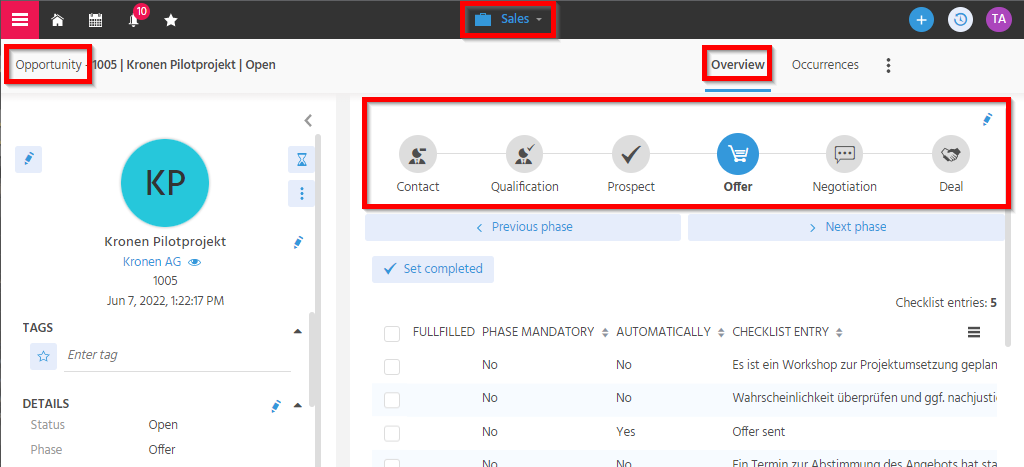 Figure: Stepper showing a sequence of selectable steps.
Behavior
The ViewTemplate renders the configured steps as a horizontal sequence. The logic that defines which steps are available and which state they have is usually implemented in the contentProcess of the underlying RecordContainer.
The following properties are relevant:
| Property | Description | Required |
|---|---|---|
stateField | Defines the state of each step. | Yes |
titleField | Defines the visible title. | Yes |
iconField | Defines the icon of the step. | No |
Example contentProcess:
var res = [];
var steps = ["BEGINNER", "ADVANCED", "PRO"];
var selected = vars.get("$param.CurrentLevel_param");

steps.forEach(function(stepId) {
    var stepState = stepId === selected ? "ACTIVE" : "EDITABLE";
    res.push([stepId, stepState, stepId, _getIcon(stepId)]);
});

result.object(res);

function _getIcon(id) {
    return {
        BEGINNER: "VAADIN:MINUS",
        ADVANCED: "VAADIN:PLUS_MINUS",
        PRO: "VAADIN:PLUS"
    }[id] || "VAADIN:CIRCLE-THIN";
}
Configuration
The required configuration consists of:
stateFieldfor the step statetitleFieldfor the visible titleiconFieldfor an optional icon
Example usage
The ViewTemplate is typically embedded through a Lookup-based setup, for example in an overview area of a sales or master-data workflow.
One concrete implementation pattern is a stepper for experience levels in PersonMain_view, using a dedicated lookup-enabled context and an Entity that provides fields such as UID, TITLE, ICON, and STATE.
Implementation hints
Step states can also be influenced dynamically, for example by providing a parameter that lists disabled step IDs. This makes it possible to enforce business rules directly in the UI logic.
Notes
The actual step logic is usually implemented in the contentProcess of the underlying RecordContainer.