Overview
Upgrade Guides
This section is the entry point for upgrading the ADITO core application between supported release steps. It focuses on the platform upgrade itself and does not cover project-specific customizing changes.
The instructions are grouped by version steps. Follow all sections from your current version onward until you reach the target release. If you are joining the process in a later version range, start with the first relevant upgrade chapter for that baseline.
How to use this section
Use the upgrade guides as the main working documentation for planning, executing, and validating a platform upgrade.
Start with the guide that matches your current version and target version. Then read all intermediate upgrade guides in sequence until you reach the target release.
Do not rely on a one-time read only. Review the relevant upgrade guides again shortly before the upgrade, because existing guides may be extended over time when additional upgrade-relevant findings become known. As a result, the upgrade guides become more valuable over time, especially for version steps that have already been used in more real projects.
When upgrading within SSP, please consult the following article:
ADITO Versions and Dependent Systems
It lists the compatible third-party system versions (e.g., MariaDB, Solr) for each ADITO release.
Release Information
Release details and version-specific changes are documented in the Changelog.
For the general support policy of ADITO major and minor releases, see Release and Support Lifecycle.
Preparations and General Information
System Backup
Before any upgrade, always back up your ADITO environment. This includes:
- A full backup of the ADITO system database
- A snapshot of the current ADITO project
Backups are essential because upgrades are not reversible.
ADITO Project Backup
Ensure that the current state of your ADITO project is committed to your Git repository before starting the upgrade. This provides a clean, restorable snapshot in case of issues.
Obtaining the Latest Version
ADITO is operated exclusively in our managed Kubernetes appliance or the ADITO Cloud. Customers do not install or update the system manually. The current ADITO version is made available through the managed platform. Please coordinate with your ADITO contact person regarding the update schedule.
Always download the latest version of the ADITO Designer and its manual separately.
Post-upgrade: System Table Upgrades
After the upgrade, open your system in the Designer and right-click on the system alias. Select "Upgrades" to run the system table upgrader and apply any necessary changes.
Post-upgrade: Alias Updates
After a system upgrade, some aliases may require manual updates in the Designer. Open your system and look for aliases marked with a yellow warning symbol:

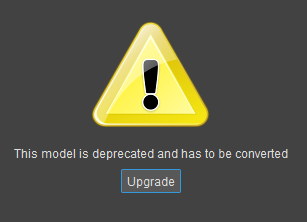
Double-click the alias to open it. Click Upgrade to perform the necessary update:
Important Notes
- Never make changes to a live system without prior testing.
- Coordinate updates and environment access with your ADITO project lead.
- After system updates, check whether aliases or system tables require manual upgrade steps in the Designer.