Gantt
Purpose
The Gantt ViewTemplate renders project-like structures as a Gantt chart. It is used to display records with start and end dates, hierarchical dependencies, and optionally editable time spans.
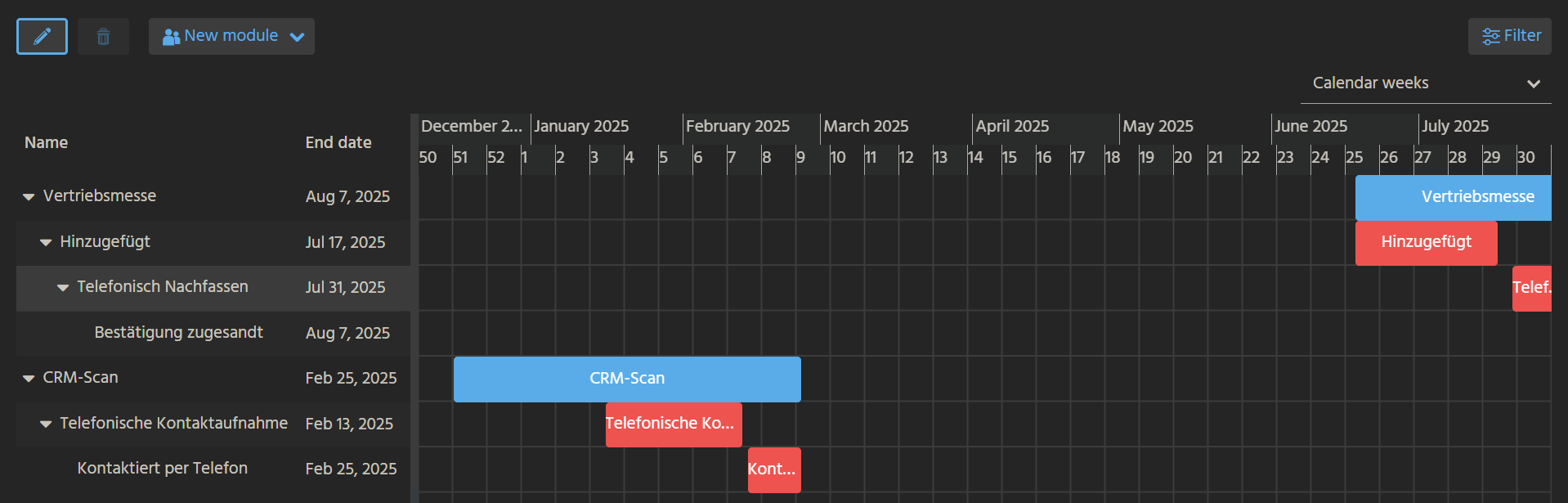 Figure: Example of a Gantt ViewTemplate.
Behavior
The ViewTemplate is divided into two main areas:
- a tree-like area on the left that lists the configured steps
- a timeline area on the right that visualizes their duration
The hierarchy and placement of each step are primarily controlled by:
predecessorIdField, which links a step to its predecessorisSubstep, which determines whether a step is shown as a nested substep of its predecessor
If the ViewTemplate is editable, users can change step durations directly in the client by moving or resizing bars.
Although different RecordContainers can be used, the Gantt ViewTemplate is commonly backed by a JDitoRecordContainer.
Configuration
The following properties are typically required:
| Property | Description |
|---|---|
columns | Defines the fields shown in the left-side tree area. |
uidField | Defines the unique identifier of each step. |
titleField | Defines the label displayed inside the bar. |
descriptionField | Defines the tooltip text. |
beginDateField | Defines the start date. |
endDateField | Defines the end date. |
predecessorIdField | Defines the predecessor relationship. |
If isSubstep is not configured, steps are displayed as nested entries below their predecessors rather than visually embedded in the same bar structure.
Example usage
An example is the ViewTemplate AllCampaignsOverviewGantt in CampaignPlanning_view.
In the ADITO client, it can be accessed under Marketing > Campaign Planning.
Notes
The data displayed in the chart is typically assembled by the JDitoRecordContainer of the underlying Entity. If the chart should be editable, the backend logic must support updating the relevant date fields.