Timeline
Purpose
The Timeline ViewTemplate displays multiple datasets in a vertical timeline. It is suitable for chronological records such as activities, history entries, or event-like data.
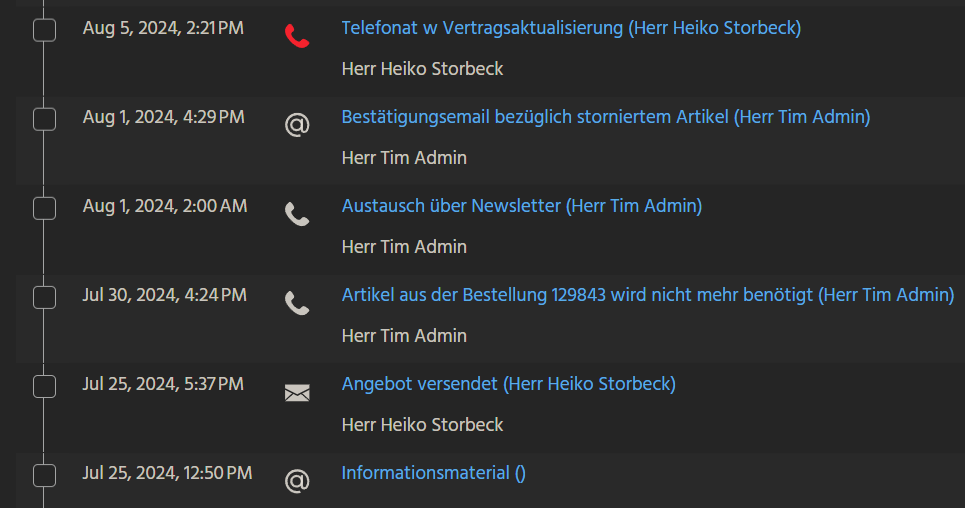 Figure: Timeline ViewTemplate displaying chronological entries.
Behavior
Each entry can use up to seven configured fields in predefined positions:
dateFieldandiconFieldon the lefttitleField,descriptionField, andsubdescriptionFieldin the centeradditionalInfoFieldon the rightinformationFieldabove the timeline content
Additional display properties include:
hideTimeorderByDatemaxDBRow
Up to three ActionGroups can be shown above the timeline. An entryAction can also be configured for double-click behavior on an entry.
Configuration
An example configuration in ActivitiesTimeline uses the following fields of Activity_entity from module activity:
| Property | Field |
|---|---|
dateField | ENTRYDATE |
titleField | SUBJECT_DETAILS |
descriptionField | RESPONSIBLE |
iconField | ICON |
In the example, informationField, subdescriptionField, and additionalInfoField are not configured.
The following ActionGroups are configured:
| Property | Actions |
|---|---|
favoriteActionGroup1 | filterActions |
favoriteActionGroup2 | MSTeamsActions |
Example usage
An example is the ViewTemplate ActivitiesTimeline in ActivityFilter_view.
In the ADITO client, it can be activated under Contact Management > Activity through the ViewTemplate selection button in the FilterView.