ResourceTimeline
Purpose
The ResourceTimeline ViewTemplate provides a planning interface for time-based assignments. It combines a resource tree with a timeline of scheduled operations and is suitable for scenarios such as service planning, appointments, or personnel scheduling.
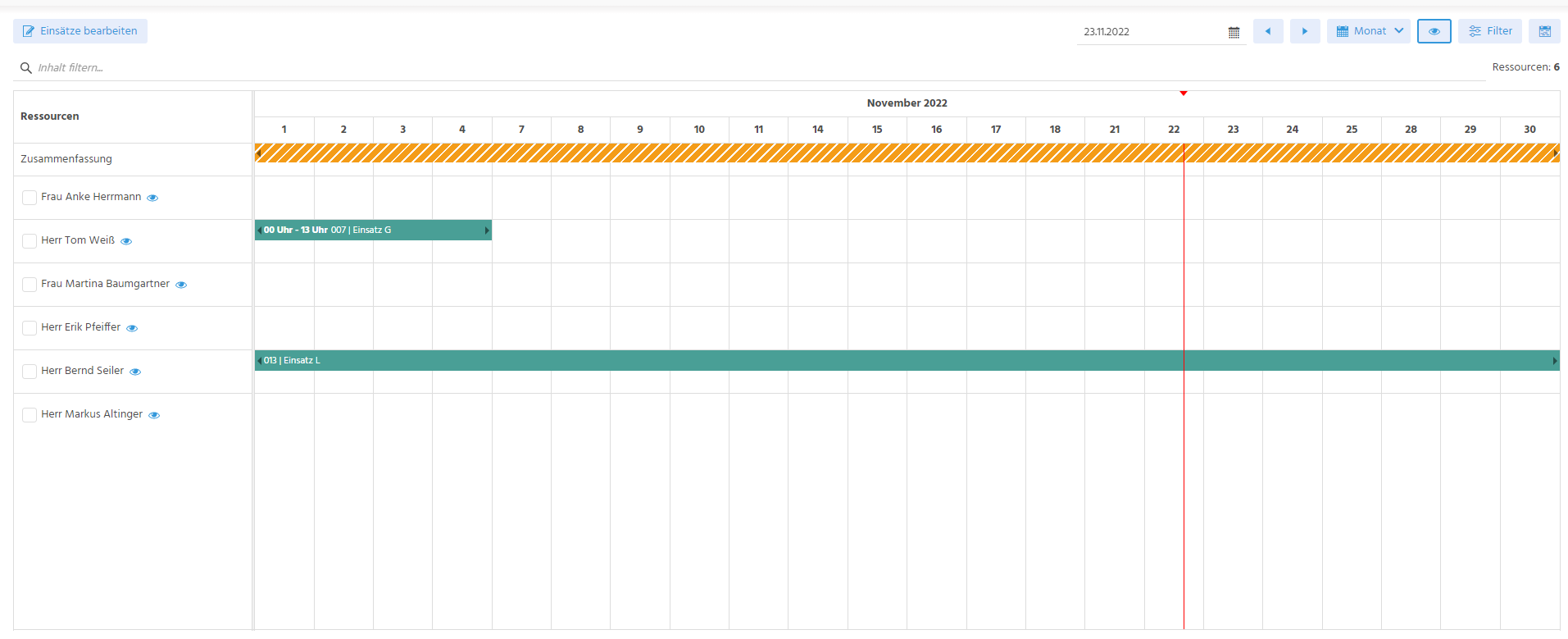 Figure: ResourceTimeline in the ADITO client.
Behavior
The ViewTemplate consists of:
- a tree of resources on the left
- a timeline of entries on the right
- interactive planning behavior such as drag-and-drop updates
The implementation usually relies on three logical entities:
- a resource entity
- an entry entity
- an operation entity
Configuration
The main ViewTemplate property is:
| Property | Description |
|---|---|
entityField | Defines the resource-providing Entity, typically #ENTITY. |
Important resource-related properties include:
| Property | Description |
|---|---|
initialDateField | Defines the initial date shown in the View. |
parentField | Defines the resource tree structure. |
businessHoursFromField | Defines the start of the visible work hours. |
businessHoursToField | Defines the end of the visible work hours. |
Important entry-related properties include:
| Property | Description |
|---|---|
entryEntityField | Defines the Consumer Entity that provides the entries. |
entryResourceIdField | Defines the resource UID assigned to an entry. |
entryDatetimeStartField | Defines the start timestamp. |
entryDatetimeEndField | Defines the end timestamp. |
entrySelectedResourcesField | Optionally defines a JSON array for multi-resource scenarios. |
entryResourceOperationIdField | Defines the operation UID linked to the entry. |
Paging should be disabled for the resource entity to avoid incomplete tree structures.
Example usage
The ViewTemplate is used in scheduling scenarios such as External Work > Resource Planning.
 Figure: ResourceTimeline in the Designer.
 Figure: Working-hour visualization in day mode.
Implementation hints
In drag-and-drop scenarios, the updated resource assignment can be resolved, for example, through logic such as:
import { result, vars } from "@aditosoftware/jdito-types";

if (vars.get("$field.SelectedResources") && JSON.parse(vars.get("$field.SelectedResources"))?.length > 0) {
  result.string(JSON.parse(vars.get("$field.SelectedResources"))[0]);
}
The ViewTemplate also supports predefined active and passive color constants such as neon.RESOURCETIMELINE_ACTIVE_COLOR_1 and neon.RESOURCETIMELINE_PASSIVE_COLOR_1, which can be overridden in the theme.