2023.0.0 to 2023.1.0
1. Modularisation: "type" Property of Projects
What changed
The type property in project package JSON files has been moved to a new node. This change prevents conflicts with the type property used by npm.
Why it matters
Previously, having a type property in the project JSON could clash with npm's usage, potentially causing issues during package management and build processes.
Recommended actions
- Review your project's package JSON files.
- Update the
typeproperty to the new designated node as specified in AID122. - Verify that your build and deployment processes work correctly after the change.
2. DB Recordcontainer Property: minimizeCountQueries
What changed
A new property minimizeCountQueries has been added to the DB recordcontainer. When enabled, it reduces the number of SELECT COUNT(*)... queries by estimating the number of records based on loaded data.
Why it matters
Reducing count queries improves performance, especially in large datasets. However, the displayed record counts might be slightly inaccurate if new records are added but not yet loaded.
Recommended actions
- Enable
minimizeCountQueriesin your DB recordcontainers to improve performance. - Be aware that displayed record counts may not always be fully accurate.
- Test your application to ensure acceptable behavior with the new setting.
3. Label/Value Pairs in ViewTemplates
What changed
ViewTemplates now support configuring label and value pairs to be displayed either side-by-side or vertically (label on top).
Why it matters
This flexibility allows for improved UI design and better readability depending on the context of the data.
Recommended actions
- Use the
isLabelTopproperty in your viewTemplates to control label positioning. - Adjust your templates to match the desired layout for your application.
4. ADITO Instance Configuration: Manager Properties and ASYS_PROCESSHISTORY Table
What changed
When upgrading, it's necessary to check if ADITO platform added new tables. Specifically, the table ASYS_PROCESSHISTORY should be added to one of your databases to store process history data.
Why it matters
Storing process history allows you to retain historical data as configured in the instance configuration, which is crucial for auditing and troubleshooting.
Recommended actions
-
Open the Designer dialog by right-clicking on a database alias configuration and selecting
Organize.... Organize-Button
 -
If
ASYS_PROCESSHISTORYis not present, add it using the "+" button at the top-left corner. -
In the configuration, navigate to Modules.
-
Set the
processHistoryCollectorAliasto the database containingASYS_PROCESSHISTORY. -
Adjust the maximum entries and lifetime settings according to your requirements.
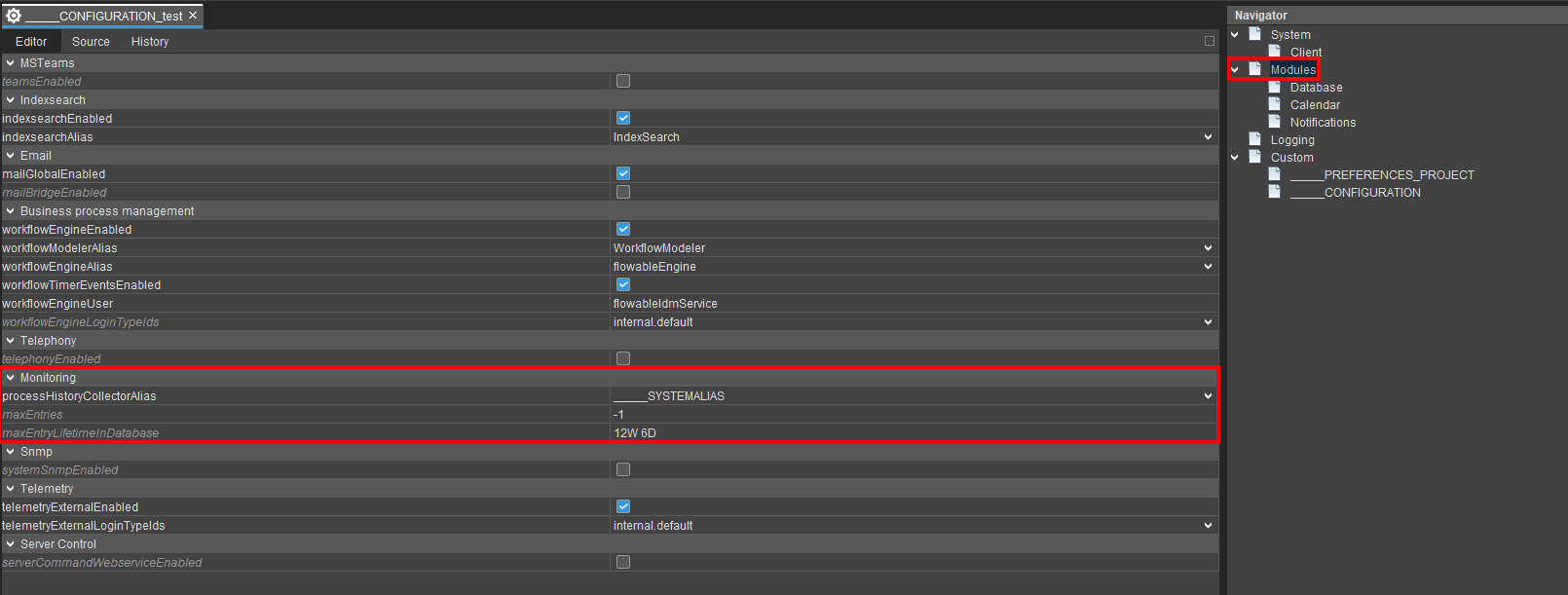 Example configuration
5. Installation Changes: Designer and Server Separation
What changed
From version 2023.1.0 onwards:
- The ADITO Designer is supplied as a ZIP file.
- The ADITO server is supplied as a separate installation file without the Designer.
Previously, both Designer and server were included in a single installation file.
Why it matters
This change enables easier access to the Designer and aligns with the upcoming installation approach starting from version 2023.2.0.
Recommended actions
-
For local server setups, configure the connection between the unzipped Designer and installed server via the
aditoHomePathproperty. -
On Linux and Mac, additionally specify the Java JDK or JRE path in
javaHomePath. -
Edit the
ADITODesigner.conffile to set thejdkhomeattribute to a valid Java 13 JDK/JRE path, as the ZIP includes only a Windows JRE by default.
-
Manually create shortcuts for the Designer executable on Windows as unzipping does not add start menu entries:
- Navigate to the Designer’s
binfolder. - Right-click
ADITOdesigner.exeand select Create shortcut. - Place the shortcut wherever convenient (desktop, taskbar, start menu).
- Navigate to the Designer’s
6. VariableGraph2: New Calculation Logic for JDito Variables
What changed
A new property jditoCalculationVersion controls how JDito variables are calculated:
- V1: Classic calculation logic using static code analysis (default before 2023.1.0).
- V2: Runtime dependency detection via function calls, including imported libraries and deadlock detection (new default for new systems as of 2023.1.0).
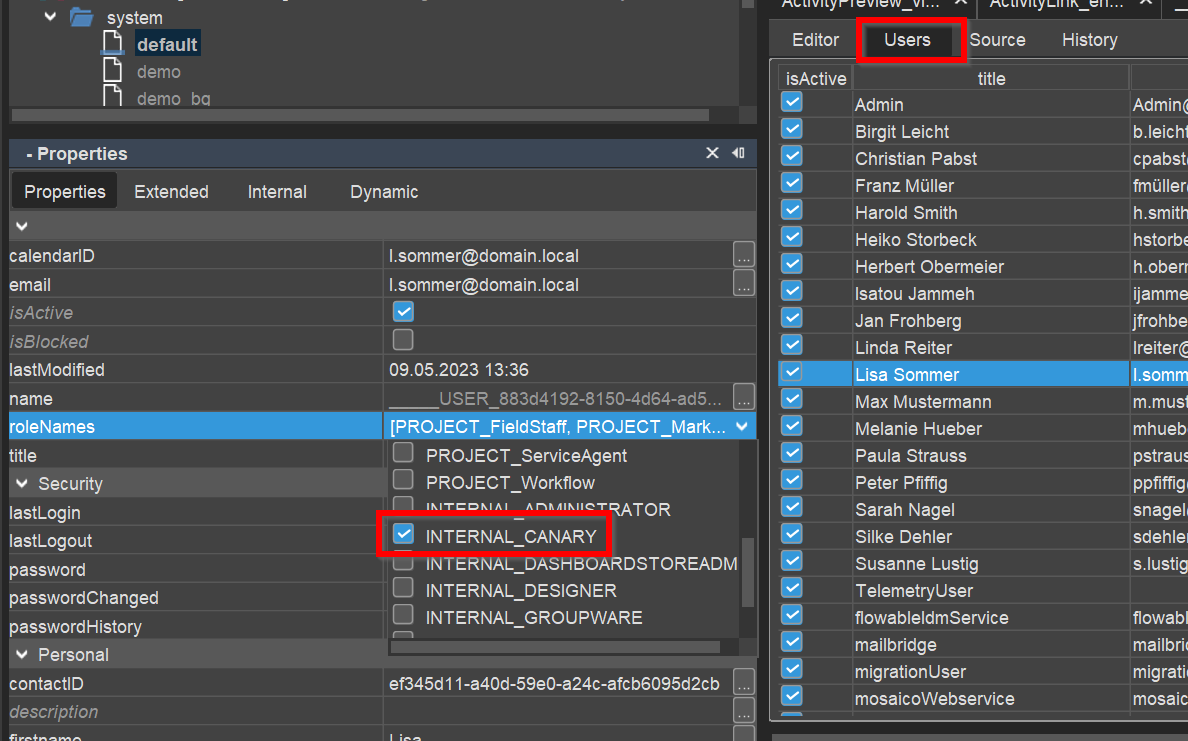
- V2_FOR_CANARY: Uses V1 by default, but V2 for users with the canary role.
Why it matters
V2 improves accuracy in dependency detection and prevents deadlocks, enhancing system stability and performance.
Recommended actions
-
Locate
jditoCalculationVersionin the project preferences:- Navigate to
preferences> double-click____PREFERENCES_PROJECT. - Find the property under the "JDito" section.
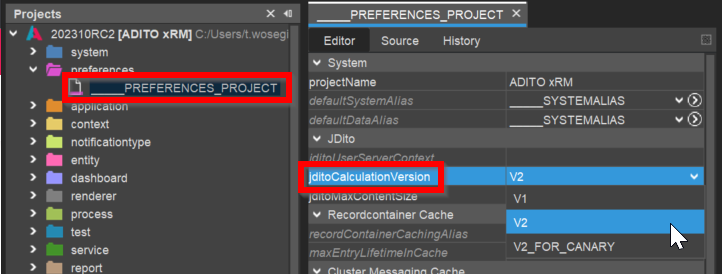
- Navigate to
-
For existing systems, the default remains V1 after upgrade. Evaluate switching to V2 for improved behavior.
-
Use
V2_FOR_CANARYto test V2 with selected users before full rollout.
Testing
- Test extensively since V2 may detect dependencies differently, potentially causing changes in variable recalculations.
- Observe for any unexpected behavior or performance impacts.
- Users must log out and log back in for changes to take effect.
Canary Role