2023.2.2 to 2024.0.0
1. POP3 Removed: Support for POP3 Email Protocol Removed
What changed
Support for the outdated email access protocol POP3 has been removed.
Why it matters
If you were still using POP3 to access mailboxes, you will no longer be able to access your mailboxes with ADITO.
Recommended actions
Switch to using IMAP to access your mailboxes instead of POP3.
2. Swagger UI: REST Webservice Process Documentation Available
What changed
Swagger UI is now available for all REST webservice processes.
Why it matters
This provides an interactive interface to explore and test REST APIs directly.
Recommended actions
Access Swagger UI by navigating to https://your.server:port/afs/swagger.
3. Changed Behaviour of EntityRecordRecipeBuilder: User Filter Initialization
What changed
When creating an EntityRecordRecipe using neonFilter.createEntityRecordsRecipeBuilder(), the userFilter is now initialized as null by default instead of {"type":"group","operator":"AND","childs":[]}.
Why it matters
Previously, the default filter prevented the initFilterProcess from being executed. Now, resetting the filter to null correctly sets it to null, allowing the process to run as expected.
Recommended actions
If your code resets the filter like builder.filter(null);, it will now behave correctly.
4. MS-SQL Server - Transaction Snapshot Isolation: New Flag Added
What changed
Alias configurations for MS SQL Server databases now include the flag enableSnapshotIsolation to enable transaction snapshot isolation.
Why it matters
This prevents long-running queries from blocking write operations, improving database concurrency.
Recommended actions
Enable the enableSnapshotIsolation flag in your Alias configurations. Additionally, enable snapshot isolation on the database itself.
For instructions, see: https://learn.microsoft.com/en-us/troubleshoot/sql/analysis-services/enable-snapshot-transaction-isolation-level
5. On Premise Systems - stderr Output: Manual Redirection Required
What changed
The installer no longer automatically routes stderr output to the file server_error.log.
Why it matters
Automatic logging of error output has been disabled to give users control over error logging.
Recommended actions
Manually redirect stderr output using the shell redirect operator. For example:
programm 2> server_error.log
6. JDito Module favorite Removed: Migration to tag Module Required
What changed
The deprecated JDito module favorite has been removed. All its constants, methods, and configs must be replaced with equivalents from the tag module.
Why it matters
Using the removed favorite module will cause errors. Migration is necessary for compatibility with ADITO 2024.0.0.
Recommended actions
Refactor your code to replace all favorite references with the corresponding tag module calls.
Example usage
Constants
| Old | New |
|---|---|
| favorite.DEFAULT_FAVORITE_GROUP | tag.DEFAULT_FAVORITE_GROUP |
| favorite.FAVORITE_GROUP | tag.FAVORITE_GROUP |
| favorite.HASHTAG | tag.HASHTAG |
Methods
| Old | New |
|---|---|
| favorite.getFavoritesAlias | tag.getTagAlias |
| favorite.add | tag.add |
| favorite.remove | tag.untag |
| favorite.createAddFavoriteConfig | tag.createAddTagConfig |
| favorite.getFavorites | tag.getTaggedObjects |
| favorite.createGetGroupConfig | tag.createGetTagConfig |
| favorite.getGroups | tag.getGroups |
| favorite.createGetGroupsConfig | tag.createGetTagsConfig |
| favorite.createGetFavoriteByIdConfig | tag.createGetTaggedObjectByIdConfig |
| favorite.createRemoveByContextConfig | tag.createUntagByContextConfig |
| favorite.createRemoveByDataConfig | tag.createUntagByContextConfig |
| favorite.createRemoveByDataConfig | tag.createUntagByDataConfig |
| favorite.createRemoveByIdConfig | tag.createUntagByIdConfig |
| favorite.createRemoveMultipleByIdConfig | tag.createUntagMultipleByIdConfig |
| favorite.createGetFavoriteByDataConfig | tag.createGetTaggedObjectByDataConfig |
| favorite.createGetFavoritesConfig | tag.createGetTaggedObjectsConfig |
Configs
| Old | New |
|---|---|
| favorite.RemoveByContextConfig | tag.UntagByContextConfig |
| favorite.RemoveByDataConfig | tag.UntagByDataConfig |
| favorite.RemoveByIdConfig | tag.UntagByIdConfig |
| favorite.RemoveByIdConfig.setFavoriteRecordId | tag.UntagByIdConfig.setTaggedObjectRecordId |
| favorite.RemoveMultipleByIdConfig | tag.UntagMultipleByIdConfig |
| favorite.RemoveMultipleByIdConfig.setFavoriteRecordIds | tag.UntagMultipleByIdConfig.setTaggedObjectsRecordIds |
| favorite.GetTaggedObjectByIdConfig | tag.GetTaggedObjectByIdConfig |
| favorite.GetTaggedObjectByDataConfig | tag.GetTaggedObjectByDataConfig |
| favorite.GetTaggedObjectsConfig | tag.GetTaggedObjectsConfig |
| favorite.GetTaggedObjectsConfig.setGroupType | tag.GetTaggedObjectsConfig.setTagType |
| favorite.GetTaggedObjectsConfig.setFavoriteGroupTitle | tag.GetTaggedObjectsConfig.setTagTitle |
| favorite.GetGroupConfig | tag.GetTagConfig |
| favorite.GetGroupConfig.setGroupId | tag.GetTagConfig.setTagId |
| favorite.GetTagsConfig | tag.GetTagsConfig |
| favorite.AddFavoriteConfig | tag.AddTagConfig |
| favorite.AddFavoriteConfig.setGroupType | tag.AddTagConfig.setTagType |
| favorite.AddFavoriteConfig.setFavoriteGroupTitle | tag.AddTagConfig.setTagTitle |
7. New Color Constants for Resource Timeline: Visual Customization
What changed
New color constants were added to the ADITO core to color entries in the resource timeline. These can be overridden via custom themes.
Why it matters
Allows better visual distinction of active and passive entries in the resource timeline, while using colors defined in the theme.
Recommended actions
Use the following constants to customize resource timeline colors:
Active entry colors:
- neon.RESOURCETIMELINE_ACTIVE_COLOR_1
- neon.RESOURCETIMELINE_ACTIVE_COLOR_2
- neon.RESOURCETIMELINE_ACTIVE_COLOR_3
- neon.RESOURCETIMELINE_ACTIVE_COLOR_4
- neon.RESOURCETIMELINE_ACTIVE_COLOR_5
- neon.RESOURCETIMELINE_ACTIVE_COLOR_6
- neon.RESOURCETIMELINE_ACTIVE_COLOR_7
- neon.RESOURCETIMELINE_ACTIVE_COLOR_8
- neon.RESOURCETIMELINE_ACTIVE_COLOR_9
- neon.RESOURCETIMELINE_ACTIVE_COLOR_10
- neon.RESOURCETIMELINE_ACTIVE_COLOR_11
Passive entry colors:
- neon.RESOURCETIMELINE_PASSIVE_COLOR_1
- neon.RESOURCETIMELINE_PASSIVE_COLOR_2
- neon.RESOURCETIMELINE_PASSIVE_COLOR_3
- neon.RESOURCETIMELINE_PASSIVE_COLOR_4
- neon.RESOURCETIMELINE_PASSIVE_COLOR_5
- neon.RESOURCETIMELINE_PASSIVE_COLOR_6
- neon.RESOURCETIMELINE_PASSIVE_COLOR_7
- neon.RESOURCETIMELINE_PASSIVE_COLOR_8
- neon.RESOURCETIMELINE_PASSIVE_COLOR_9
- neon.RESOURCETIMELINE_PASSIVE_COLOR_10
- neon.RESOURCETIMELINE_PASSIVE_COLOR_11
8. SOLR Upgrade to Version 8 Required: Changes for Unmanaged Systems
What changed
ADITO 2024.0.0 and later require SOLR version 8. Unmanaged systems need manual updates.
Why it matters
SOLR v8 introduces new features and compatibility requirements necessary for ADITO.
Recommended actions
Add the following environment variable to your SOLR service configuration:
SOLR_OPTS=-Dsolr.disableConfigSetsCreateAuthChecks=true
Define this variable in your "docker-compose.yml" file as shown below:
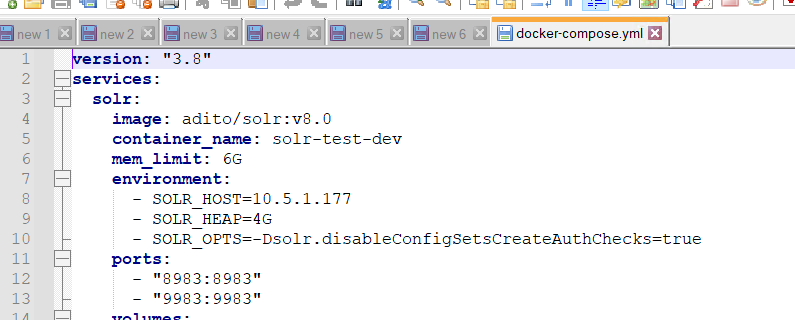
Figure 1: Adding SOLR_OPTS environment variable in docker-compose.yml
9. Alias Upgrade is Necessary: Manual Upgrades Required in ADITO Designer
What changed
Some Aliases require manual upgrading after updating to ADITO 2024.0.0 or later.
Why it matters
Failure to upgrade Aliases may prevent the ADITO system from starting.
Recommended actions
Check your system via system -> your_system. Aliases requiring upgrade are marked with a yellow exclamation symbol:

Figure 2: Aliases needing upgrade
Double-click an Alias to open the upgrade window and click "Upgrade" to perform the necessary upgrade:
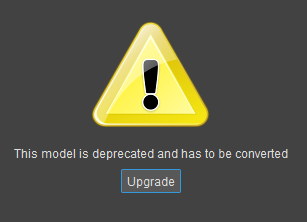
Figure 3: Alias upgrade dialog
10. Curly Brackets {} No Longer Allowed in Query Parameters: REST Webservice Calls
What changed
Using curly brackets {} directly in query parameters of REST Webservice calls is no longer supported.
Why it matters
Unescaped curly brackets cause failures in REST calls.
Recommended actions
Escape curly brackets by encoding them using JavaScript's encodeURI() function.
For example, instead of:
restConfig.addQueryParameter("query", "{foo=\"bar\"}");
Use:
restConfig.addQueryParameter("query", encodeURI('{foo="bar"}'));