Mai 2026

With May 2026, the ongoing UI modernization of the ADITO platform continues to take shape. A central focus of this release window remains the gradual replacement and refinement of core interface components with updated implementations that provide a more consistent user experience and stronger accessibility support.
This includes improvements to interaction patterns, keyboard usability, screen-reader support, and ARIA semantics across newly revised components.
Drawer: Refined Interaction Pattern with Better Accessibility
2026.0.2 CoreThe Drawer has been revised as part of the broader UI refresh. The update improves visual consistency, makes common actions easier to understand, and strengthens the component's accessibility baseline for everyday use.
 Figure: Previous Drawer vs. Updated Drawer
-
More consistent component design
The Drawer now follows the updated visual language more closely, creating a more uniform experience across different parts of the application. -
Clearer actions in compact layouts
Icon-only buttons now provide better contextual guidance through tooltips, making the interface easier to understand without adding visual clutter. -
Improved accessibility support
The component now includes improved accessibility semantics and better assistive-technology support, helping the Drawer behave more reliably for keyboard and screen-reader users.
Navigation Menu: Redesigned for a Cleaner and More Accessible Entry Point
2026.0.2 CoreThe ADITO navigation menu has been reworked to modernize one of the application's most central interaction points. The result is a cleaner structure, improved orientation, and stronger accessibility support in daily navigation.
 Figure: The new ADITO navigation bar.
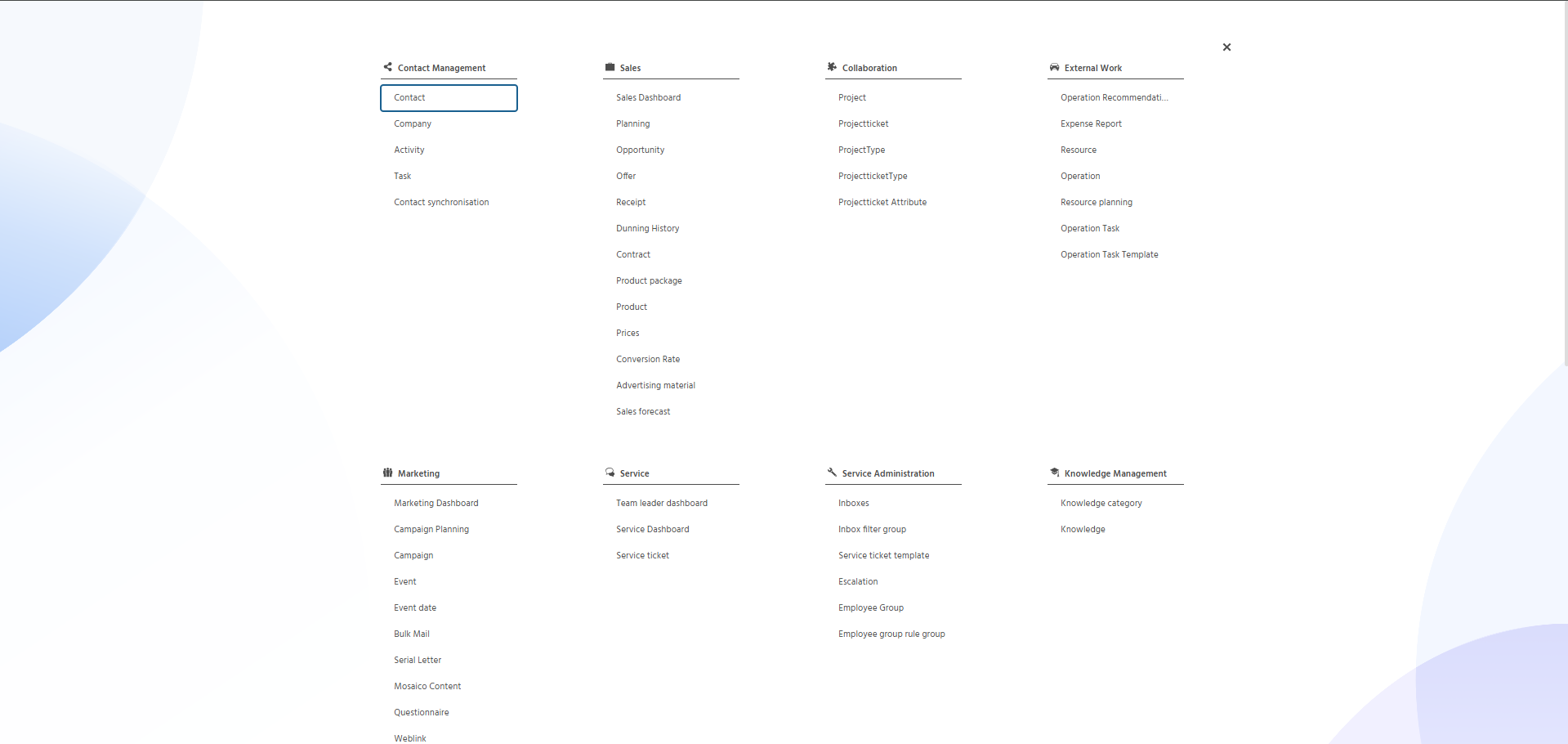 Figure: The new ADITO menu.
-
Cleaner overall structure
Updated visuals and a larger popup create a calmer, more spacious layout. -
Accessibility-first navigation behavior
Keyboard navigation and improved ARIA support make the menu easier to use with assistive technologies. -
Reduced interface complexity
Rarely used elements such as the side menu and history button have been removed to keep the navigation more focused. -
Reorganized key actions
Notifications have moved to the top right, and Userhelp is now directly accessible from the navigation bar. -
Smoother search continuity
The index search now remembers previous results, making repeated searches faster and reducing unnecessary repetition during navigation.
For more details, see the full blog post: A New Menu is Coming
ADITO Designer: Standalone Transpile and Deploy Enters Beta
1.2.0 Standalone Transpile and Deploy 1.1.4 Transpile v2The ADITO Designer plugin Standalone Transpile and Deploy moves Transpile v2 into beta and removes the previous dev-only limitation. Teams can now use Transpile v2 in production environments.
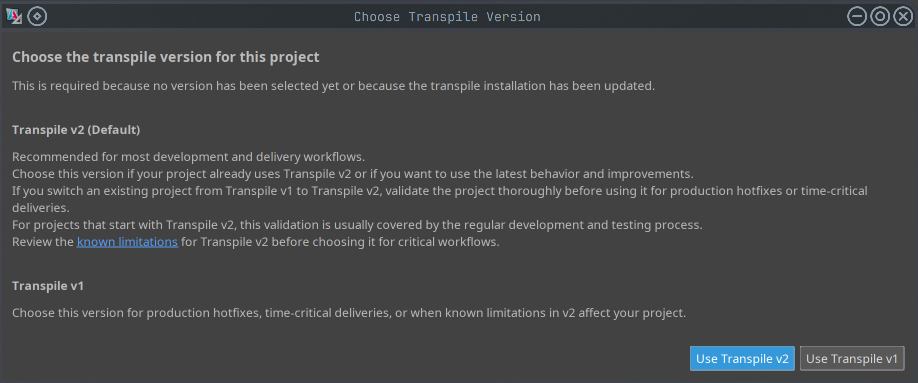 Figure: Choose between Transpile v1 and v2 on the first build
-
Production usage is now enabled
The previous dev-only restriction has been removed, allowing rollout on productive systems. -
Project-level transpile version control
The transpile version can now be configured per project in.aditoprjviatranspile.version. -
Project overrides are supported again
If files exist in both module and project, the project version can override module content again. -
Safer rollout with guided fallback
On first run after the update, users choose between v1 and v2. If the first v2 build fails, fallback to v1 is offered. -
Automatic tool updates
The plugin now keeps transpile tools up to date automatically.
For more details, see the full blog post: Standalone Transpile and Deploy Enters Beta Phase