MultiEditTable
Purpose
The MultiEditTable ViewTemplate displays multiple datasets in an editable table. Each row represents one dataset and each column corresponds to a configured EntityField.
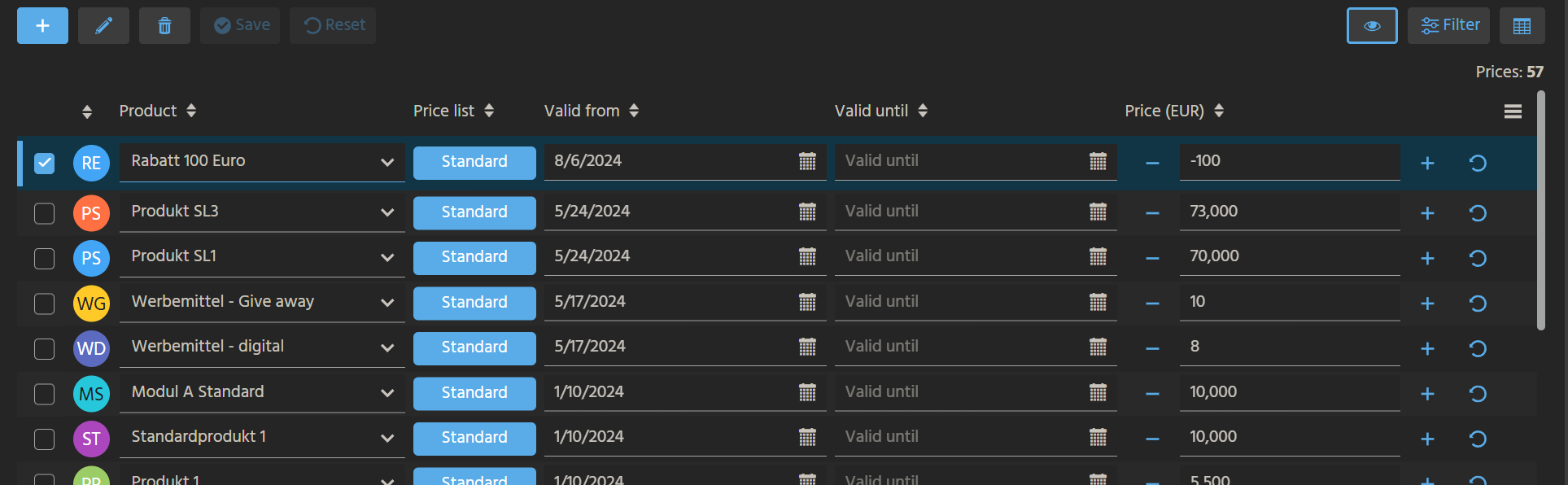 Figure: MultiEditTable used for editing multiple records.
Behavior
The visible columns are defined by columns, while editable fields are configured separately through editableColumns.
Additional renderer mappings can be used to control the display and editing behavior of specific fields:
viewRendererMappingfor view modeeditRendererMappingfor edit mode
Unsaved changes are highlighted in the table. Paging is not supported.
Supported content types
Editing currently supports the following content types:
UNKNOWNNONETEXTNUMBERTELEPHONEEMAILLINKPASSWORDDATEFILESIZEBOOLEANFILTER_TREE
The following content types are not supported for editing:
SIGNATURELONG_TEXTHTMLIMAGEFILE
Unsupported fields can still be displayed in the table but cannot be edited directly there.
Example usage
An example is the ViewTemplate MultiEditTable in ProductpriceFilter_view in Context Productprice.
In the ADITO client, it can be accessed under Sales > Prices. The view initially shows a regular table. After switching the ViewTemplate, users can edit price-related data directly in the table.
Typical behaviors in the example include:
PRODUCT_IDas a selectable field through its Consumer configurationPRICESedited through an edit renderer such asNUMBERFIELDVALID_FROMandVALID_TOedited through date-based controlsPRICELISTdisplayed with color styling through a badge renderer
Implementation hints
Paging is not supported in MultiEditTable.
Unsupported content types can still be included for display, but they cannot be edited directly in the table.