Table
Purpose
The Table ViewTemplate displays multiple datasets in a tabular layout. It is suitable for result lists and overview scenarios in which each row represents one dataset and each column represents one configured field.
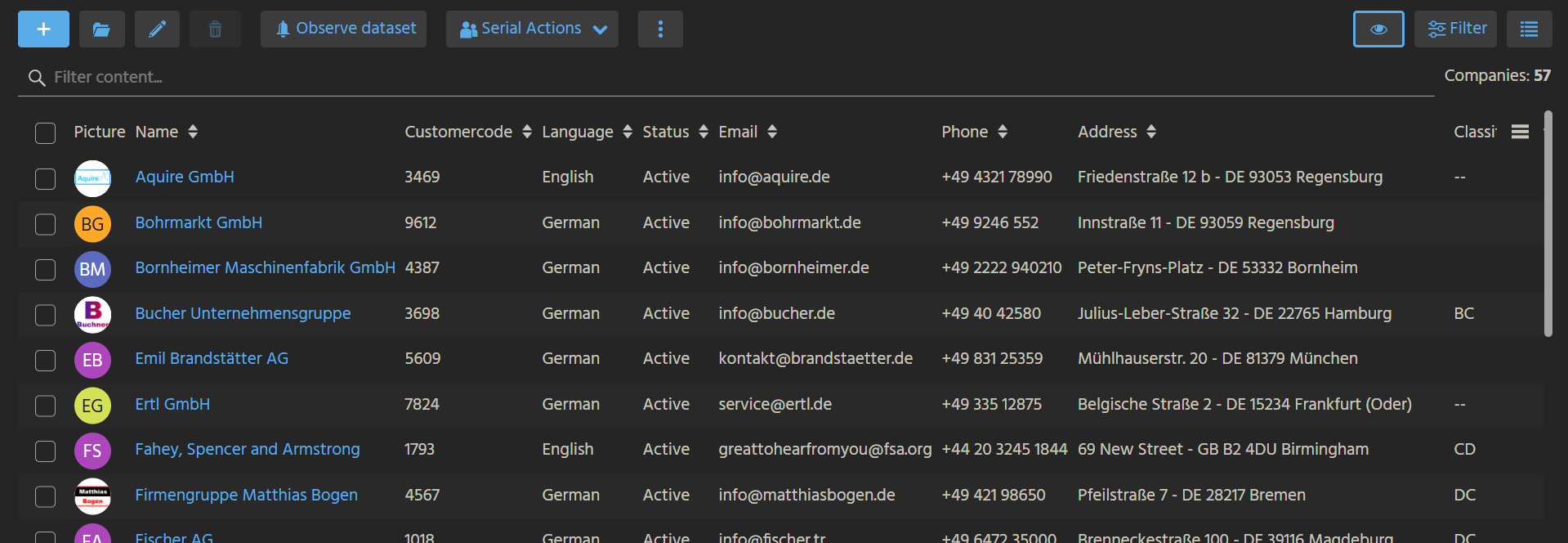 Figure: Table ViewTemplate displaying multiple records in rows and columns.
Behavior
The visible columns are defined through the columns property. Users can configure column selection and order through the property editor by adding, removing, or reordering EntityFields.
The property hideContentSearch controls whether the content search bar above the table is shown.
Configuration
In the example Organisations, the following fields of Organisation_entity from module contact are configured:
PICTURENAMECUSTOMERCODELANGUAGESTATUSSTANDARD_EMAIL_COMMUNICATIONSTANDARD_PHONE_COMMUNICATIONADDRESS_IDCLASSIFICATIONVALUE
For hideContentSearch:
truehides the search barfalseshows the search bar
The content search bar works only if paging is disabled in the corresponding RecordContainer.
Example usage
An example is the ViewTemplate Organisations in OrganisationFilter_view within Context Organisation.
In the ADITO client, it can be seen under Contact Management > Company, where each row represents one company and the configured columns provide the corresponding overview data.
Implementation hints
If hideContentSearch is set to false, the corresponding RecordContainer must have paging disabled. Otherwise, the content search bar is shown but cannot be used as intended.