Tree and TreeTable
Purpose
The Tree and TreeTable ViewTemplates visualize hierarchical data. Both are used for parent-child structures, grouped records, or mixed hierarchies, but they differ in presentation.
Treefocuses on hierarchical nodes with title, description, and icon fields.TreeTableextends that concept with table columns.
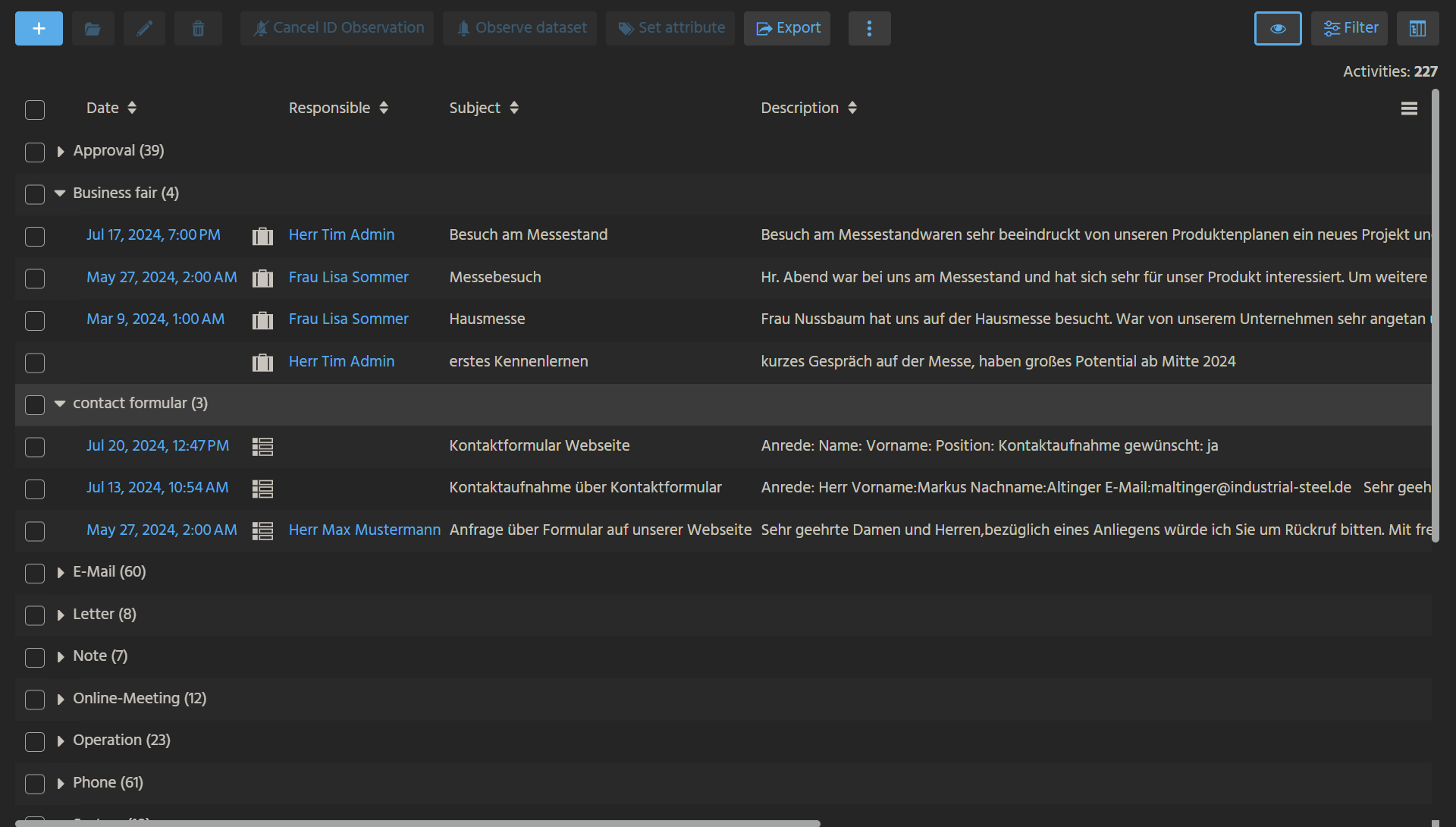 Figure: TreeTable with grouped tabular data.
Behavior
Tree
The Tree ViewTemplate groups datasets hierarchically and supports:
- grouping through
defaultGroupFields - leaf rendering through
titleField,descriptionField, andiconField - optional ActionGroups
- optional child counters through
showChildrenCount
TreeTable
The TreeTable ViewTemplate displays grouped datasets in a table-like structure and supports:
- columns through
columns - grouping through
defaultGroupFields - optional drag-and-drop if
parentFieldis configured accordingly
TreeTable is typically used in Filter Views when grouping should remain visible together with tabular data.
Configuration
Important Tree properties include:
| Property | Description |
|---|---|
entityField | Defines the source entity, often #ENTITY. |
linkedColumns | Defines fields used for navigation to related Views. |
parentField | Defines the tree hierarchy. |
informationField | Defines optional additional information. |
nodeExpandedField | Controls the initial expanded state. |
titleField | Defines the node title. |
descriptionField | Defines secondary node information. |
iconField | Defines the node icon or image. |
defaultGroupFields | Defines the default grouping fields. |
fixedFilterFields | Restricts the available grouping fields. |
expandRootItems | Expands all root items by default. |
Important TreeTable properties include:
| Property | Description |
|---|---|
entityField | Defines the source entity, often #ENTITY. |
columns | Defines the visible columns. |
linkedColumns | Enables navigation to related records. |
parentField | Defines the hierarchy. |
informationField | Defines optional top-line information. |
defaultGroupFields | Defines the default grouping. |
fixedFilterFields | Restricts grouping fields. |
expandRootItems | Expands all root items by default. |
If expandRootItems is used without paging, the client may load all items at once and performance may degrade.
Data requirements
Parent records must be added before child records. This applies to both JDitoRecordContainer and DatabaseRecordContainer implementations.
Two common strategies are:
- layer-by-layer generation for known hierarchy levels
- recursive loading for unknown or variable depth
Example usage
An example of Tree is the ViewTemplate Tree in 360DegreeFilter_view, used in contexts such as Company.
An example of TreeTable is ActivitiesTreeTable in ActivityFilter_view.
In the ADITO client, TreeTable can be used under Contact Management > Activity, where users can select the TreeTable view and configure grouping in the filter component.
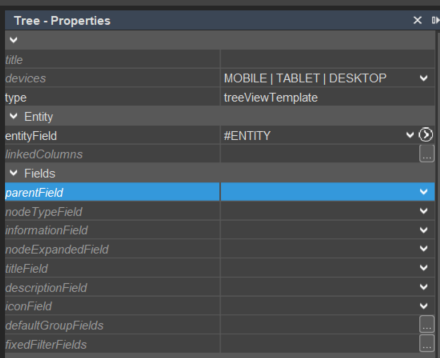 Figure: Property configuration for Tree.
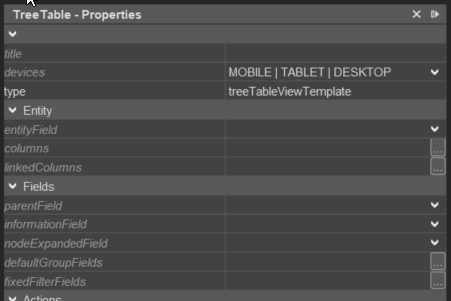 Figure: Property configuration for TreeTable.
Implementation hints
If expandRootItems is used without paging, the client may load all items at once and performance may degrade.
Parent records must always be provided before child records. Otherwise, the hierarchy cannot be resolved correctly.
Implementation example
The following simplified pattern shows how a tree can be built from organizations and persons:
import { result } from "@aditosoftware/jdito-types";
import { newSelect } from "SqlBuilder_lib";

var personData = newSelect("CONTACTID, FIRSTNAME, LASTNAME, ORGANISATION_ID")
    .from("PERSON")
    .join("CONTACT", "PERSONID = PERSON_ID")
    .where("ORGANISATION_ID is not null")
    .and("PERSON_ID is not null")
    .table();

var orgData = newSelect("CONTACTID, ORGANISATIONID, NAME")
    .from("ORGANISATION")
    .join("CONTACT", "ORGANISATIONID = ORGANISATION_ID")
    .where("ORGANISATION_ID is not null")
    .and("PERSON_ID is null")
    .table();

for (let i = 0; i < orgData.length; i++) {
  for (let j = 0; j < personData.length; j++) {
    if (personData[j][3] === orgData[i][1]) {
      personData[j][3] = orgData[i][0];
    }
  }
}

var res = [];

for (let i = 0; i < orgData.length; i++) {
  res.push([orgData[i][0], null, orgData[i][2]]);
}

for (let i = 0; i < personData.length; i++) {
  res.push([
    personData[i][0],
    personData[i][3],
    personData[i][1] + " " + personData[i][2]
  ]);
}

result.object(res);
This pattern assumes that the corresponding RecordContainer maps UID, PARENT, and TITLE appropriately.