Entity - Processes
JDito processes can cause performance problems when they are:
- Too slow due to inefficient logic
- Executed too frequently, especially per record, which can accumulate significant processing time
Optimize Slow Processes
Review JDito code for unnecessary or inefficient logic. Simplify wherever possible. Since JDito is JavaScript-based, general JS performance best practices apply. Refer to the "AID001 Coding Styles" document for clean, maintainable code structures.
Optimize Process Frequency
Some JDito processes (like valueProcess or displayValueProcess) are executed per dataset. This adds up quickly when displaying lists or FilterViews. To reduce their impact:
Avoid valueProcess and displayValueProcess
Use a SQL-based expression in the RecordFieldMapping instead. It is calculated once at load time, not per row, which significantly improves performance in list views like tables or treetables.
For fields that appear only in detail views or edit dialogs — and not in large lists — using valueProcess may be acceptable and often simpler. In these cases, a SQL expression would only add unnecessary complexity.
Use conditional logic to skip execution where not needed
For example:
if (vars.get("$sys.viewmode") != neon.FRAME_VIEWMODE_TABLE) {
  result.string(neon.COMPONENTSTATE_INVISIBLE);
}
Apply this technique to:
- Actions that have no effect visible in the current View
- EntityFields not included in a view (typically skipped automatically by ADITO; manual optimization is rarely necessary)
- EntityField processes (e.g.,
iconProcess,titleProcess,tooltipProcess,stateProcess,onValidationProcess,onValueChange,dropDownProcess,mandatoryProcess) - Entity-related processes (e.g.,
iconIdProcess,imageProcess,colorProcess,contentTitleProcess,contentDescriptionProcess)
*Replace constant logic with parameters
If a value is the same for all records, calculate it once in a Parameter’s valueProcess and read it from there in your entity.
The valueProcess of the Parameter is executed only once — when the Parameter is accessed for the first time. The result is cached and reused for all subsequent calls, avoiding redundant recalculations.
Split complex logic out of entity-level processes
Move calculations to a separate hidden EntityField using a SQL expression, rather than embedding it in a frequently called process.
Skip unnecessary logic in edit mode
Use this pattern:
const mode = vars.get("$sys.presentationmode");
const state = vars.get("$sys.operatingstate");

if (state == neon.OPERATINGSTATE_VIEW && mode == neon.CONTEXT_PRESENTATIONMODE_FULL) {
  // Run only in view mode
}
Guard FilterView-specific logic explicitly
Entity-related UI processes can also run while opening an EditView or other views where the corresponding UI element is not actually visible. For the underlying behavior, see Accessing the value of an EntityField.
In practice, this matters most for helper functions that use $sys.filter, $sys.selectionsRecordsRecipe, or follow-up loading via entities.createConfigForLoadingRows(). If such code is triggered in EDIT or NEW, it can unintentionally load all records of an Entity and block the View or even destabilize the pod under load.
Use explicit guards before evaluating FilterView-specific logic:
const presentationMode = vars.get("$sys.presentationmode");
const recordState = vars.get("$sys.recordstate");

if (presentationMode !== neon.CONTEXT_PRESENTATIONMODE_FILTER) {
  return [];
}

if ([neon.OPERATINGSTATE_NEW, neon.OPERATINGSTATE_EDIT].includes(recordState)) {
  return [];
}
If the logic must work for a single-record EditView or PreviewView, do not derive the target set from $sys.filter. Restrict it directly to the current record, for example via $sys.uid, or skip the logic entirely if no persisted record exists yet.
Example: problematic pattern in edit mode
let filter = vars.get("$sys.filter");

if (res.length == 0 && filter && filter.filter) {
  var loadConfig = entities.createConfigForLoadingRows()
    .filter(JSON.stringify(filter.filter))
    .fields(["#UID"])
    .entity(pEntity);
}
In a FilterView, filter.filter contains the active user-defined filter. In an EditView, there is no such filter context. If the code still falls back to filter.filter without any further restriction, the resulting load can effectively target all records of the Entity.
Better approach for single-record contexts:
const recordState = vars.get("$sys.recordstate");
const uid = vars.get("$sys.uid");

if (recordState === neon.OPERATINGSTATE_NEW) {
  return [];
}

if (uid) {
  return neonFilter.createEntityRecordsRecipeBuilder()
    .uidsIncludelist([uid])
    .toString();
}
For EditView and single-record View scenarios, prefer restricting the logic directly to $sys.uid. In NEW, skip the block entirely because no persisted record exists yet.
Remove unnecessary processes
Review your project for any processes that are no longer needed or have no functional impact. This includes:
- Processes that were once required but are now redundant due to changes in the application.
- Processes that were added for testing or debugging purposes and are no longer relevant.
Limit execution of onValueChange execuion
If using onValueChange, limit the types in onValueChangeTypes to only what's needed. Avoid enabling "Process" unless explicitly required.
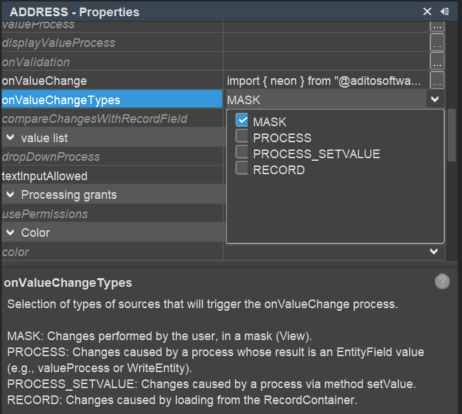 Figure: Optimized
 onValueChangeTypes configuration
Additional Tips
- Avoid running
dropDownProcessormandatoryProcessin FilterViews. - Replace dropdown logic with SQL
expressionlogic when possible.
Customizing Manual
For further guidance, refer to the Customizing Manual (PDF).