Vector Search via Solr
This guide explains how to configure, build, and query a vector search index
with Solr. The example adds a vector search configuration to
Organisation_entity.
This guide is currently a work in progress. It will be updated when vector search and the corresponding xRM modules for the embedding model are available.
Summary
Vector search stores embedding vectors in a dedicated Solr collection and
queries this collection through indexsearch.COLLECTION_VECTOR_INDEX. The
configuration uses an IndexRecordContainer with VECTORGROUP_DEFINITION and a
#VECTOR system field.
This guide covers the required instance settings, the vector record container, indexer execution, vector search requests, and the embedding model call used to create vectors.
Prerequisites
- The Indexsearch module must be configured for the target system.
- The target entity must provide the data that should be indexed for vector search.
- An embedding model endpoint must be available and must return vectors with
the dimension required by the
#VECTORindex field. - Credentials for the embedding model must be stored in an approved secret source, such as an alias or environment configuration.
Outcome
After completing this guide, the target entity has a vector index group, the vector index can be built or updated, and JDito processes can query the vector index with an embedding generated from search input text.
1. Configure the Instance and IndexSearch Alias
Enable vector search for the system and, if needed, define a separate Solr collection name for the vector index.
-
Open the system instance configuration.
-
Enable vector search in the instance configuration.
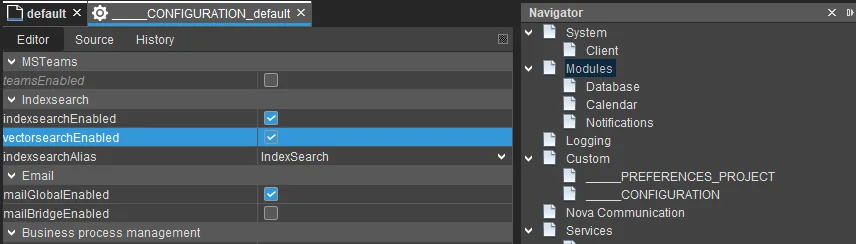 Figure: Instance configuration with vector search enabled.
 -
Optionally, define the vector collection name in the configuration of the
IndexSearchalias.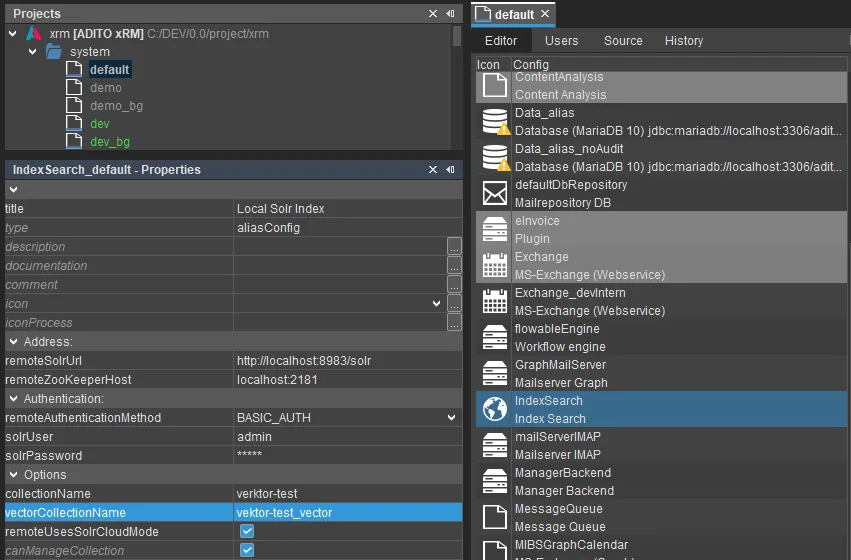 Figure: IndexSearch alias configuration with a vector collection name.
 -
Save the configuration and restart or reload the affected server components if required by the target environment.
The standard collection and the vector collection must use different Solr collection names. If both settings point to the same collection, index setup and search execution can fail.
2. Define a Vector Record Container
Create a new index record container for the entity that should be available for vector search.
-
Create a new record container of type
index.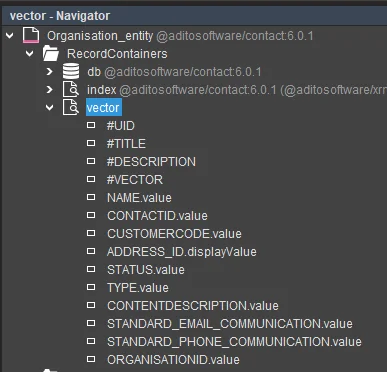 Figure: Entity with a new index record container.
 -
Set the configuration mode to
VECTORGROUP_DEFINITION.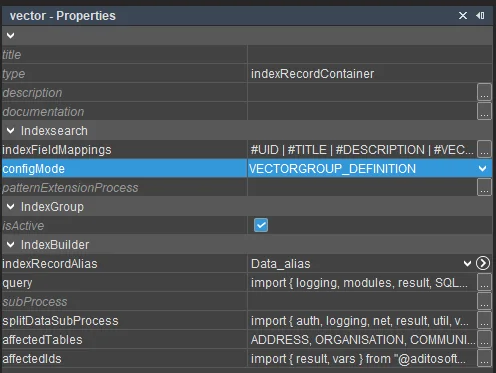 Figure: Record container configured as a vector group definition.
 -
Add the fields that should be available in the vector index to the record field mappings.
-
Add the system field
#VECTORto the record field mappings. This field stores the embedding vector.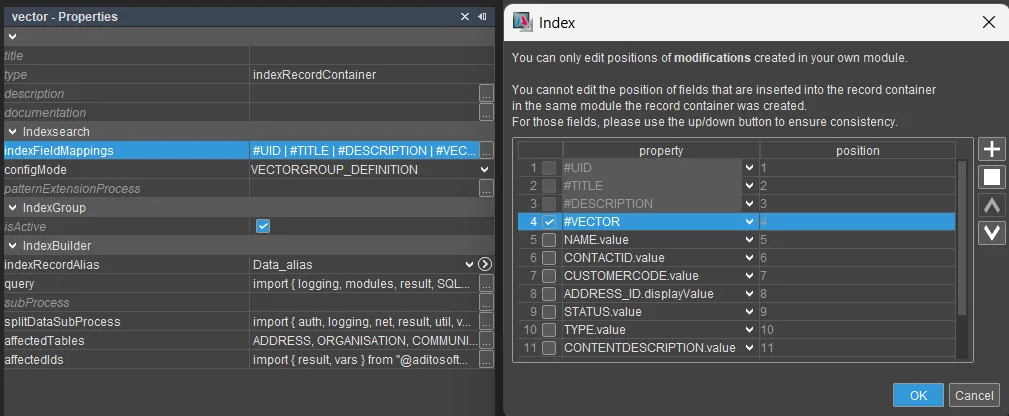 Figure: Record field mappings with the
 #VECTORsystem field. -
Define the query process as you would for a standard index group. The query must return the data in the same order as the field mappings.
-
Add either a
subProcessor asplitDataSubProcessto create vector data. UsesubProcesswhen one vector document per dataset is sufficient. UsesplitDataSubProcesswhen one ADITO entry should create multiple vector documents.noteThis example uses
splitDataSubProcessto create multiple documents. The example process is provided below. -
Configure the incremental indexer settings as you would for a standard search index.
-
If the vector search requires permissions, include all fields and filter extensions needed for permission checks and result filtering.
-
Deploy the configuration to the server.
Example splitDataSubProcess
The following process creates multiple vector documents from one source dataset.
It copies the original dataset, creates one embedding input per vector document,
and stores the returned vector in the #VECTOR field.
import { auth, logging, net, result, util, vars, project } from "@aditosoftware/jdito-types";
import { Utils } from "Utils_lib";
import { AiEmbeddingUtils } from "_Demo_AiEmbeddingUtils_lib";

const GLOABL_VECTOR_FIELD = 3; // Position of '#VECTOR' in 'indexFieldMapping' - 1
const DESCRIPTION_FIELD = 2; // Posisiton of '#DESCRIPTION'

if (vars.exists("$local.data"))
{
    // Get current dataSet
    // '$local.data' is a two dimensional string array (string[][])
    let data = vars.get("$local.data");

    // Create imput texts for ebedding model
    let modelImput = buildOnlyVectorInputValuesFromDataSet(data);

    //logging.log("+ VectorInput=" + modelImput);

    let dataSets = [];

    for (let i = 0; i < modelImput.length; i++)
    {
        // create new DataSet to store the vector
        // do not override the existing one.
        let splitDataSet = copyDataSet(data);

        let input = modelImput[i];

        // set input value as description
        splitDataSet[DESCRIPTION_FIELD] = (input) ? [input] : null;

        // Get (first) vector from modell
        // returns the vector as JSON-string or null;
        // This is a placeholder for the actual embedding model call.
        let vector = AiEmbeddingUtils.getVectorFromRemote(input);

        // Add vector to dataSet for the '#VECTOR' system field.
        // The dataSet does only support a string[] as valus,
        // so the vector must be converted to either a single string or an array of strings.
        splitDataSet[GLOABL_VECTOR_FIELD] = (vector) ? [vector] : null; // Convert number[] array to string "[n0, n1, n2, ... n1023]"

        // Add DataSet to result array.
        dataSets.push(splitDataSet);
    }
    // Set array of modified DataSet as result.
    // Result must always be a three dimensional string array (string[][][])
    result.object(dataSets);
}

// ////////////////////////////////////////
// Create matching DataSet array for result
// ////////////////////////////////////////

/**
 * Creates a copy of the given DataSet for the indexer.
 *
 * @param {string[][]} pDataSet - The DataSet a copy is created for.
 *
 * @returns {string[][]} The new copy of the DataSet. Otherwise null, if the DataSet was null.
 */
function copyDataSet(pDataSet)
{
    if(!pDataSet)
        return null;

    var copy = [];
    for (var i = 0; i < pDataSet.length; i++)
    {
        copy[i] = pDataSet[i] ? pDataSet[i].slice() : null;
    }
    return copy;
}

// ////////////////////////////////////////
// Split input from DataSet
// ////////////////////////////////////////

/**
 * Creates mutliple vector input values from a single DataSet.
 *
 * @param {string[][]} pDataSet - The current DataSet of the indexer containing the loaded data.
 *
 * @returns {string[]} An array of strings containing the text values for the embedding model.
 */
function buildOnlyVectorInputValuesFromDataSet(pDataSet)
{
    if(!pDataSet || pDataSet.length == 0)
        return null;

    let inputValues = [];

    // vector for only title and description.
    inputValues.push(buildVectorInputFromDataSet(pDataSet));

    // add input that contians all fields
    inputValues.push(pDataSet.flatMap(elements => (elements) ? elements.join() : "").join(";"));

    // add more input values if required.
    // Here is also the place where the splicing of large data like documents into smaller chunks is done.
    // For each input value, a new vector is created resulting in muliple documents and a better search performance.

    return inputValues;
}

/**
 * Joins the values of a row of a DataSet to a single comma separated string.
 * If the row is empty or null an empty string is returned.
 *
 * @param {string[]} pRow - The row of the DataSet.
 *
 * @returns {string} The joined values of the row as string. Otherwise an empty string.
 */
function flattenRow(pRow)
{
    if (pRow && pRow.length > 0)
        return pRow.join()

    return "";
}
For reference on how to get a vector from the embedding model, see the appendix for triggering the embedding model.
3. Build or Rebuild the Vector Index
Use a server process to rebuild the vector index. Always pass the vector index collection to the indexer call.
import { indexsearch } from "@aditosoftware/jdito-types";

indexsearch.runIndexer(["Organisation"], indexsearch.COLLECTION_VECTOR_INDEX);
For a complete rebuild of all vector groups, pass null as the group list:
indexsearch.runIndexer(null, indexsearch.COLLECTION_VECTOR_INDEX);
For large datasets, prefer the incremental indexer and process records in batches.
const indexerConfig = indexsearch.createIncrementalIndexerRunConfig()
    .group("Organisation")
    .addUids(["uid-1", "uid-2"]);

indexsearch.runIncrementalIndexer(
    indexerConfig,
    indexsearch.COLLECTION_VECTOR_INDEX
);
4. Search the Vector Index
A vector search needs a vector generated from the search input text.
- Send the search text to the embedding model.
- Create an index query with
indexsearch.createIndexQuery(). - Set the vector with
setVector(...). - Set
topKandrows. - Restrict the search with
setIndexGroups(...)if only specific vector groups should be searched. - Add filters if needed. Build filter patterns for
indexsearch.COLLECTION_VECTOR_INDEX. - Execute the search against
indexsearch.COLLECTION_VECTOR_INDEX.
import { indexsearch } from "@aditosoftware/jdito-types";

const searchText = "example search text";

// Call the embedding model to get a vector
// This is a placeholder for the actual embedding model call.
// This will retrive a 1024-dimensional vector from the embedding model and returns it as a JSON string.
// "[0.012, -0.034, ... 0.012,]"
const vector = getVectorFromRemote(searchText);

// Create the index query and set the vector
const query = indexsearch.createIndexQuery()
    .setVector(vector)
    .setTopK(10)
    .setRows(10)
    .setIndexGroups("Organisation")
    .setResultIndexFields(
        "_local_id_",
        "_index_group_",
        "_title_",
        "_description_",
        "score"
    );

// Execute the search against the vector index
const result = indexsearch.searchIndex(
    query,
    indexsearch.COLLECTION_VECTOR_INDEX
);
The collection parameter is mandatory for vector searches. If the query is executed against the normal search index, vector requests can fail or use the wrong mappings.
For vector searches, keep rows equal to or lower than topK. This avoids
requesting more result documents than the nearest-neighbor query has selected.
Appendix: Trigger the Embedding Model
Use the net API to call the embedding model endpoint. The request must return
an embedding vector as a JSON array string, for example
"[0.012, -0.034, ...]".
Follow these rules when calling the embedding model.
- Do not hard-code API keys or tokens in the process.
- Load credentials from a secure alias, environment configuration, or another approved secret source.
- Configure the embedding request or model so that it returns vectors with size
1024. - The vector size must be
1024because the current technical implementation of the#VECTORindex field is fixed to that size. - Store the vector as a string value in the
#VECTORfield of the dataset.
The full example below uses a placeholder token to show the request structure. Replace it with credentials loaded from an approved secret source before using the process in a real environment.
Minimal request structure:
const body = {
    model: "adito-embed",
    input: inputText,
    dimensions: 1024,
    "no-log": true
};

const requestEntity = JSON.stringify(body);
To get multiple vectors with one request, set an array of strings as the input
parameter. The response contains an array of vectors in the same order as the
input array.
After receiving the response, extract the embedding and store it as a JSON string. For simple single-sentence inputs used for a search, it is sufficient to retrieve only the first vector.
const parsed = JSON.parse(response);
const vector = JSON.stringify(parsed.data[0].embedding);
Full example to query the embedding model and get the first vector:
/**
 * Retrieves the vector from the embedding model for the fiven text input.
 *
 * @param {string} pInputText - The text for which the vector should be retrieved from the model.
 *
 * @returns {string} The vector returned form the embedding model.
 */
function getVectorFromRemote(pInputText)
{
    if (Utils.isNullOrEmptyString(pInputText))
        return null;

    // Build the POST request for the REST endpoint of the ADITO embedding model to retrieve the vector(s).

    // Create the request body as object.
    let body = {
        model : "adito-embed",
        input : pInputText,

    };
    // Add the 'no-log' option.
    body["no-log"] = true;

    // Parse the body into a JSON string.
    let requestEntity = JSON.stringify(body);
    //logging.log("+ Body=" + requestEntity)

    // Create the REST request config.
    // - Set URL for the ADITO embedding model. Could also be loaded from the AI-AliasConfig or custom properties.
    // - Use 'application/json' as content type for send and accept.
    // - Use 'util.DATA_TEXT' as jDito type for send and accept.
    // - Method/ActionType must be POST to send the vector.
    // - Set the body as JSON string.
    let restConfig =  net.createConfigForRestWebserviceCall()
        .url("https://ai.adito.cloud/embeddings")
        .dataTypeAccept("application/json")
        .dataTypeSend("application/json")
        .dataTypeJDitoAccept(util.DATA_TEXT)
        .dataTypeJDitoSend(util.DATA_TEXT)
        .actionType(net.POST)
        .requestEntity(requestEntity);

    // Embedding model uses OAuth2 for authentication.
    // - Typically this should be configured and loaded via an AuthAlias or from the custom properties.
    let authConfig = auth.createConfigForOAuth2().token("myApiToken");

    // Send the request.
    // This should return a JSON string.
    let response = net.callRestWebservice(restConfig, authConfig);

    // Parse and extract the Vector(s) from the request.
    return extractFirstVectorFromResponse(response);
}

/**
 * Extracts the first vector form the response of the ebedding model.
 *
 * @param {string} pResponse - The REST webservice response of the embedding model.
 *
 * @returns {string} The first vector of the response if present as string in the form '[n0, n1, n2, ... n1023]', null otherwise
 */
function extractFirstVectorFromResponse(pResponse)
{
    if (!pResponse)
        return null;

    //logging.log("+ Model-Response=" + pResponse);

    // Parse the received JSON string.
    // Response structure
    // {
    //    "model": "adito-embed",
    //     "data": [
    //         {
    //             "index": 0,
    //             "object": "embedding",
    //             "embedding": [0.027004120871424675, 0.04190221056342125, ... ]
    //         }
    //     ],
    //     "object": "list",
    //     "usage": {
    //         "completion_tokens": 0,
    //         "prompt_tokens": 6,
    //         "total_tokens": 6,
    //         "completion_tokens_details": null,
    //         "prompt_tokens_details": null
    //     }
    // }
    let parsed = JSON.parse(pResponse);


    // The vector(s) are part of the elements in the 'data' array.
    // The vector itself is the number[] named 'embedding'.

    if (!parsed.data || parsed.data.length == 0)
        return null;

    if (!parsed.data[0])
        return null;

    // This function only extracts the first vector.
    if (!parsed.data[0].embedding)
        return null;

    // Return the extracted vector as a JSON string that can be inserted in the DataSet.
    return JSON.stringify(parsed.data[0].embedding);
}