Favorite
Purpose
The Favorite ViewTemplate allows users to assign tags to datasets. These tags act as personal bookmarks or classification markers and make tagged datasets available in the special Favorite context of the ADITO client.
 Figure: Client appearance of the Favorite ViewTemplate.
Behavior
The ViewTemplate provides two interaction patterns:
- a star button that adds or removes the default tag
STANDARD - a text field for entering custom tag names, including suggestions for existing tags
Tags that start with # are treated as hashtags. They remain searchable but do not create visible entries in the Favorite context.
Configuration
At Entity level, the property useFavorites must be enabled to support user-specific tagging.
In many cases, no special ViewTemplate configuration is required. If the ViewTemplate is named Favorites and placed in the desired PreviewView location, the standard behavior is available automatically.
The following properties can be configured if required:
| Property | Description |
|---|---|
title | Can usually remain empty. It does not control the drawer caption Tags. |
objectType | Defines the source of the OBJECT_TYPE value used in the Favorite context. |
rowId | Defines the identifier of the tagged dataset. The default #UID resolves this automatically in standard scenarios. |
For objectType, a dedicated EntityField can be used, for example with the following valueProcess:
result.string("Person");
Alternatively, #CONTEXTNAME can be used.
Example usage
An example is the ViewTemplate Favorites in PersonPreview_view.
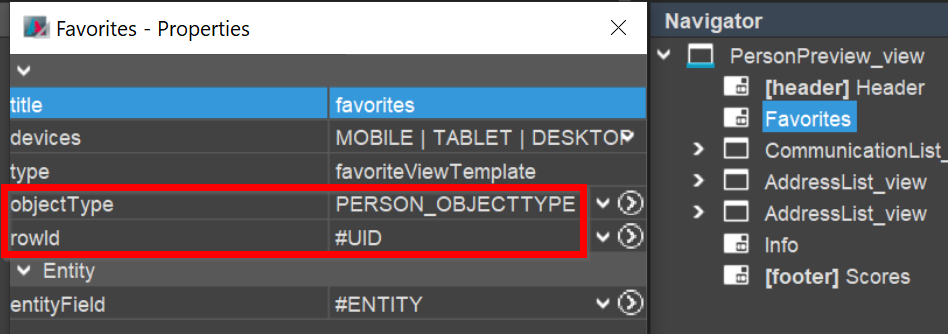 Figure: Example configuration of the Favorite ViewTemplate.
Implementation hints
This ViewTemplate should only be used in PreviewViews.
At Entity level, the property useFavorites must be enabled to support user-specific tagging.
If the ViewTemplate is named Favorites and placed in the desired PreviewView location, the standard behavior is available automatically in many cases.
Notes
In advanced scenarios, tags can also be assigned through Actions or other automation instead of the Favorite ViewTemplate itself.
Technical background
Tagging is based on two system tables:
ASYS_RECORDGROUP
This table stores the definitions of the tags themselves.
| Column | Description |
|---|---|
ID | Technical identifier of the record group. |
USER_ID | Creator of the tag. |
TITLE | Tag title, for example important or #export. |
GROUP_TYPE | Type of the tag definition. |
GROUP_TYPE can have the following values:
FAVORITE_GROUPfor regular tags shown in theFavoritecontextDEFAULT_FAVORITE_GROUPfor the default star-based tagSTANDARDHASHTAGfor tags beginning with#
ASYS_RECORD
This table stores the assignment of tags to individual datasets.
| Column | Description |
|---|---|
ID | Technical identifier of the assignment. |
OBJECT_TYPE | Label shown in the Favorite context. |
ROW_ID | Identifier of the tagged dataset. |
RECORDGROUP_ID | Reference to the corresponding ASYS_RECORDGROUP entry. |