JDito
What Is JDito?
JDito is the programming language used for customizing ADITO. Everything that goes beyond the basic functionality provided by components is implemented in processes, which are essentially JDito scripts.
JDito is based on JavaScript, but unlike browser-side JavaScript it does not provide DOM APIs. Instead, it extends JavaScript with system modules that expose ADITO-specific functionality such as SQL access, telephony integration, and reading or returning values from and to components.
Do not use system-reserved names as variable names. For example, a variable must not be named result, tools, or test. It is also recommended not to reuse names of system components or properties such as Activity, title, contentType, or state, because this can lead to unexpected side effects. A simple way to avoid collisions is to use prefixes such as my or a, for example myTitle or aState.
The following example shows how a variable named test is marked in the ADITO Designer code editor:

How to Use JDito
The lexical structure of JDito matches JavaScript. General JavaScript basics can therefore be learned from standard JavaScript references, for example: https://www.w3schools.com/js/
JDito is used in processes. In ADITO, these can broadly be divided into two groups:
-
Component-specific processes
These JDito scripts are used for a specific purpose within a component, for example to calculate display values, font colors, or validation results. They are configured directly in component properties and are executed whenever the system needs the property value. -
Project-wide processes
These processes are located in theprocessnode of the ADITO Designer project tree. They are grouped into virtual subnodes according to the processvariantsproperty:-
authentication:
All processes responsible for authentication - see chapter Authentication Methods -
executable
Executable processes are used to automate specific tasks and can be used manually or for scheduled tasks, e.g., nightly imports of data or mass data manipulation. -
internal
These processes are called by the ADITO core and define custom behavior for specific system tasks. For example,autostartNeonruns whenever a user logs on to the web client and initializes client-wide variables such as access rights. -
library
These processes group collections of JDito functions by topic, for example calendar handling, document generation, or SQL helper functions. Libraries can be imported into other processes. There are two common library types:- Entity-specific libraries, which contain helper functions limited to or mainly used by a single Entity, for example
Organisation_libin module contact). - Multi-purpose libraries, which provide functionality used by multiple Entities. Examples are
Neon_lib,DateUtils_lib, andMoney_lib.
- Entity-specific libraries, which contain helper functions limited to or mainly used by a single Entity, for example
-
webservice
These processes are designed to be used as web services. Other systems can call these to get data from ADITO, write data to ADITO, or to trigger actions within ADITO. Find more information in the ADITO document Webservices. -
workflow
All processes related to workflows - see the ADITO chapters about Workflow management and the technical workflow reference.
-
In principle, these system-wide processes can also be customized. However, this often creates merge and update problems when a new xRM version is released. For custom functionality, it is therefore usually better to create new processes such as KeywordRegistry_custom or MyNewContext_lib.
Further information
Additional JDito information is available through JSDoc in the coding assistance of the Designer. For example, if you import Person_lib using import { PersUtils } from "Person_lib";, you can type PersUtils. and press CTRL+SPACE to display all functions of class PersUtils. The first time this is used, the Designer may need a few minutes to finish the background task Initializing JS features. Once the function list is shown, you can navigate through it and inspect the JSDoc, including summary, parameters, and return value information.
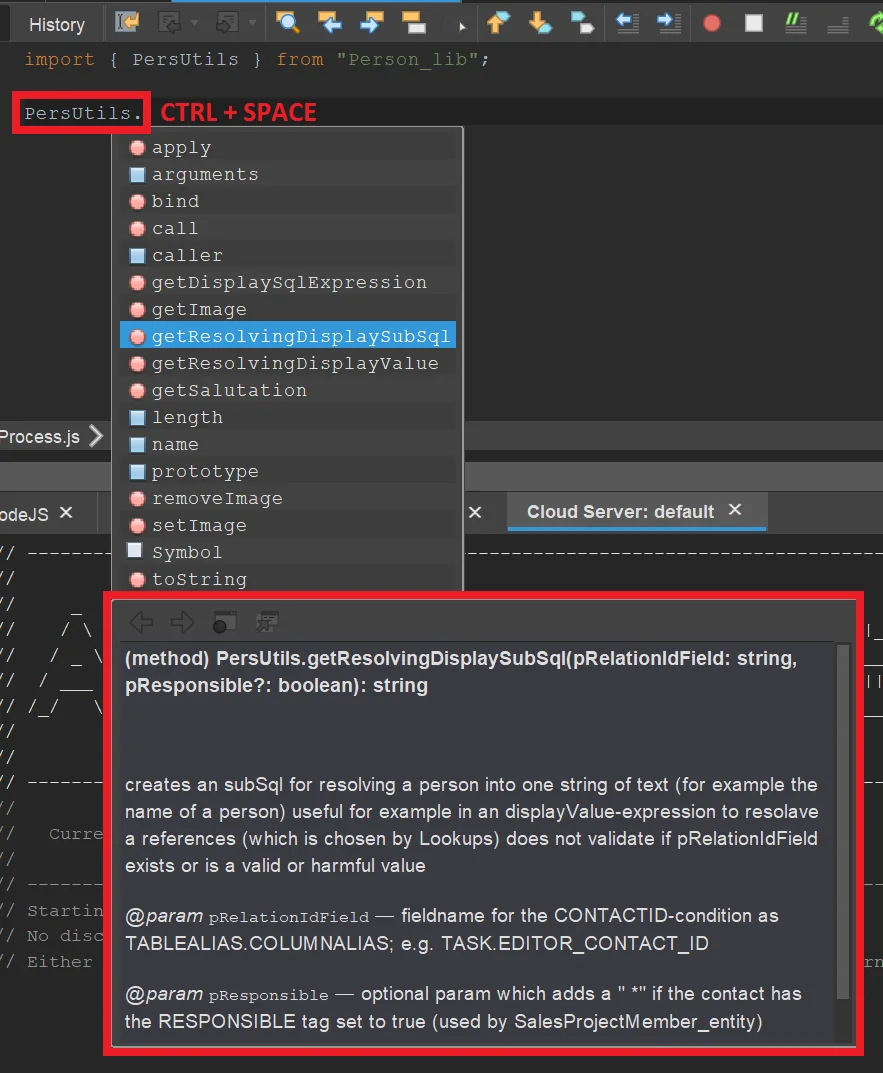
Figure: Example of the JSDoc of method getResolvingDisplaySubSql in class PersUtils.
A glossary for JDito system modules and variables is available in JDito System Modules and System Variables.
Information about working with XML in JDito is available in XML in JDito.