Database Tables
This chapter explains how database structures are created and maintained in ADITO projects and how these structures are made available to the Entity Model.
What this chapter covers
For most projects, database-related work in the Entity Model area consists of four tasks:
- creating or modifying tables and columns,
- managing the structure through Liquibase,
- synchronizing the project-side
Alias Definition, and - generating or reviewing changesets.
By default, ADITO cloud systems use a MariaDB database. In many cases, each Entity is connected to a specific database table through a RecordContainer.
There are several ways to create the required database tables and to insert data such as demo content or keywords.
One option, although not the typical ADITO workflow, is to execute the required MariaDB statements directly, either with an external tool or in the ADITO Designer through the Execute SQL button.
Another option is to use the ADITO database editor. In the Projects window, navigate to system and double-click your system, for example default. The ADITO cloud server must be running and a tunnel connection must be available. In the editor, open Data_alias. The database content is then shown as a tree structure where tables and columns can be viewed and modified through the context menu.
Whenever you have modified the structure or configuration of the database by any of the above methods, you need to update the Alias Definition, in order to use the changes in your project.
Liquibase
In practice, the standard approach is to use Liquibase. With Liquibase, you define database changes in XML files and execute them in a controlled way through the ADITO tooling.
Liquibase is an open source tool for database schema change management. It is not developed by ADITO, but it is integrated into the ADITO Designer via a plugin. Detailed documentation is available at https://www.liquibase.org/, and ADITO-specific information can be found in Create Liquibase files automatically in the Designer Manual.
Treat committed Liquibase changesets as immutable. Do not edit a changeset after it has been committed and potentially executed in another environment. Create a new changeset for every follow-up change instead.
When you add or revise Liquibase changes, follow these safety rules:
- Use a new changeset instead of modifying an existing committed file.
- Add preconditions for structural changes so that repeated executions fail safely or are skipped intentionally.
- When a changeset replaces seed data or configuration data, execute
deleteoperations beforeinsertoperations to avoid duplicates and conflicting rows. - Keep related cleanup and replacement logic in the same migration step when possible so that the intent remains traceable.
Content of Data_alias folder
In an ADITO project, the XML files used by Liquibase are stored below alias > Data_alias in the Projects window or, in modularized projects, inside module-specific alias folders.
From the context menu of the Data_alias project folder, you can execute the following Liquibase commands:
- update
- drop all
- drop all and update
The Liquibase entry point is always a file named changelog.xml at the top level of the Data_alias folder. This file does not contain the actual changes. Instead, it references other changelog files further down in the folder structure or in module alias folders.
Here is a generic example:
<?xml version="1.1" encoding="UTF-8" standalone="no"?>
<databaseChangeLog xmlns="http://www.liquibase.org/xml/ns/dbchangelog"
                   xmlns:ext="http://www.liquibase.org/xml/ns/dbchangelog-ext"
                   xmlns:xsi="http://www.w3.org/2001/XMLSchema-instance"
                   xsi:schemaLocation="http://www.liquibase.org/xml/ns/dbchangelog-ext http://www.liquibase.org/xml/ns/dbchangelog/dbchangelog-ext.xsd http://www.liquibase.org/xml/ns/dbchangelog http://www.liquibase.org/xml/ns/dbchangelog/dbchangelog-4.4.xsd">
    <include relativeToChangelogFile="true" file="../Module1_alias/changelog.xml"/>
    <include relativeToChangelogFile="true" file="../Module2_alias/changelog.xml"/>
    <include relativeToChangelogFile="true" file="../Module3_alias/changelog.xml"/>
    <include relativeToChangelogFile="true" file="../Module4_alias/changelog.xml"/>
    <include relativeToChangelogFile="true" file="../Module5_alias/changelog.xml"/>
 </databaseChangeLog>
Figure: Example of a top-level changelog.xml file.
These referenced changelog files, in turn, either reference further changelog files or reference files that contain actual changeSet entries. These change sets control the database changes, for example for
- creating new tables
- creating new columns
- inserting data into existing tables
- updating existing data
- etc.
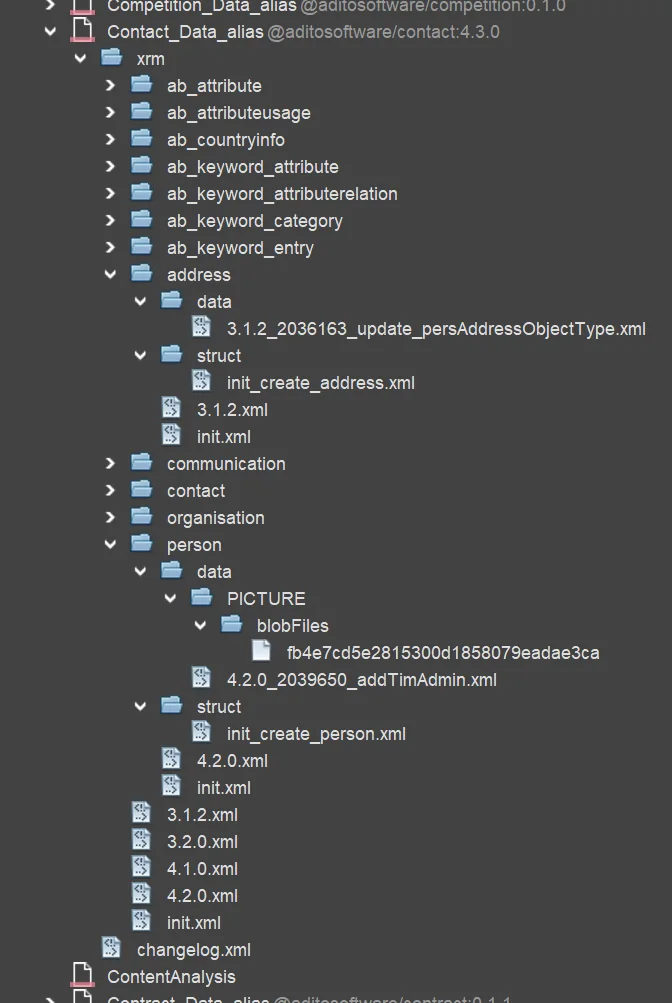
Do not let the naming cause confusion. Technically, all Liquibase XML files in ADITO are changelogs because they use the surrounding tag databaseChangeLog. In everyday ADITO usage, however, a file is usually called a changelog if it mainly references other XML files. Files that contain actual changeSet tags are typically called changesets, even though their filenames are usually descriptive names such as init_create_address.xml or 4.2.0_2039650_addTimAdmin.xml.
You can create folders, changelog files, and changeset files through the Data_alias context menu:
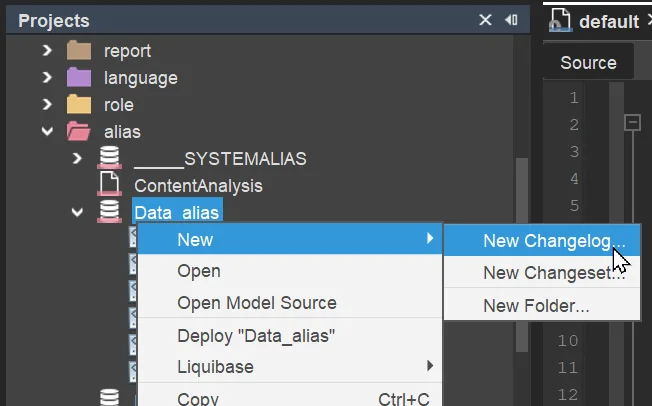
As a result, each XXX_Data_alias project folder typically contains a nested structure of folders, changelogs, and changesets. The following example is taken from the ADITO xRM module Contact Management:
Changeset examples
Here is a generic example of a changeset that creates a new table:
<?xml version="1.1" encoding="UTF-8" standalone="no"?>
<databaseChangeLog xmlns="http://www.liquibase.org/xml/ns/dbchangelog" xmlns:ext="http://www.liquibase.org/xml/ns/dbchangelog-ext" xmlns:xsi="http://www.w3.org/2001/XMLSchema-instance" xsi:schemaLocation="http://www.liquibase.org/xml/ns/dbchangelog-ext http://www.liquibase.org/xml/ns/dbchangelog/dbchangelog-ext.xsd http://www.liquibase.org/xml/ns/dbchangelog http://www.liquibase.org/xml/ns/dbchangelog/dbchangelog-3.6.xsd">
    <changeSet author="j.smith" id="23533445-0d3d-499c-aa98-cf37ca4793c1">
        <createTable tableName="MYTABLE">
            <column name="MYTABLEID" type="CHAR(36)">
                <constraints primaryKey="true" primaryKeyName="PK_MYTABLE_MYTABLEID"/>
            </column>
            <column name="MYCOLUMN1" type="VARCHAR(36)"/>
            <column name="MYCOLUMN2" type="VARCHAR(20)"/>
            <column name="MYCOLUMN3" type="DATE"/>
            <column name="MYCOLUMN4" type="DECIMAL(10,2)"/>
        </createTable>
    </changeSet>
</databaseChangeLog>
create_mytable.xml
And here is a generic example of a changeset that inserts datasets into an existing table:
<?xml version="1.0" encoding="UTF-8"?>
<databaseChangeLog xmlns="http://www.liquibase.org/xml/ns/dbchangelog" xmlns:ext="http://www.liquibase.org/xml/ns/dbchangelog-ext" xmlns:xsi="http://www.w3.org/2001/XMLSchema-instance" xsi:schemaLocation="http://www.liquibase.org/xml/ns/dbchangelog-ext http://www.liquibase.org/xml/ns/dbchangelog/dbchangelog-ext.xsd http://www.liquibase.org/xml/ns/dbchangelog http://www.liquibase.org/xml/ns/dbchangelog/dbchangelog-4.1.xsd">
  <changeSet author="j.smith" id="29368dec-2195-48d1-9b81-b57973a833c1">
    <insert tableName="MYTABLE">
      <column name="MYTABLEID" value="1d194e2f-fa81-4b9c-95ba-a245d87de3bc" />
      <column name="MYCOLUMN1" value="MYVALUE11" />
      <column name="MYCOLUMN2" value="MYVALUE21" />
      <column name="MYCOLUMN3" value="MYVALUE31" />
      <column name="MYCOLUMN4" value="MYVALUE41" />
    </insert>
    <insert tableName="MYTABLE">
      <column name="MYTABLEID" value="37631246-0c1e-4618-a280-c1731211b9f3" />
      <column name="MYCOLUMN1" value="MYVALUE12" />
      <column name="MYCOLUMN2" value="MYVALUE22" />
      <column name="MYCOLUMN3" value="MYVALUE32" />
      <column name="MYCOLUMN4" value="MYVALUE42" />
    </insert>
  </changeSet>
</databaseChangeLog>
insert_mytable.xml
Liquibase update
If you add or modify Liquibase XML files, you must execute a Liquibase update so that the changes are applied to the database.
alias > Data_alias > (context menu:) Liquibase > Update... (This option is only available, if a database connection exists.)
This opens a dialog in which you select the database connection. Make sure that you choose the data database, not the system database. If the update succeeds, the Designer shows an Update successful! message.
The Liquibase update dialog shows the flag "example", in order to decide, whether or not example data (contacts, companies, Activities, etc.) should be inserted in your database. Please be aware: Checking checkbox "example" will result in a complete loss of any productive data - even if you only choose option "Liquibase - update" (without "drop all"). Therefore, checkbox "example" should NEVER be checked in a productive system or whenever you have entered your own data that must not be deleted.
Liquibase errors
If one of the liquibase XML files contains an error (e.g., a typo), the update process stops at this file, and the following liquibase files will not be executed. There is no rollback in this case.
If you choose "Drop All & Update...", then "Drop All" and "Update" are separate commands, which are executed subsequently. If, e.g., "Drop All" has been executed, but the first "Update" XML file fails, then the database is empty.
A single changeset is always executed as database transaction, i.e., if, e.g., in a table creation file, the third column has been misconfigured, then the table will not be created at all.
Automatic XML file generation
For Liquibase XML files that create tables or insert data, there is an alternative to writing them completely by hand. You can first create the tables through the ADITO Designer database editor and fill them with datasets through the client, and then generate the corresponding changelog from the table context menu:
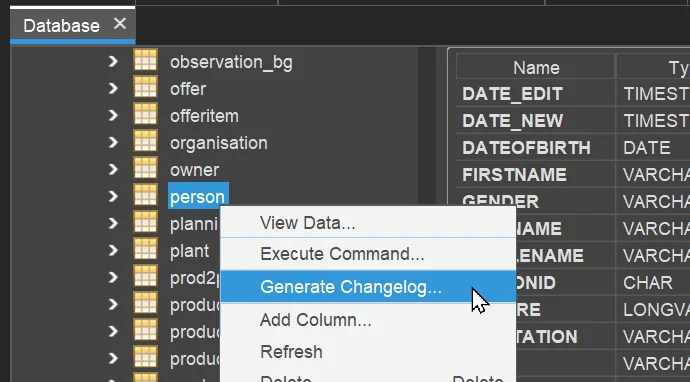
This opens the following dialog:
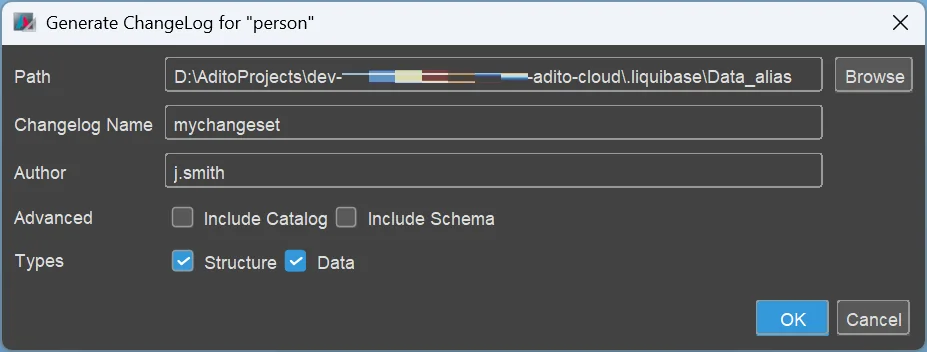
As you can see in line "Types", you can select option
- "Structure": This means you get a changeset for creating the selected table.
- "Data": This means you get, in the same file, a changeset with insert-related tags for each dataset of this table.
Depending on the table's configuration, further changesets might be added, e.g., for creating database indices.
In the above example, the result would be something like this (abbreviated):
<?xml version="1.0" encoding="UTF-8"?>
<databaseChangeLog xmlns="http://www.liquibase.org/xml/ns/dbchangelog" xmlns:ext="http://www.liquibase.org/xml/ns/dbchangelog-ext" xmlns:xsi="http://www.w3.org/2001/XMLSchema-instance" xsi:schemaLocation="http://www.liquibase.org/xml/ns/dbchangelog-ext http://www.liquibase.org/xml/ns/dbchangelog/dbchangelog-ext.xsd http://www.liquibase.org/xml/ns/dbchangelog http://www.liquibase.org/xml/ns/dbchangelog/dbchangelog-4.1.xsd">
  <changeSet author="j.smith" id="ab77746e-3086-430b-9b33-7f71e37afa4c">
    <preConditions onFail="MARK_RAN">
      <not>
        <tableExists tableName="person" />
      </not>
    </preConditions>
    <createTable tableName="person">
      <column name="PERSONID" type="CHAR(36)">
        <constraints nullable="false" primaryKey="true" />
      </column>
      <column defaultValueComputed="NULL" name="DATEOFBIRTH" type="date" />
      <column name="FIRSTNAME" type="VARCHAR(50)" />
      <column name="MIDDLENAME" type="VARCHAR(50)" />
      <column name="LASTNAME" type="VARCHAR(50)" />
      <column name="GENDER" type="VARCHAR(36)" />
      <column name="SALUTATION" type="VARCHAR(16)" />
      <column name="TITLE" type="VARCHAR(50)" />
      <column name="TITLESUFFIX" type="VARCHAR(50)" />
      <column name="USER_NEW" type="VARCHAR(50)" />
      <column name="DATE_NEW" type="datetime">
        <constraints nullable="false" />
      </column>
      <column name="USER_EDIT" type="VARCHAR(50)" />
      <column defaultValueComputed="NULL" name="DATE_EDIT" type="datetime" />
      <column defaultValueComputed="NULL" name="PICTURE" type="LONGBLOB" />
    </createTable>
  </changeSet>
  <changeSet author="j.smith" id="cd22246e-3086-430b-9b33-7f71e37afa4c">
    <insert tableName="person">
      <column name="PERSONID" value="0061c866-98a9-49a0-8fae-040221d02c4b" />
      <column name="DATEOFBIRTH" />
      <column name="FIRSTNAME" value="Alan" />
      <column name="MIDDLENAME" />
      <column name="LASTNAME" value="Miller" />
      <column name="GENDER" />
      <column name="SALUTATION" value="Mr." />
      <column name="TITLE" />
      <column name="TITLESUFFIX" />
      <column name="USER_NEW" value="Admin" />
      <column name="DATE_NEW" valueDate="2024-09-27T09:54:22" />
      <column name="USER_EDIT" />
      <column name="DATE_EDIT" />
      <column name="PICTURE" />
    </insert>
    <insert tableName="person">
      <column name="PERSONID" value="05e16612-3015-4381-b3da-cd1dc23a0fd7" />
      <column name="DATEOFBIRTH" />
      <column name="FIRSTNAME" value="Betty" />
      <column name="MIDDLENAME" />
      <column name="LASTNAME" value="Clark" />
      <column name="GENDER" value="f" />
      <column name="SALUTATION" value="Mrs." />
      <column name="TITLE" value="Dr." />
      <column name="TITLESUFFIX" />
      <column name="USER_NEW" value="Fred Myers" />
      <column name="DATE_NEW" valueDate="2024-08-01T13:30:27" />
      <column name="USER_EDIT" />
      <column name="DATE_EDIT" />
      <column name="PICTURE" />
    </insert>
  </changeSet>
  <changeSet author="j.smith" id="ff44446e-3086-430b-9b33-7f71e37afa4c">
    <createIndex indexName="IDX_PERSON_FIRSTNAME" tableName="person">
      <column name="FIRSTNAME" />
      <column name="PERSONID" />
    </createIndex>
  </changeSet>
  <changeSet author="j.smith" id="bc55546e-3086-430b-9b33-7f71e37afa4c">
    <createIndex indexName="IDX_PERSON_LASTNAME" tableName="person">
      <column name="LASTNAME" />
      <column name="PERSONID" />
    </createIndex>
  </changeSet>
</databaseChangeLog>
It can happen that the id values (UUIDs) are sometimes the same (i.e., not unique). In these case, you need to rework the ids by yourself, to make them different from each other; you may generate new UUIDs via the Designer's option "Tools" > Generate UUID. This will store a new UUID in your Windows clipboard, so you can paste it in the XML file.
In practice, you will work with separate files for creating tables and inserting datasets. Therefore, if you need both, you should simply execute the "Generate Changelog" dialog twice - one time with option "Structure" checked, and one time with option "Data" checked. Then you get 2 separate files.
Flexible column data types
One of Liquibase's benefits is that it can handle multiple database systems, which have different column data types.
When Liquibase is executed, Liquibase's data types (as included in the XML files) are automatically mapped to data types proper to the specific database engine connected to the ADITO project. For example, Liquibase's data type NCLOB (used for very large text fields) remains a NCLOB for Apache Derby databases, but is mapped to a LONGTEXT for MariaDB and MySQL, while in MicrosoftSQL it will be a NVARCHAR(MAX).
When customizing ADITO, you should prefer the target data types of these Liquibase mappings even if Liquibase itself is not used for the concrete change. You can find a list of the preferable data types, according to database system, in the article "Preferable data types", available in this article of the ADITO Knowledge Base. (To read this article, you need access to the ADITO Service Client.)
Common column type conventions
DATETIME and TIMESTAMP
In MariaDB (and similarly in MySQL), DATETIME and TIMESTAMP serve
different purposes. DATETIME stores a fixed date and time value without
timezone semantics. By default, it has second-level precision, but an optional
fractional precision can be added. Use DATETIME for business data that
should represent the same clock time independently of timezone handling, for
example birthdays, contract signing times, or expiry dates.
Use TIMESTAMP for technical data that represents a specific point in time,
for example record modification times or log entries.
Boolean values
Store boolean values as TINYINT. In MariaDB, BOOLEAN is effectively
represented as TINYINT(1), with TRUE and FALSE mapping to 1 and 0.
SQL access and safety
When writing custom SQL, use prepared statements or SqlBuilder whenever
external input is involved. In addition, qualify column names with their table
name, for example CONTACT.CONTACTID, especially in queries that involve
multiple tables or reused standard column names.
Avoid reserved words for table names, column names, and other identifiers whenever possible. While some database systems allow quoted identifiers, using non-reserved names avoids portability and maintenance problems.
Current database-specific reserved word lists:
- MariaDB reserved words
- MySQL keywords and reserved words
- SQL Server reserved keywords
- Oracle SQL reserved words
For details and examples, see Basic SQL Statement.
Indices
As shown in the automatic generation example, some database columns are indexed. Appropriate indexing is important for system performance. Further information is available in Performance Optimization.
Constraints
In the database of the ADITO xRM project, constraints are usually only set for the primary key, and in very few further cases (e.g., a "not null" constraints for all columns refering to an EntityField of contentType "Boolean"). In particular, there are no foreign key constraints on database level. If you want to make sure that a specific EntityField is not empty, you usually set its property mandatory to true (rather than setting a "not null" constraint on its corresponding database column).
This has multiple reasons, e.g., it simplifies the task of dropping and re-creating database tables, and it grants more flexibility when creating interdependent datasets.
However, in special cases, it can be useful to set a database constraint - but still keep in mind the above aspects.