Graph Mailserver and Mail Repository
The Graph Mailserver and the Graph Mail Repository use Microsoft Graph to read, modify, store, delete, copy, and send emails. The Microsoft Entra application used by ADITO must therefore have the required Microsoft Graph permissions before the Mailbridge is tested.
Required Microsoft Graph Permissions
For normal Mailbridge processing, grant admin consent for Mail.ReadWrite in the
Microsoft Entra app registration. The Mailbridge does not only read emails. It
also updates message flags after processing so that the same message is not
processed again during the next run.
Grant Mail.Send as well when ADITO sends emails through the Graph Mailserver.
Mail.Read is not sufficient for the Mailbridge. A mailbox access restriction
can limit which mailboxes the application may access, but it does not replace a
missing Mail.ReadWrite permission.
The following operations are performed by the Graph Mailserver or the Graph Mail Repository:
| Operation | ADITO method | Microsoft Graph endpoint | Required permission |
|---|---|---|---|
| Fetch messages. | GraphMailRepository.getMessages | GET /users/{id}/mailFolders/{id}/messages | Mail.Read or Mail.ReadWrite |
| Update message flags. | GraphMailRepository.setFlag | PATCH /users/{id}/mailFolders/{id}/messages/{id} | Mail.ReadWrite |
| Store messages. | GraphMailRepository.storeMessages | POST /users/{id}/mailFolders/{id}/messages | Mail.ReadWrite |
| Delete messages. | GraphMailRepository.deleteMessages | DELETE /users/{id}/mailFolders/{id}/messages/{id} | Mail.ReadWrite |
| Copy messages. | GraphMailRepository.copyMessages | POST /users/{id}/mailFolders/{id}/messages/{id}/copy | Mail.ReadWrite |
| Send messages. | GraphMailServer.sendMessages | POST /users/{id}/sendMail | Mail.Send |
Typical permission failure symptoms are:
- Message processing fails when the Mailbridge calls
setFlag. - Fetching messages works, but updates, deletes, copies, or stores fail.
- Microsoft Graph returns
403 Forbiddenor an insufficient-privileges error for write operations. - The same messages are fetched again because the Mailbridge cannot mark them as processed.
Use Mail.Read only for a strictly read-only Graph integration that never lets
the Mailbridge update, store, delete, copy, or flag messages.
Restrict Mailbox Access
Microsoft Graph application permissions for Exchange Online mailbox resources
apply tenant-wide by default. An application with Mail.ReadWrite or
Mail.Send can access all mailboxes in the tenant unless Exchange Online
restricts the mailbox scope. Microsoft documents this tenant-wide default for
mail application permissions in the
Application Access Policies documentation.
After the required Microsoft Graph permissions have been granted, restrict the Entra application before using it for the Mailbridge. Without this restriction, the app has more access than the Mailbridge requires.
Mailbox access restrictions control the scope of granted application
permissions. They do not grant missing permissions. If Mail.ReadWrite is
missing, fix the Entra application permissions before troubleshooting the mailbox
scope.
Typical mailbox restriction failure symptoms are:
- Microsoft Graph requests for the Mailbridge mailbox fail with HTTP status
403. Test-ApplicationAccessPolicyreturnsDeniedfor the Mailbridge mailbox.Test-ApplicationAccessPolicyreturnsGrantedfor mailboxes that must not be accessible.- The policy exists, but it was created for a regular distribution group instead of a mail-enabled security group.
Microsoft recommends Role Based Access Control for Applications for new Exchange Online configurations. If RBAC does not restrict the required Microsoft Graph mailbox permission in the target tenant, use an Application Access Policy as shown below. Microsoft still documents Application Access Policies for Graph mail permissions.
1. Create the Mail-Enabled Security Group
Connect to Exchange Online with an account that can manage Exchange applications and recipients.
Connect-ExchangeOnline
Create a mail-enabled security group for the mailboxes that the Graph application may access.
New-DistributionGroup `
  -Name "GraphMailboxAccess" `
  -Type "Security" `
  -PrimarySmtpAddress "graph-mailbox-access@example.com"
Add the mailbox used by the Mailbridge to this group.
Add-DistributionGroupMember `
  -Identity "GraphMailboxAccess" `
  -Member "mailbridge@example.com"
Do not omit -Type "Security". This is the decisive part of the setup.
Without -Type "Security", Exchange creates a regular universal distribution
group. Application Access Policies require a valid security principal. A
mail-enabled security group is valid for this purpose. The
New-ApplicationAccessPolicy documentation
lists mail-enabled security groups as supported PolicyScopeGroupId recipients
and regular distribution groups as unsupported. A regular distribution group can
make the policy look correct while the effective Graph mailbox access is still
wrong.
2. Create the Application Access Policy
Create the access policy for the Microsoft Entra application. Use the
application client ID as AppId and the mail-enabled security group address as
PolicyScopeGroupId.
New-ApplicationAccessPolicy `
  -AppId "<application-client-id>" `
  -PolicyScopeGroupId "graph-mailbox-access@example.com" `
  -AccessRight RestrictAccess `
  -Description "Restrict Graph Mailbridge access to selected mailboxes"
Only mailboxes that are members of this group are allowed for the application. Requests for other mailboxes must be denied.
3. Verify Admin Consent in Microsoft Entra ID
Open the application registration in Microsoft Entra ID and verify that admin
consent was granted for the required Microsoft Graph application permissions.
For Mailbridge processing, Mail.ReadWrite must be granted. For sending emails,
Mail.Send must be granted. The full permission names are listed in the
Microsoft Graph permissions reference.
Application Access Policy changes can take more than one hour to affect Microsoft Graph REST API calls, even when the PowerShell test already returns the expected result. Microsoft notes this propagation delay in the Application Access Policies documentation.
4. Test the Policy
Test the allowed Mailbridge mailbox.
Test-ApplicationAccessPolicy `
  -AppId "<application-client-id>" `
  -Identity "mailbridge@example.com"
The expected AccessCheckResult is Granted.
Test at least one mailbox that must not be accessible.
Test-ApplicationAccessPolicy `
  -AppId "<application-client-id>" `
  -Identity "other.user@example.com"
The expected AccessCheckResult is Denied. A Graph request against a denied
mailbox should fail with HTTP status 403.
If the result is wrong, check these items first:
- The group was created with
-Type "Security". PolicyScopeGroupIdpoints to the mail-enabled security group, not to a regular distribution group.- The Mailbridge mailbox is a member of the group.
- The
AppIdis the application client ID of the Entra application used by the Graph Mailserver alias. - Admin consent was granted for the Graph application permissions.
Configure the Graph Mailserver Alias
In ADITO, configure a Graph Mailserver alias with the values from the Microsoft Entra app registration. The base configuration requires the application client ID and the tenant ID.
The serverAuthMethod property defines which credential the alias uses:
| Authentication method | Required alias property |
|---|---|
SHARED_SECRET | clientSecret |
CERTIFICATE | certificateName |
The following example shows an alias configuration for the SHARED_SECRET
authentication method:
 Figure: Graph Mailserver alias configuration with shared-secret authentication.
The following example shows an alias configuration for the CERTIFICATE
authentication method:
 Figure: Graph Mailserver alias configuration with certificate authentication.
The clientSecret can be found in the Azure Portal under Certificates & Secrets.
More than one secret can be created for an app registration. The
certificateName is the name of the certificate that was uploaded to the Azure
Key Vault.
After logging in to the Azure Portal, go to App registrations and select the
application you created.
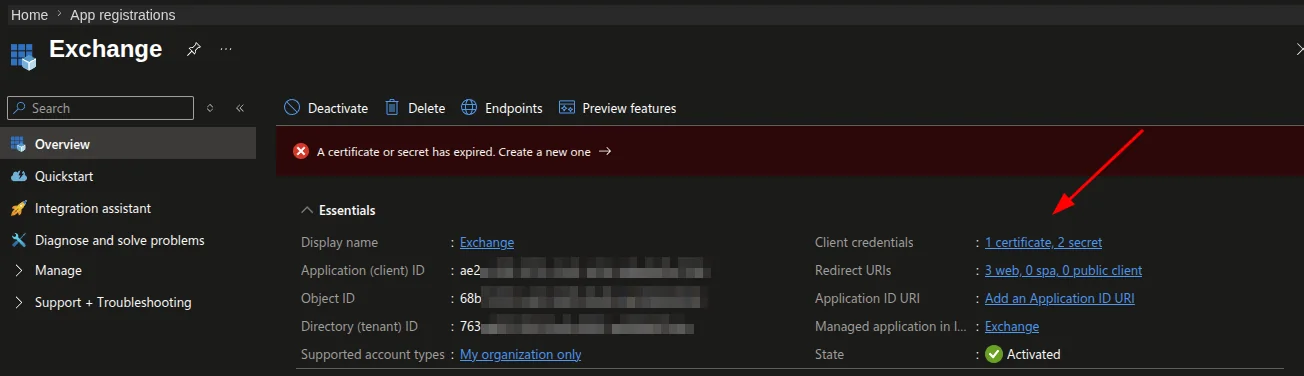 Figure: Microsoft Entra app registration overview in the Azure Portal.
Click the link next to Client credentials to open the page where you can add a
secret.
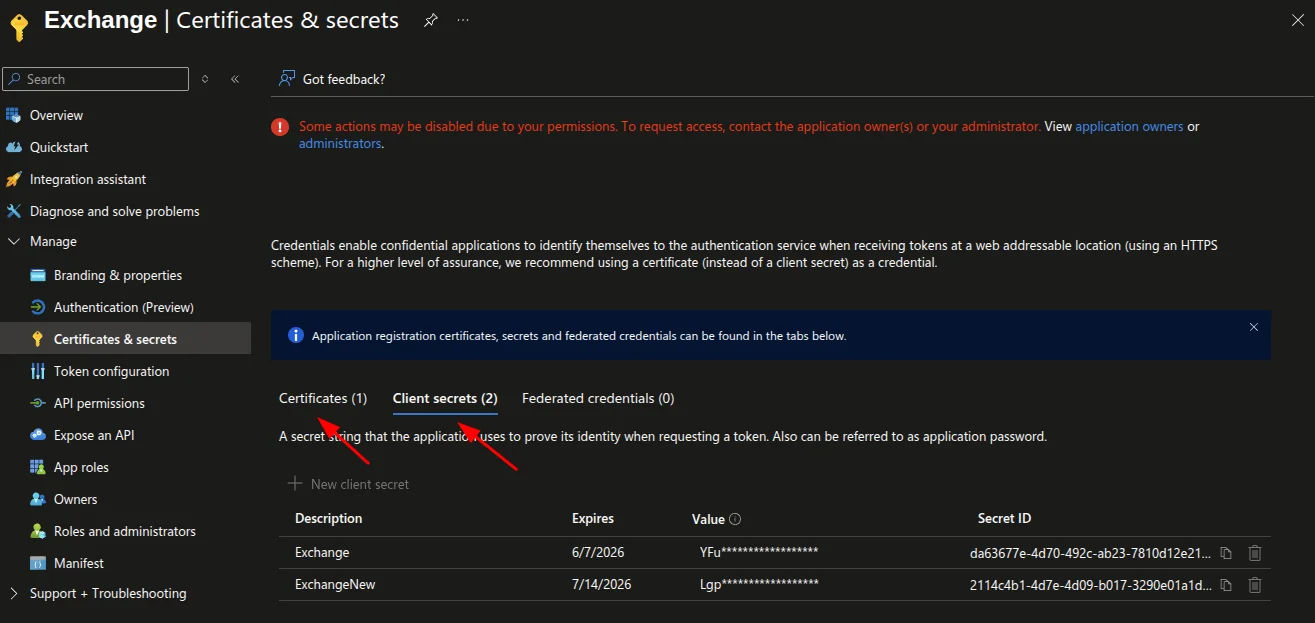 Figure: Client credentials area of the app registration.
In this area, add a new secret or upload a certificate.
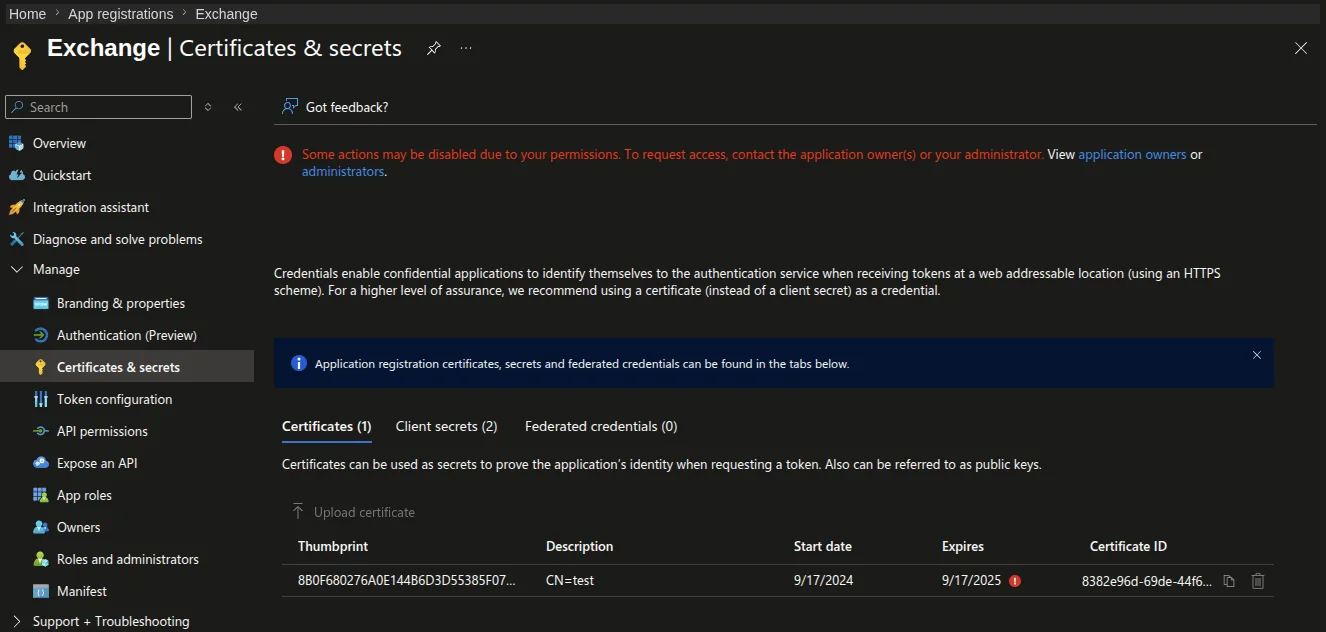 Figure: Certificates and secrets configuration for the app registration.
Certificate Authentication
For more detailed information on how to set up and use certificate-based authentication, refer to the Certificate Authentication documentation.