Tables of ADITO xRM
ADITO projects are usually not built completely from scratch. Instead, they are often based on ADITO xRM or one of its industry solutions. This base project already includes many Entities, for example for contacts, companies, activities, products, offers, and administrative tasks.
Every database table has a primary key column named <table name>ID, for example ORGANISATIONID, according to the ADITO spelling guidelines. When this primary key is referenced in another table, the column is typically named <table name>_ID, for example ORGANISATION_ID. This makes relationships easier to recognize in the data model. In most cases, the primary key value is a 36-character UID.
In the xRM project, columns containing foreign keys usually do not have database-level foreign key constraints. This simplifies tasks such as dropping and recreating tables and allows more flexibility when creating interdependent datasets. Whether you follow the same pattern in custom tables depends on your project conventions.
Core tables
Because ADITO xRM focuses strongly on relationships between persons and organizations, the following tables form the core of the xRM data model:
PERSON: Stores person-related data such as name and date of birth.ORGANISATION: Stores organization-related data such as company name, type, and additional information.- CONTACT:
- Connects persons and organizations and also links addresses, communication data, and activities.
- In ADITO, a
PERSONorORGANISATIONdataset never stands completely on its own. It is always connected to at least oneCONTACTdataset throughPERSON_IDandORGANISATION_ID. - Private persons also receive a related
CONTACTdataset. In that case,ORGANISATION_IDis0, notnull. - An organization without a related person is likewise represented by a
CONTACTdataset. In that case,PERSON_IDisnull, not0. - In ADITO logic, references to persons and organizations are normally handled through
CONTACT_ID, not throughPERSON_IDorORGANISATION_ID. - The standard address of a contact is stored in
CONTACT.ADDRESS_ID. The field is optional, but if at least one address exists, one of them must be defined as the standard address.
ADDRESS: Stores address data together with aCONTACT_ID.COMMUNICATION: Stores communication data such as phone numbers or email addresses together with aCONTACT_ID.ACTIVITY: Stores information about activities such as meetings or calls. Because one contact can be related to multiple activities,ACTIVITYLINKconnectsACTIVITYandCONTACTviaACTIVITY_IDandOBJECT_ROWID.
Diagram
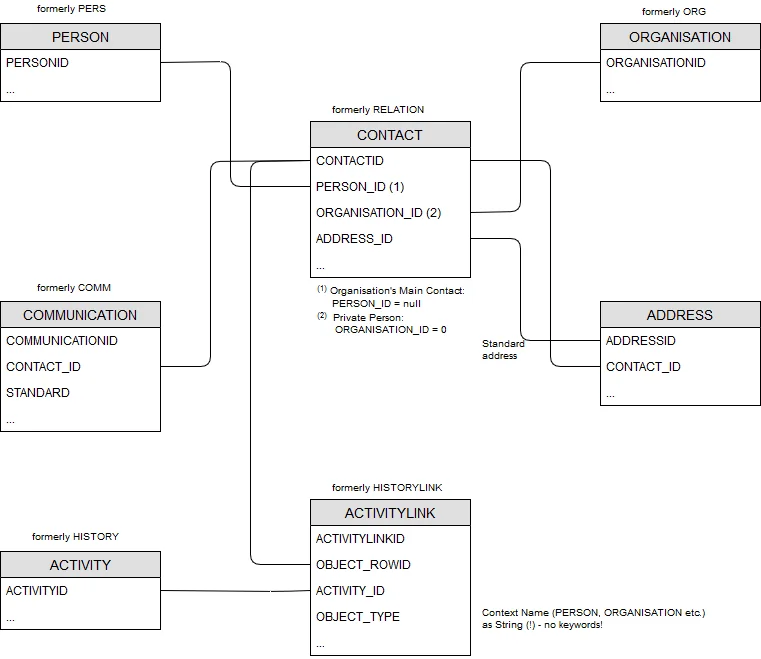
Figure: ER diagram of the ADITO xRM core tables, including their former names up to ADITO 5.
Entities and Database Tables
The corresponding ADITO Entities are not simple 1:1 representations of these database tables, even if the names look similar:
Person_entityin module contact represents contact persons and is based on bothPERSONandCONTACT. In the web client, it appears under the titleContact.Organisation_entityin module contact represents organizations and is based onORGANISATIONandCONTACT. In the web client, it appears under the titleCompany.Contact_entityis a special case and is not a direct representation of database tableCONTACT. It should not be confused withPerson_entity, which appears asContactin the web client.AnyContact_entitycombines aspects ofPerson_entityandOrganisation_entity. It displays both persons and organizations and is another special case that can be ignored for the purposes of this overview.