Provider and Consumer
Dependencies between Entities can be defined using Providers and Consumers in order to exchange data. A Provider exposes data from one Entity. A Consumer is configured on the other side and references the Provider through its entityName and fieldName properties.
An Entity can contain multiple Providers and multiple Consumers. A Consumer can reference only one Provider, but one Provider can be used by multiple Consumers.
The usage of Providers and Consumers is, among other cases, often required for configuring a MasterDetailLayout.
Step-by-step:
Provider
First, you create a Provider on the side of that Entity that is to provide its data:
- Open the providing Entity in the Navigator window and choose "New Provider" from the context menu:

- Name the new Provider according to the data it will provide, e.g, "Persons" or "Organisations" etc.
Consumer
Then, create a Consumer on the side of that Entity that is to consume the Provider's data:
- Open the consuming Entity in the Navigator window and choose "New Consumer" from the context menu:

-
Name the new Consumer according to the data it will consume, e.g, "Persons" or "Organisations" etc. (In many cases, the Consumer will have the same name as the Provider it depends on.)
-
Click on the new Consumer and edit its properties, especially
entityName: Select the name of the corresponding Provider's EntityfieldName: Select the name of the corresponding Provider
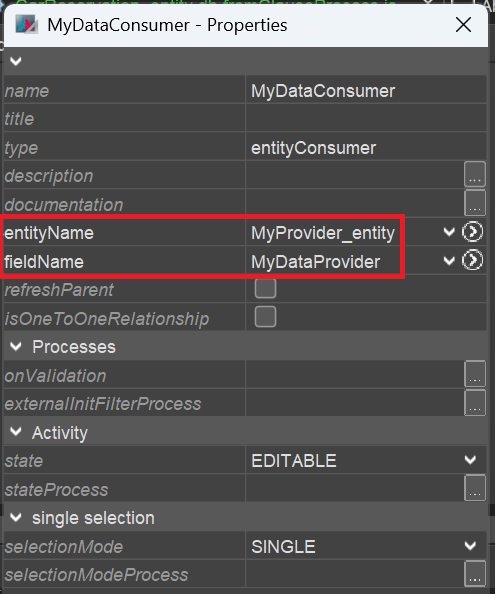
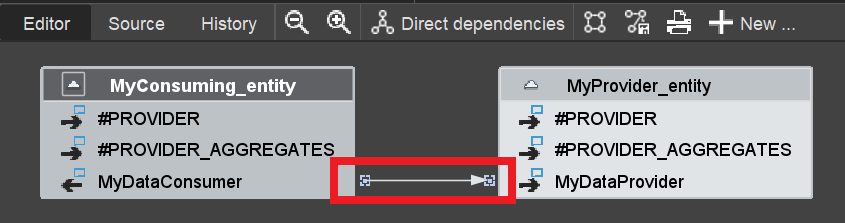
The above configuration connects the provider Entity with the consuming Entity, which is visible in the Editor (upper middle part) of the Designer. Here, you can see a connecting line, in the form of an arrow that reaches from the Consumer to the Provider:
Parameters
Parameters allow an Entity to react differently depending on the values passed to it. They are used particularly often in Provider-Consumer scenarios. See Parameters.