System Variables
System Variables in the Entity Model
System variables contain values provided by the ADITO core or assigned within JDito code. They always use the $ prefix and are accessed through system.vars via vars.get() and vars.set().
// Reading a variable
vars.get("$sys.operatingstate");
vars.get("$local.value");
vars.getString() is no longer required, even when reading string values. The method will be marked as deprecated in a future ADITO version.
System variables can only be read and written in the context in which they were created.
It is therefore not possible to set a variable in one context, for example an Organisation opened in one browser tab, and access it from another context in a different tab.
As a consequence, global variables are only of limited use as caching mechanisms, because invalidation is difficult to control. In practice, invalidation usually happens either
- after a user re-login, for example in
autostartNeon, or - through a dedicated ServiceImplementation configured for the process.
There are several categories of system variables, not only $sys variables. The following sections describe the most important ones.
$local Variables
$local variables exist for the duration of a user's session. On the server side, their persistence depends on the configuration of the corresponding server process, which must always run under a specific user.
For example, autostartNeon initializes several $local variables that are later required by the client. $local variables are only visible within specific JDito processes. They are primarily set by the ADITO core to pass contextual values into those processes.
A common example is process_audit, which reacts to dataset audit events. Information about affected database columns, their types, and their old and new values is passed in $local variables and can then be accessed through system.vars:
// Reading a local variable
var action = vars.get("$local.action");

// Setting a local variable
vars.set("$local.taskId", "1234-1234-1234");
For server-side execution, this means that you can decide during server process configuration whether the JDito instance should be retained:
- If yes, the global variable persists across multiple executions on the same server pod, for example
adito-web-bg-0. - If no, then the global variable is reinitialized for each new execution and must be set again.
Overview of $local Variables
Maintaining complete documentation for all $local variables across every possible context would be difficult and would quickly become outdated. The following overview therefore focuses on the variables that are most commonly relevant in project work.
Use the Designer debugger instead to inspect the $local variables that are available in the current process context. When the debugger is active, the Debugger window shows all relevant variables for the breakpoint location.
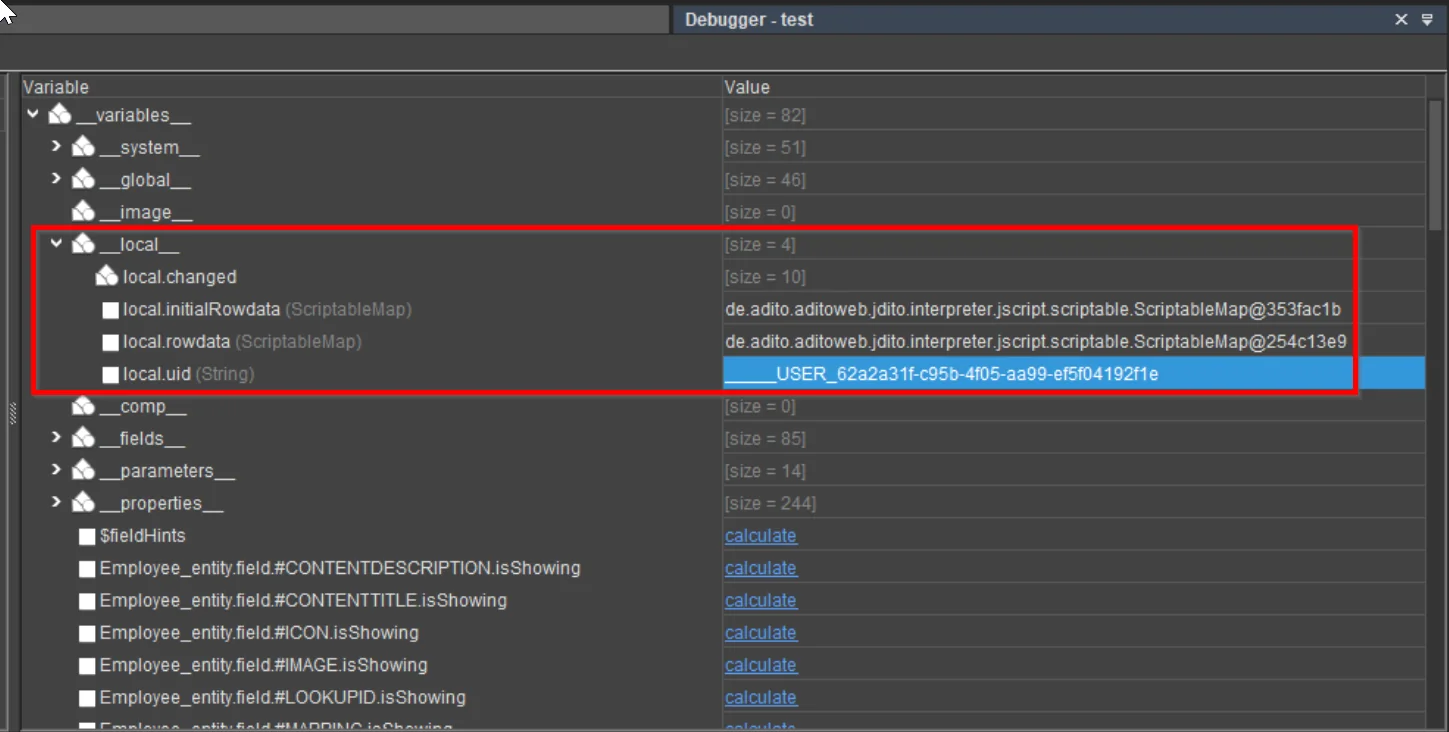 Figure: Inspection of
 $local variables via the Designer Debugger.
For more information on the debugger, consult the Designer Manual (PDF).
The list below does not include $local variables that are already explained in other chapters, for example:
$local.operator2→ see chapter FilterExtension$local.value→ see chapter Accessing the value of an EntityField
When using full-text search in this document, keep in mind that line breaks may split variable names. As a result, variables such as $local.initialRowdata may only be found when searching for initialRowdata.
This list is not complete. It contains only common examples. Many $local variables can have different meanings depending on the process.
Selected $local Variables
Name: $local... | Examples of Return Value | Data Type | Examples of Usage |
|---|---|---|---|
condition | Filter condition, e.g., "CONTACT.STATUS is null" | String | filterConditionProcess of a FilterExtension; groupQueryProcess of a FilterExtensionSet |
filter | Filter configuration (see below) | object | contentProcess of a jDitoRecordContainer |
idvalue | IDs affected by a change in an indexRecordContainer | object | affectedIds process of an indexRecordContainer (see chapter “Index for Global Search”) |
idvalues | ID affected by a change in a jDitoRecordContainer | String | contentProcess of a jDitoRecordContainer |
initialRowdata | Initial values of an Entity dataset (before user changes) | object (EntityField name → initial value) | onDBUpdate process of a dbRecordContainer |
lookupFieldName | See below | String | Used in FilterExtensionSet for Attributes |
rawvalue | User input (e.g., selected item in combo box) | String | filterConditionProcess of a FilterExtension |
rowdata | Entity dataset values after user changes | object (EntityField name → value) | onDBDelete |
uid | Record identifier in a dbRecordContainer | String | onDBInsert, onDBUpdate, onDBDelete |
$local.filter
This variable provides the filter configuration used within a context such as a jDitoRecordContainer. Its structure is shown below.
// if a filter is set, it looks like this:
{
    "filter": {
        "type": "group",
        "operator": "AND",
        "childs": [
            {
                "type": "row",
                "name": "ACTIVE",
                "operator": "EQUAL",
                "value": "Ja",
                "key": "true",
                "contenttype": "TEXT"
            }
        ]
    },
    "permissions": null,
    "subset": null,
    "ids": null
}

// if a filter is NOT set, it looks like this:
{
    "filter": null,
    "permissions": null,
    "subset": null,
    "ids": null
}
$local.lookupFieldName
Availability:
This variable is available in the valueProcess of a Parameter within a Consumer.
Content:
- If the Consumer is connected to an EntityField (i.e., lookup field), the variable contains the name of that EntityField.
- If used in FilterExtensions or FilterExtensionSets where a Consumer provides the values, the variable contains the name of the FilterExtensionField.
Example Use Case in xRM: In a FilterExtensionSet for Attributes, some FilterExtensionFields use a Consumer to provide selectable values. To identify which FilterExtensionField triggered the process, the system uses:
vars.get("$local.lookupFieldName");
This allows the Consumer to react dynamically based on the selected FilterExtensionField.
Overview of $sys Variables
The following table provides a detailed overview of most of the available $sys variables in ADITO. These variables are accessible within the client context and can be used to retrieve system, session, UI, and user-related information.
All $sys variables are read-only.
Name ($sys....) | Description of Return Value |
|---|---|
clientcountry | Country of the client |
clientid | ID of the client |
clientlanguage | Language of the client |
clientlocale | Localisation of the client (e.g., de_DE) |
clienttemp | Temp directory of the client |
clientuid | UID of the client |
clientvariant | Language variant of the client |
currentcontextname | Name of the current context |
currententityname | Name of the current entity |
currentimage | ID of the current image variable |
datarowcount | Number of datasets loaded in the RecordContainer (considering filters and limit via maximumDbRows) |
datarowcountfull | Total number of datasets available via the RecordContainer, ignoring maximumDbRows limit |
date | System date as long |
dbalias | Active database alias |
dynamicdate | System date as long |
extendedpattern | Pattern as executed (index search) |
filter | Current selection filter object with properties: .filter, .permission, .filterCondition, .condition |
filterable | Boolean indicating whether the current view is filterable |
groupable | Boolean indicating whether the current view is groupable |
hasSelection | Boolean indicating whether a selection is used |
isclient | Boolean indicating whether the execution context is the client |
isserver | Boolean indicating whether the execution context is the server |
licenseid | ID of the license |
operatingstate | Current operating state of the entity/view |
order | Current record sort order |
origin | Origin of the URL |
pageable | Boolean indicating whether the RecordContainer is pageable |
parententity | Name of the parent entity (for dependencies) |
parentuid | UID of the parent entity (for dependencies) |
pattern | Current pattern as entered (index search) |
preferencesid | ID of the selected preferences (if multiple choices exist) |
presentationmode | Current state of the view/entity |
recordstate | State of the current record in the view/entity |
scope | Scope of the execution (server for server / vaadin for client) |
selection | Current selection (for entity or index) |
selectionGroups | Current selection groups |
selectionGroupRows | Current selection group rows |
selectionRows | All rows in the current selection |
selectionsRecordsRecipe | RecordsRecipe describing the current selection |
serverdata | DATA directory of the server |
serverhome | HOME directory of the server |
serverid | ID of the current system |
serveros | Operating system of the server |
servertemp | TEMP directory of the server |
serverversion | Server version |
staticdate | Current date (static) as long |
staticmillis | Current timestamp in milliseconds |
timezone | Time zone of the current user |
today | Current day (without time) as long |
uid | UID of the current record |
uidcolumn | Name of the UID column in the record |
user | Username of the current user |
usertoken | Token of the current user |
validationerrors | String containing current validation errors |
viewmode | View mode of the current component |
Selection-Related Variables
$sys.selectionGroups and $sys.selectionGroupRows are recalculated when the
current selection changes. This makes them suitable for client-side logic that
should react to selection updates, for example in stateProcess
implementations.
Keep the following constraints in mind:
- The variables are not available in preview mode.
- Code should always check whether the variables exist before using them.
- In practice, the variables are most useful together with a
$sys.presentationmodecheck. - If the surrounding Action or UI logic relies on
selectionType, remember thatMULTIselection handling can override the expected recalculation behavior. For selection-driven state evaluation,UNBOUNDis often the safer configuration.
$context Variables
$context variables are available only during the lifetime of a context, such as a Neon data model opened in a MainView.
They are temporary and scoped to that specific context, allowing you to store and access values relevant to the currently opened entity or view.
Examples:
// Reading a context variable
var oldObjectType = vars.get("$context.originalObjectType");

// Setting a context variable
vars.set("$context.PushDataPrivacyNotification", "true");