Introduction
Getting Started
This section will help you to navigate the Entity Model.
Before you begin, you might want to check out the getting started guide for Customizing ADITO in general.
The Entity Model
ADITO is based on the Unified Entity Model. This means that all business objects are modeled as Entities. Terms such as Entity, Context, and View are written with an initial uppercase letter in order to distinguish them from everyday language. The attributes of a business object are represented by EntityFields.
For example, the business object Person is modeled as an Entity named Person_entity in module contact, with EntityFields such as FIRSTNAME, LASTNAME, and DATEOFBIRTH.
At the center of this model is the separation between
- business structure and logic,
- data access and persistence, and
- client-side presentation.
The data of an Entity is typically loaded and persisted through a RecordContainer, which acts as the interface to the actual storage location, usually a database. The RecordContainer maps EntityFields to database columns and controls the required access logic.
The user interface is then built on top of this structure. ViewTemplates define how data is displayed, Views combine one or more ViewTemplates, and a Context groups an Entity with the Views that belong to it.
Core relationship between the main models
The following model types form the core of most ADITO customizations:
Context: Groups an Entity and its Views.Entity: Defines the business object, its fields, and a large part of its logic.RecordContainer: Defines how the Entity data is loaded and written.View: Defines a client-side container for one or more ViewTemplates.ViewTemplate: Defines how specific Entity data is displayed in the client.
This separation is important because it allows one Entity to be reused in different Views and even in different Context constellations without duplicating the underlying business model.
Structural overview
The ADITO concept is based on a clear separation between
- data structure and logic in
Entities, - data storage and retrieval in
RecordContainers, and - presentation in
Views, grouped byContexts.
If a View or field value must be used across Context boundaries, the connection between the corresponding Entities is usually modeled through Provider and Consumer.
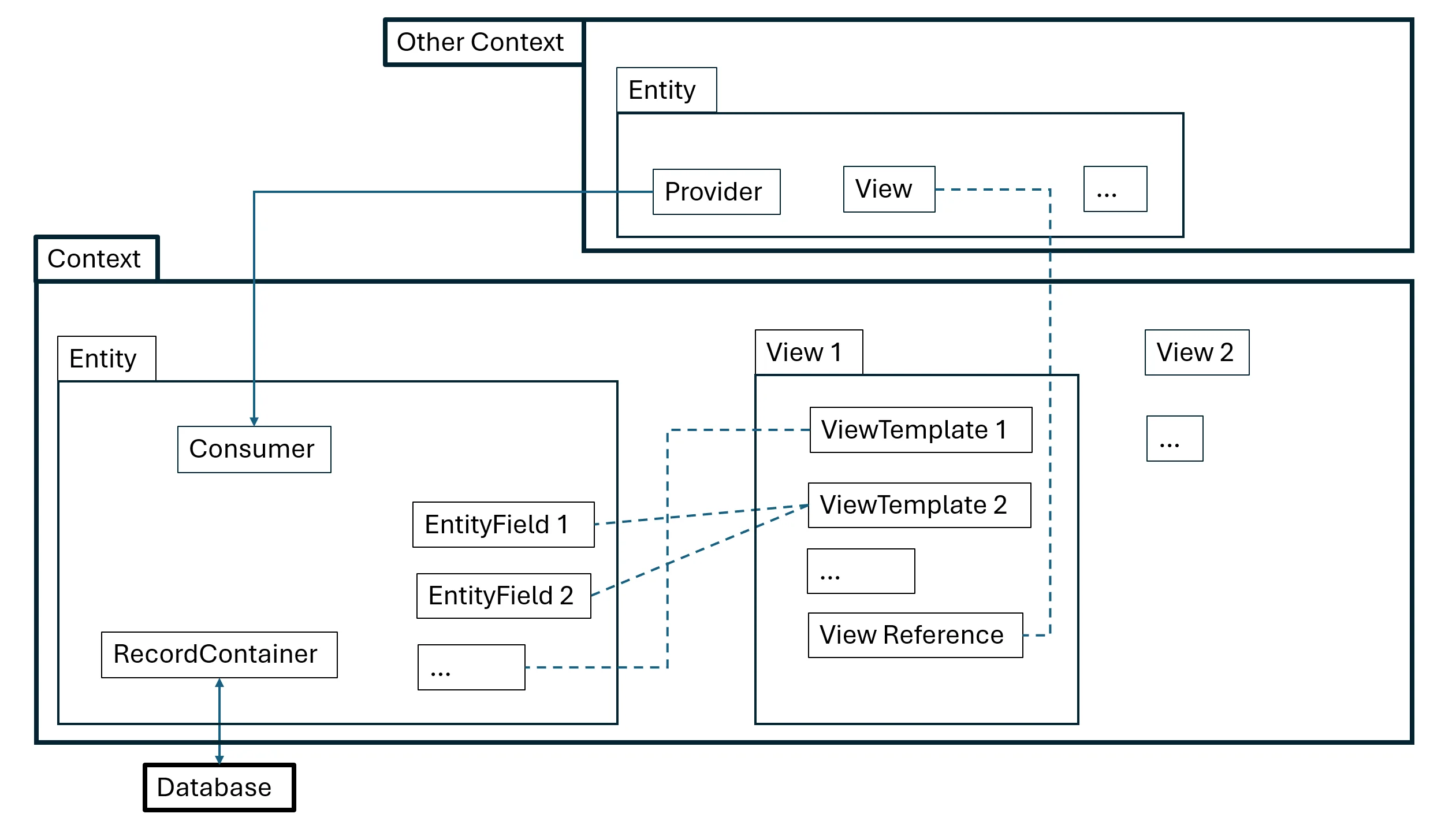
The Context
A Context groups one Entity with any number of Views through the Context properties entity and xxxView. You can create a new Context through New in the context menu of the context folder in the Projects window.
The Entity and its content
Entities are the central structural and logical elements in ADITO. They represent business objects and a large part of the associated implementation logic. An Entity contains static properties such as titles and flags, as well as process-based properties such as initFilterProcess.
You can create a new Entity through New in the context menu of
- the
entityfolder in the project tree, in which case the Entity must be assigned to a Context afterwards, or - an existing Context, in which case the Entity is created and assigned automatically. In practice, this second variant is more common.
An Entity typically contains several additional model elements:

The following sections summarize the role of these elements.
Views
A View groups ViewTemplates of different types, for example a table and a card-based representation. The contained ViewTemplates reference the EntityFields that should be shown.
One of the most important View properties is layout, which defines the structure and order in which the contained ViewTemplates are arranged.
ViewTemplates
ViewTemplates define which data is shown and how it is presented, for example as a table, list, or chart. Detailed descriptions of the available ViewTemplate types are documented in ViewTemplates & Layouts.
To create a new ViewTemplate for a specific View, open the View in the Navigator window by double-clicking it in the Projects window. Then right-click the View and choose Add ViewTemplate... from the context menu. Finally, select the ViewTemplate type and assign a name.
The following overview lists common default combinations for standard Views:
| Standard View | layout | ViewTemplate type |
|---|---|---|
| FilterView | GroupLayout | Table, TreeTable |
| EditView | BoxLayout | Generic (editMode: true) |
| PreviewView | HeaderFooterLayout | Header: Card; Footer: ScoreCard; in between: Generic |
| MainView | MasterDetailLayout | -- (reference PreviewView as master) |
The EntityFields to be shown must be assigned in the field-related properties of the ViewTemplate, for example
- property
columnsof a Table ViewTemplate or of a TreeTable ViewTemplate. - property
fieldsof a Generic ViewTemplate. - properties
iconField,titleField,subtitleField,descriptionFields, andinformationFieldsof a Card ViewTemplate.
Programming Languages
Although ADITO follows a low-code approach, customization often includes implementation work. The following languages are especially relevant in the Entity Model area:
- JDito, for processes and process-based properties
- XML, for Liquibase, XML handling in JDito, and the source representation of ADITO models
- JSON, for specific JDito-based integrations and data structures
- SQL, especially for database access through helpers such as
SqlBuilder - AsciiDoc, for documentation content stored in
documentationproperties
Documentation properties
Many ADITO model elements provide a documentation property. Use this
property to store technical or functional explanations directly on the model,
for example to describe its purpose, assumptions, or special behavior. The
content is written in AsciiDoc (.adoc) format.
This is especially useful for model elements that are not fully self-
explanatory in their title or configuration alone. For example, the generated
model reference also exposes a documentation property for
Entity,
EntityField, and
Parameter.