Renaming YAML model elements
Renaming an ADITO model element requires changes to its definition and its references. VS Code refactoring does not update all ADITO model references. Search the entire workspace and review each match before changing it.
An incomplete rename can disconnect children from their parent or leave views and processes referring to an old name. Make a commit or backup before starting so that you can review and restore the changes.
At a glance
Use this checklist for each element you rename:
- Identify the element, its current name and path, and its new name. Save a commit or backup so that you can review and restore your changes.
- Search the whole workspace for the old name and path. Identify which results refer to the element and which refer to something else.
- Rename the definition file and, where applicable, its named directory.
- Update references to the old paths, including parent paths of children.
- Update references to the old name in YAML and process files, checking each occurrence in context.
- Search again, review the changes, and test the affected functionality.
The following sections explain each step. The examples at the end show a view and a context rename.
Rename an element step by step
1. Find references
Open the project root in VS Code. Open Search: Find in Files with Ctrl+Shift+F (the default on Windows and Linux), and search for the old name across the workspace. Check the search exclusions and include relevant YAML, JavaScript, TypeScript, and other project files. Search for the full path as well as the name; repeat the search after renaming.
Review each result in context before replacing it. Common names such as
DATE_EDIT can refer to fields in different entities. A workspace-wide
replace-all could change unrelated models or database identifiers.
2. Rename the definition
Where an element has a named directory, rename both the directory and the definition file, preserving the complete type suffix. For example:
- processes/Activity_lib/Activity_lib.process.yaml
+ processes/ActivityTools_lib/ActivityTools_lib.process.yaml

- contexts/Activity/entity/fields/ICON/ICON.field.yaml
+ contexts/Activity/entity/fields/ACTIVITY_ICON/ACTIVITY_ICON.field.yaml
In the Explorer, use the Rename action on each item. Keep associated files,
such as process.js, with their definition, and check relative file references
after moving files. The directory structure depends on the element type: the
entity in this example is in the fixed entity directory, so rename its file
without renaming that directory:
- contexts/Activity/entity/Activity_entity.entity.yaml
+ contexts/Activity/entity/ActivityDetails_entity.entity.yaml
3. Update parent paths
Children can identify their parent by a project-root-relative path in
Parent.parent. For example, after renaming the entity above, update the path
in its field definitions and other children:
Parent:
  parent: /contexts/Activity/entity/ActivityDetails_entity.entity.yaml
  yamlPath: General/entityFields
Keep yamlPath unless the location within the parent model also changes.
Children are not limited to fields: consumers, actions, aggregate fields, and
services can also refer to the entity. If a directory moves, check paths to
definitions beneath it as well.
4. Update name references
Names can appear without a file path. For example, an entity rename can affect both a context definition and a process:
# Context YAML
Entity:
  entity: ActivityDetails_entity
// Entity selection in a process
builder.entity("ActivityDetails_entity");
The surrounding JavaScript is omitted; update the actual expression in its original context. Also inspect other kinds of references, including lists and references from other contexts.
Fields and parameters in processes
Field and parameter names can occur inside strings, so a JavaScript symbol rename cannot be relied on to find them. For example:
vars.get("$field.ACTIVITY_ICON"); // Renamed field
vars.get("$param.Entrydate_param"); // Parameter reference
Search for the old name, including occurrences in longer strings and in arguments passed to other functions. Check which entity or parameter each occurrence refers to before changing it.
Views and record container mappings
View templates can refer to a field through different properties. For an
ICON to ACTIVITY_ICON rename, inspect each relevant view, for example:
# Examples from different view templates
entityField: ACTIVITY_ICON
iconField: ACTIVITY_ICON
iconIdField: ACTIVITY_ICON
A record container can have separate mappings for a field's value and display value. Inspect their names and references individually. A mapping name can contain a dot that is part of the model name, before the type suffix:
recordfieldmappings/DATE_EDIT.value/DATE_EDIT.value.dbRecordContainerField.yaml
The mapping can also point to a database field:
General:
  recordfield: ACTIVITY.DATE_EDIT
The database column and the model field are distinct identifiers. Do not
rename ACTIVITY.DATE_EDIT just because a model field changes; change it only
when the corresponding database mapping is intentionally changed too.
5. Verify the change
Search again for the old name and path, including partial names and different capitalization. Investigate remaining matches rather than assuming they are all incorrect. Review the file moves and content changes in Source Control, validate the YAML with the configured schema, and run the project's applicable checks. Test the affected views and processes and confirm that children still appear under the intended parent. Schema validation alone cannot prove that every dynamic or string-based reference resolves correctly.
Automate repetitive replacements
VS Code can replace repeated text across files. Open Replace in Files with Ctrl+Shift+H (the default on Windows and Linux). Enter the old and new text, inspect the proposed changes in the diff preview, and replace individual matches or all matches in a reviewed file. Use the search details to restrict files where appropriate, but search the whole workspace separately to find references outside that scope. See the VS Code search and replace documentation for the controls.
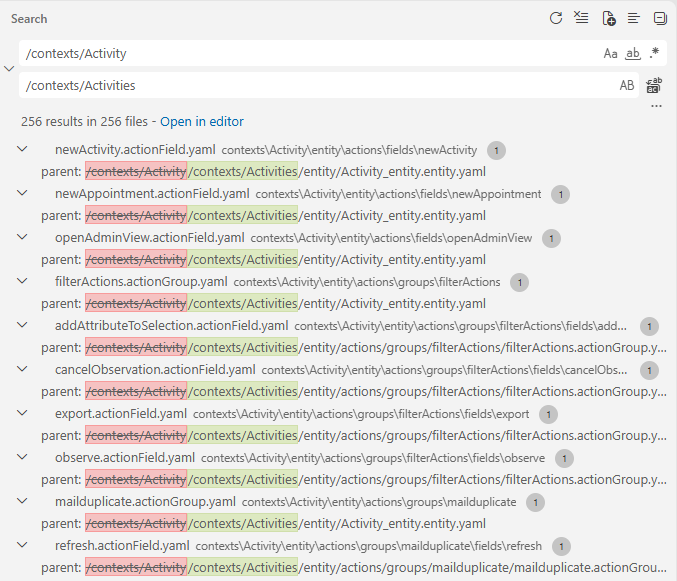
Figure: The Search view previews replacements in parent paths before they are applied.
The screenshot shows a search without a trailing slash. This can also match
longer names that start with Activity, so inspect those results carefully. The
example below uses the trailing slash to narrow the directory-prefix match.
For example, when renaming the Activity context to Activities, two
replacements can update matching path text. The more specific replacement must
come first:
- /contexts/Activity/Activity.context.yaml
+ /contexts/Activities/Activities.context.yaml

- /contexts/Activity/
+ /contexts/Activities/
Review the matches before applying either replacement. Search again for the
old path and context name afterwards. Text replacement changes file contents;
rename the context directory and definition file separately. It also does not
identify symbolic references or determine which Activity strings refer to
the context.
For larger or repeated migrations, a project-specific script can enumerate affected files, report proposed file moves and reference changes, and apply them after review. Prefer exact paths and schema-aware YAML property handling where possible. Have the script report ambiguous matches for manual review, detect name collisions, and support a preview before writing. Test it on a copy or a clean commit and review its diff. JavaScript strings, dynamically constructed names, database identifiers, and references in other projects can require additional investigation; a script cannot safely infer every target from the text alone. Follow the verification step above after automation.
Example: Rename a view
For example, rename ActivityFilter_view to ActivitySearch_view. Rename both
the view directory and its definition file, keeping the templates and other
children in the renamed directory:
- contexts/Activity/views/ActivityFilter_view/ActivityFilter_view.view.yaml
+ contexts/Activity/views/ActivitySearch_view/ActivitySearch_view.view.yaml
Update references to the view name. In this example, these include the context's filter view and a separate view reference:
# Activity.context.yaml
Views:
  filterView: ActivitySearch_view
# A viewReference YAML file
General:
  view: ActivitySearch_view
Update paths to the view definition in its children. For example, the table template's parent must point to the renamed directory and file:
Parent:
  parent: /contexts/Activity/views/ActivitySearch_view/ActivitySearch_view.view.yaml
  yamlPath: General/children
Search for paths to other files under the old view directory as well as the view name. References can also exist outside the context.
Example: Rename a context
Renaming Activity to Activities moves the entire context directory. Rename
the context definition file inside it as well:
- contexts/Activity/Activity.context.yaml
+ contexts/Activities/Activities.context.yaml
Every definition below that directory now has a new project-relative path, even when its own filename stays the same. For example:
- /contexts/Activity/entity/Activity_entity.entity.yaml
+ /contexts/Activities/entity/Activity_entity.entity.yaml

- /contexts/Activity/entity/fields/ICON/ICON.field.yaml
+ /contexts/Activities/entity/fields/ICON/ICON.field.yaml

- /contexts/Activity/entity/recordContainers/db/db.dbRecordContainer.yaml
+ /contexts/Activities/entity/recordContainers/db/db.dbRecordContainer.yaml

- /contexts/Activity/views/ActivityFilter_view/ActivityFilter_view.view.yaml
+ /contexts/Activities/views/ActivityFilter_view/ActivityFilter_view.view.yaml

- /contexts/Activity/views/ActivityFilter_view/viewTemplates/ActivitiesTable/ActivitiesTable.table.yaml
+ /contexts/Activities/views/ActivityFilter_view/viewTemplates/ActivitiesTable/ActivitiesTable.table.yaml
Search the whole workspace for /contexts/Activity/ and update references to
the moved definitions, including those in files outside the context. For
example, these parent paths refer to three different levels:
# A view reference whose parent is the context
Parent:
  parent: /contexts/Activities/Activities.context.yaml
# An entity field whose parent is the entity
Parent:
  parent: /contexts/Activities/entity/Activity_entity.entity.yaml
# A record field mapping whose parent is the record container
Parent:
  parent: /contexts/Activities/entity/recordContainers/db/db.dbRecordContainer.yaml
# A view template whose parent is the view
Parent:
  parent: /contexts/Activities/views/ActivityFilter_view/ActivityFilter_view.view.yaml
The context definition's filename changes in addition to the directory prefix;
replacing only /contexts/Activity/ leaves references to Activity.context.yaml
incorrect. Search separately for the old context name and filename, including
symbolic references in YAML and strings in processes. Review each match: names
such as Activity_entity and ActivityFilter_view do not automatically change
when the context is renamed. Check relative links after the move too.