FieldGroup
A FieldGroup is an ADITO model that combines multiple EntityFields and adds a dedicated editing configuration.
An example can be found in Person_entity of module contact. There, a FieldGroup is used to display a person's full name in the Card ViewTemplate of the PreviewView in a single line below the image.

When the edit button in the upper-right corner is clicked, the related EntityFields become editable individually:

Do not confuse the two edit buttons. The additional button in the lower-left corner opens the EditView. In this example, the relevant button is the one in the upper-right corner of the CardViewTemplate. It only edits the EntityFields displayed in that template.
Configuration
Open Person_entity in the Navigator. Right-click the Fields folder and choose New Field Group. In the dialog, assign the name FULL_NAME_fieldGroup.
In ViewTemplate Header of PersonPreview_view, assign the new FieldGroup to property titleField.
The central property of a FieldGroup is valueProcess, where you can combine any available EntityFields. In this example, the implementation simply uses contenttitle:
import { result, vars } from "@aditosoftware/jdito-types";

result.string(vars.get("$field.contenttitle"));
The actual concatenation of the full name is implemented in the valueProcess of EntityField contenttitle:
import { result, vars  } from "@aditosoftware/jdito-types";
import { Contact, ContactTitleRenderer } from "Contact_lib";

if(vars.get("$this.value") == null)
{
    var contact = new Contact();
    contact.salutation = vars.get("$field.SALUTATION");
    contact.title = vars.get("$field.TITLE");
    contact.firstname = vars.get("$field.FIRSTNAME");
    contact.middlename = vars.get("$field.MIDDLENAME");
    contact.lastname = vars.get("$field.LASTNAME");
    contact.organisationName = vars.get("$field.ORGANISATION_NAME");

    var renderer = new ContactTitleRenderer(contact, null);
    result.string(renderer.asString());
}
This concatenation could also be implemented directly in the FieldGroup valueProcess.
To make the related EntityFields such as FIRSTNAME and LASTNAME editable separately in the PreviewView, drag them onto the FieldGroup in the Navigator. They then appear as child elements of the FieldGroup. You can arrange them by drag and drop:
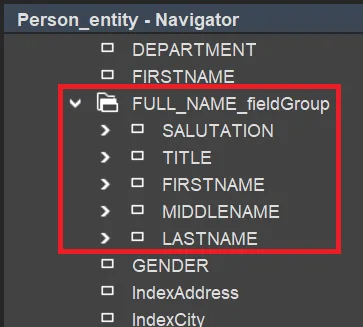
The fields are then edited in that order when the user clicks the corresponding edit button.
When you select the child EntityFields inside the FieldGroup, no properties are shown. This is expected, because these references only define which fields are editable and in which order they appear in the client.
The xRM project contains further examples, for example in Contract of module contract, where the EntityFields CONTRACTTYPE.displayValue and CONTRACTCODE are combined in FieldGroup CONTRACTCODE_DISPLAY_fieldGroup.
import { result, translate, vars  } from "@aditosoftware/jdito-types";

var contractType = vars.getString("$field.CONTRACTTYPE.displayValue");
var contractCode = vars.get("$field.CONTRACTCODE");

result.string((contractType || translate.text("Contract_Contract")) + " " + contractCode);