Database Calendar
The ADITO Calendar can use a normal database alias as its backend. Use a database-backed calendar when appointments and tasks should be stored in ADITO without synchronizing them with an external calendar system.
Alias Configuration
Create or select a DB alias and set it as calendarAlias in the instance
configuration. A database calendar does not have a calendar-specific alias
sub-datamodel like Microsoft Graph, EWS, or CalDAV.
Ensure that the database represented by the alias contains the required system table ASYS_CALENDARBACKEND.
If not, create the table using the Designers.
- open the target database alias in the ADITO Designer;
- navigate to tables and open the context menu.
- choose the Create system tables option.

- search for ASYS_CALENDARBACKEND and select it.
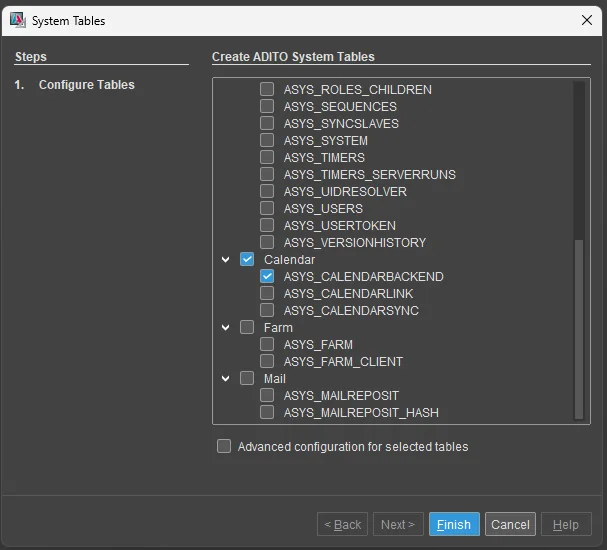
- Press Finish to create the table.
Use this backend when:
- calendar caching is required;
- calendar entries should remain inside ADITO;
- no external mailbox or CalDAV account is required;
The main purpose of using a database as a calendar alias is to provide a persistent calendar cache for the primary calendar.
See index.md for more information.
Instance Configuration
| Property | Description |
|---|---|
calendarEnabled | Enables the calendar module. |
calendarAlias | Sets the DB alias used as the calendar backend. |
calendarAliasTasks | Optionally sets a different DB alias for tasks. |
calendarTimeout | Sets the timeout for calendar operations. |
calendarCachingAlias | Sets the DB alias used by the calendar cache if calendar caching is enabled. |
If no separate task backend is required, leave calendarAliasTasks unset or set
it to the same DB alias as calendarAlias.
User Configuration
For a database-backed calendar, no external mailbox mapping is required. Use the general calendar user properties only when the project uses them for permissions, ownership, or display behavior.