Exchange Web Services Calendar
The Exchange Web Services backend uses Microsoft Exchange Web Services (EWS) to read and write calendar events. Use this backend for legacy EWS integrations or dedicated Exchange Server environments.
Reference data model: AliasSubExchangeWs
Microsoft is phasing out EWS for Exchange Online starting in October 2026. Use Microsoft Graph for new Microsoft 365 integrations. EWS remains relevant for legacy setups and dedicated Exchange Server environments.
Authentication Methods
EWS supports two authentication modes:
| Method | Description |
|---|---|
| Default | Uses user, password, and optionally domain-based authentication. |
| OAuth2 | Uses OAuth2 client credentials with tenant ID, client ID, and client secret. |
For broader EWS setup details, see Exchange Webservices.
OAuth2 Application Access
Use OAuth2 application access when ADITO should access Exchange through a registered application.
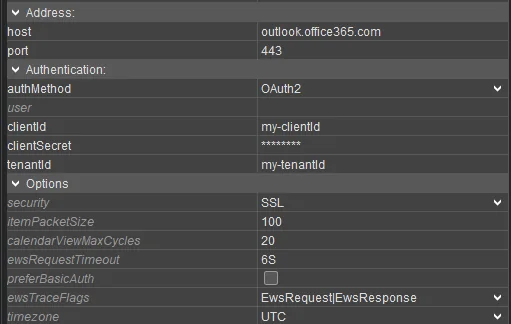 Figure: Exchange Web Services alias configured with OAuth2 application credentials.
| Property | Description |
|---|---|
host | Sets the Exchange server host. Leave this empty only when autodiscover is used. |
port | Sets the Exchange server port. |
security | Defines whether the connection uses SSL. |
authMethod | Select OAUTH2 for OAuth2 application access. |
tenantId | Sets the Microsoft Entra tenant ID. |
clientId | Sets the application client ID. |
clientSecret | Sets the application client secret. |
timezone | Sets the time zone used for Exchange calendar calculations. Configure this carefully because all-day events and daylight-saving-time handling depend on it. |
calendarLinkerAlias | Sets the database alias for the calendar linker. |
uidResolverType | Sets the UID resolver type. |
uidResolverAlias | Sets the database alias for the UID resolver table. |
uidResolverTable | Sets the UID resolver table, typically ASYS_UIDRESOLVER. |
OAuth2 with Impersonation
Use impersonation when a central Exchange user should be used as the login account for calendar requests.
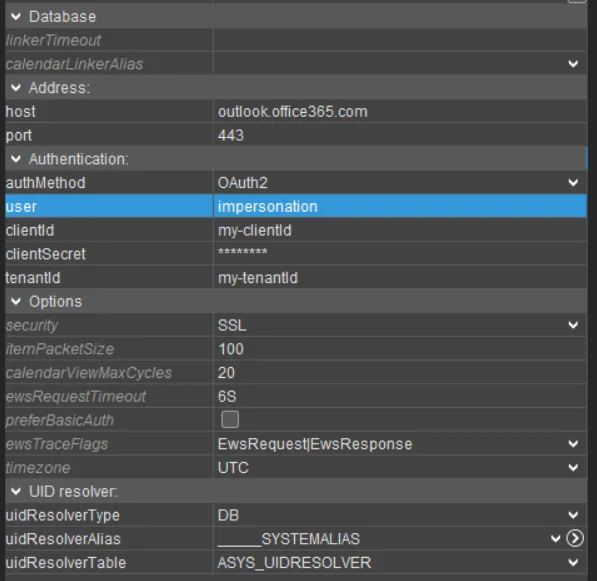 Figure: Exchange Web Services alias configured for OAuth2 with impersonation.
Configure user with the impersonation account. The configured user is then
used as the login account for EWS backend access.
For impersonation setup details, see General information about the connection of Microsoft Exchange.
Delegated User Access
Use delegated user access when each ADITO user should access the mailbox with user-specific credentials or user-specific Exchange settings.
Configure the user's calendarId with the email address used by the Exchange
mailbox.
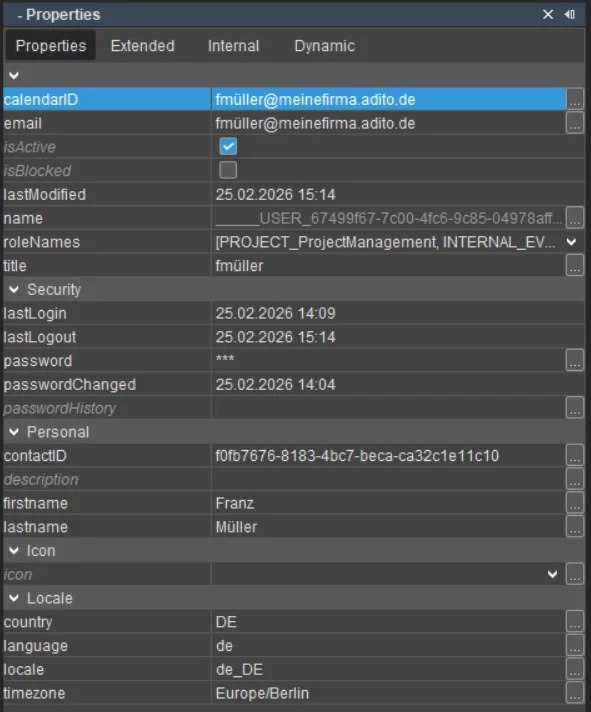 Figure: Calendar ID user property for Exchange mailbox mapping.
Use the extended user properties to configure Exchange-specific values where the project requires them.
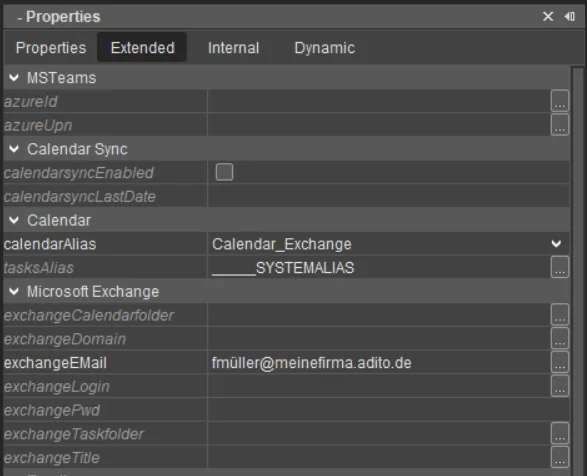 Figure: Extended user properties for an Exchange Web Services calendar backend.
For delegated impersonation scenarios, configure the delegated impersonation properties in the extended user properties.
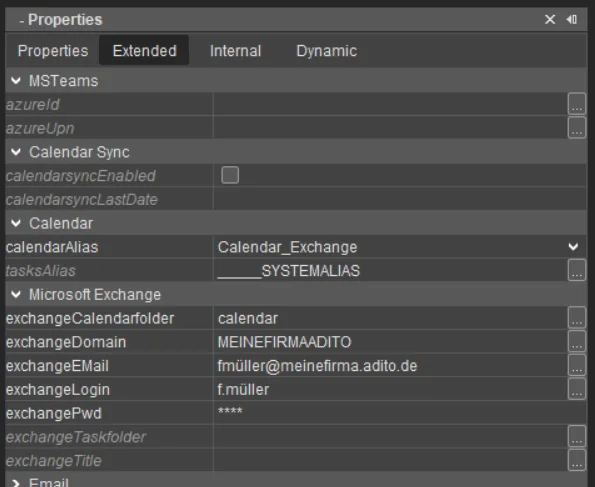 Figure: Extended user properties for delegated EWS impersonation.
The exchangeemail property can be used to override the default calendarId
for Exchange-specific mailbox mapping.
Additional EWS Options
| Property | Description |
|---|---|
preferBasicAuth | Makes EWS prefer Basic authentication over Windows authentication. Use this only when the Exchange authentication setup requires it. |
ewsRequestTimeout | Sets the timeout for requests to the Exchange Web server. |
itemPacketSize | Sets how many items ADITO requests from Exchange in one packet. The default is 100. |
calendarViewMaxCycles | Sets the threshold used when ADITO switches calendar search algorithms for long intervals. The default is 20. |
ewsTraceFlags | Enables EWS Java API debug output when the EXCHANGE debug level is active. |