General Setup
The ADITO Calendar is configured through aliases. The selected alias defines where appointments and tasks are stored and which backend ADITO uses for calendar operations.
Configuration Flow
Configure the calendar in this order:
- Create an alias for the calendar backend.
- Configure the alias properties required by the selected backend.
- Configure the shared linker and, where required, the UID resolver.
- Set the alias as the default calendar backend in the instance configuration.
- Configure the calendar preferences.
- Configure the users that should use the calendar.
- Test read, create, update, and delete operations with a representative user.
Create the Calendar Alias
Open the alias creation dialog and create an alias for the calendar backend.
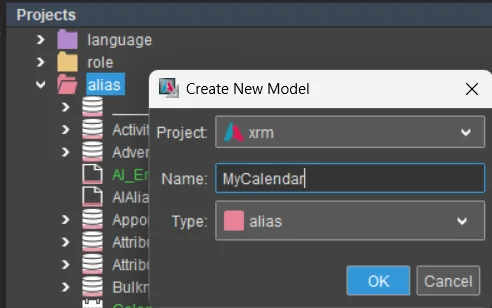 Figure: Alias creation dialog for a new calendar backend alias.
Choose the backend type that matches the target calendar system.
 Figure: CalDAV alias type.
 Figure: Microsoft Exchange Web Services alias type.
 Figure: Microsoft Graph alias type.
The available calendar-capable backends are:
| Backend | Alias type | Notes |
|---|---|---|
| Microsoft Graph | MS-Exchange (Graph) / AliasGraphBackend | Use this for Microsoft 365 calendar access through Microsoft Graph. |
| Exchange Web Services | MS-Exchange (Webservice) / AliasSubExchangeWs | Use this for EWS environments. For Exchange Online, plan migration to Microsoft Graph. |
| CalDAV | CalDAV / AliasSubCaldav | Use this for CalDAV-compatible servers. |
| Database | DB alias | Use this when calendar entries should be stored in an ADITO database backend. |
_____SYSTEM_CALENDAR_NONE is an explicit no-backend alias. Use it only when
the calendar should have no active backend.
Configure Shared Alias Settings
Calendar Linker
External calendar aliases use a calendar linker. The linker stores mappings between ADITO calendar entries and linked elements within the ADITO system.
The linker is optimized for the old frame-based ADITO systems of the legacy Swing client.
New systems should rely on the up-to-date calendar link entity provided by the appointement module.
 Figure: Calendar linker configuration.
 Figure: Full calendar linker configuration.
| Property | Description |
|---|---|
calendarLinkerAlias | Sets the database alias for the calendar linker. This is typically the ADITO system database alias. This value defaults to the ______SYSTEMALIAS if not set. |
linkerTimeout | Sets the query timeout for the database used by the linker. If no value is configured, the corresponding system database request timeout is used. |
UID Resolver
EWS and CalDAV also use a UID resolver. It stored additional information about calendar entries that helps to load entries based on their UID more efficiently. Use a database-backed UID resolver for productive systems so that UID mappings remain stable across server restarts.
 Figure: Database-backed UID resolver configuration.
 Figure: Memory UID resolver configuration for non-persistent scenarios.
| Property | Description |
|---|---|
uidResolverType | Sets the UID resolver type. The default type is MEMORY. |
uidResolverAlias | Sets the database alias that contains the UID resolver table. This value defaults to the ______SYSTEMALIAS if not set. |
uidResolverTable | Sets the UID resolver table. If the table does not exist, create the system table ASYS_UIDRESOLVER in the selected database alias. |
Configure the Instance
The instance configuration defines the default calendar backend for the system.
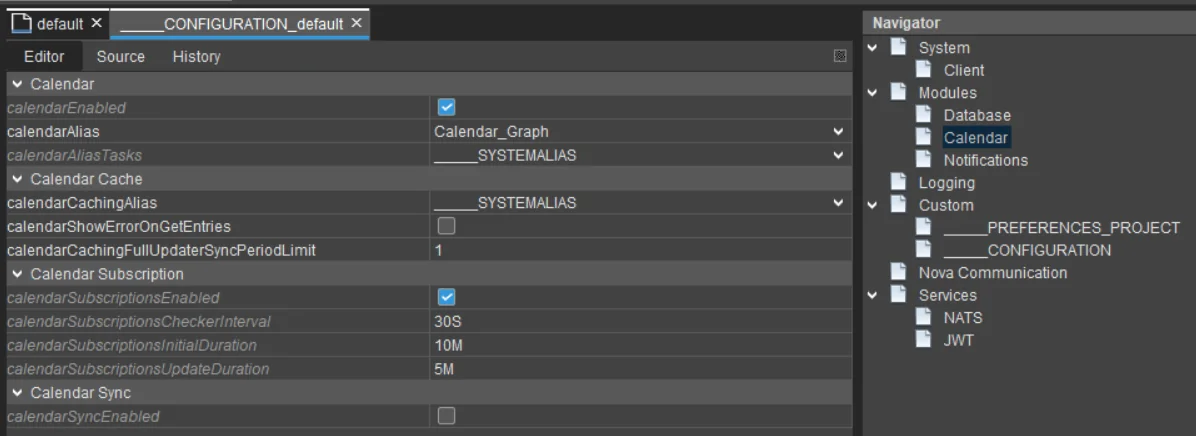 Figure: Calendar-related instance configuration with a Microsoft Graph alias selected.
| Property | Description |
|---|---|
calendarEnabled | Enables the calendar module. |
calendarAlias | Sets the default backend alias for appointments and events. |
calendarAliasTasks | Sets a separate backend alias for tasks if tasks should use a different backend. |
calendarTimeout | Sets the backend access timeout. |
calendarCachingAlias | Sets the database alias used by the calendar cache. If no value is set, ADITO uses defaultDataAlias. |
calendarShowErrorOnGetEntries | Controls whether backend fetch errors are shown to users or only logged. |
The value of calendarAlias decides which backend ADITO uses. For example, if
calendarAlias points to a Microsoft Graph alias, the ADITO Calendar uses
Microsoft Graph for appointment access.
For cache-specific instance settings, see Calendar Caching.
Configure Calendar Preferences
Calendar preferences define user-facing behavior such as reminders, sorting, and categories.
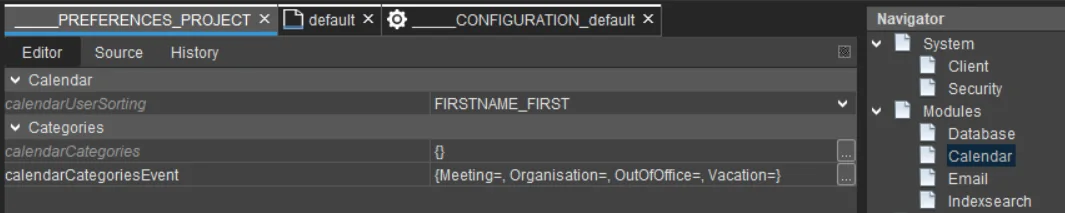 Figure: Calendar preferences.
| Preference | Description |
|---|---|
calendarReminderInterval | Sets the interval for checking overdue reminders. A value of 0 disables reminders. |
calendarReminderPeriod | Sets the retroactive lookup period for reminders. |
calendarUserSorting | Defines the user display order. Available values are FIRSTNAME_FIRST, LASTNAME_FIRST, and TITLE. |
calendarCategories | Defines task categories and their display colors. |
calendarCategoriesEvent | Defines appointment categories and their display colors. |
Configure Users
Each ADITO user that works with an external calendar must be mapped to a
calendar account in the backend. Configure the user's calendarId with the
email address or calendar identifier expected by the target backend.
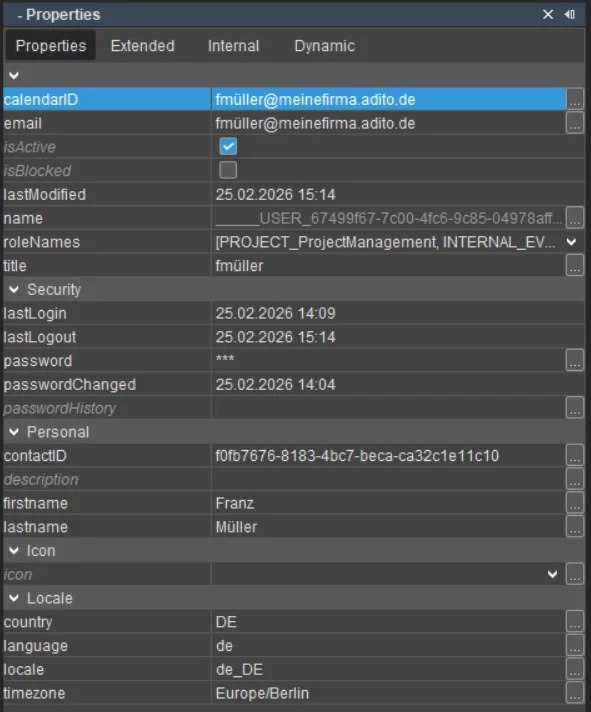 Figure: User property for the calendar ID.
If a user should use a calendar alias that differs from the system default, configure the user-specific calendar alias in the extended user properties. Backend-specific user properties are only shown for the user's active calendar backend.
After changing a calendar alias or user mapping, open the calendar with a user that has representative permissions and test loading, creating, updating, and deleting an appointment.
The user's calendar ID must be unique within the ADITO system. Multiple users cannot use the same calendar ID.