Database RecordContainer
A Database RecordContainer (dbRecordContainer) provides the standard mapping between EntityFields and database columns and is the most common RecordContainer type in ADITO projects.
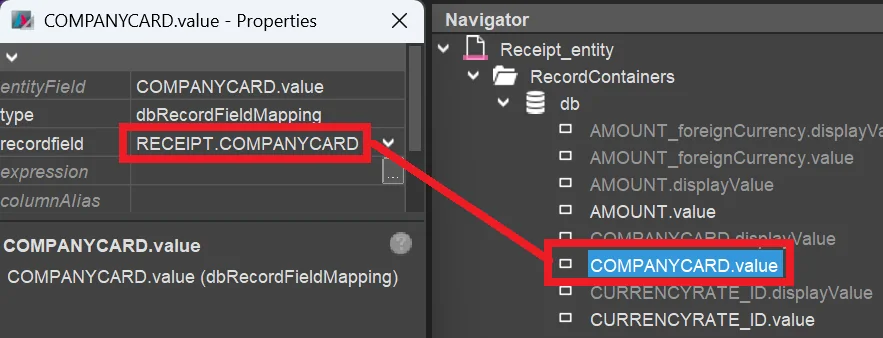 Figure: Mapping of an EntityField on the right and a database column on the left.
The database tables selectable in property recordfield are loaded from the
Alias Definition,
not directly from the database. Make sure that the Alias Definition is
synchronized with the database so that all required tables and columns are
available in recordfield.
Based on these RecordFieldMappings, the Database RecordContainer automatically generates the required SQL statements for:
- loading data via
SELECT, - updating data via
UPDATE, - creating data via
INSERT, - ordering data via
ORDER BY, and - deleting data via
DELETE.
In addition, you can override specific parts of the generated SQL, especially by using:
- the RecordContainer properties
fromClauseProcess(FROM),conditionProcess(WHERE), andorderClauseProcess(ORDER BY), or - the RecordFieldMapping property
expression, for example for a subselect or SQL calculation.
Detailed additional information is available in Basic SQL Statement.
Write hooks
onDBInsert, onDBUpdate, and onDBDelete are optional server-side hooks for
write operations of a dbRecordContainer. They are intended for follow-up logic
that must run together with the database write operation.
| Process | Timing | Available variables |
|---|---|---|
onDBInsert | Runs after the record has been inserted. | $local.uid, $local.rowdata, $local.changed |
onDBUpdate | Runs after the record has been updated. | $local.uid, $local.rowdata, $local.changed, $local.initialRowdata |
onDBDelete | Runs before the record is deleted. | $local.uid, $local.rowdata, $local.changed |
Use $local.rowdata and, where available, $local.initialRowdata instead of
$field variables in these hooks because field variables can already be
outdated at that point. For client-side follow-up actions such as popups or
navigation, use afterSave instead of onDB... processes.
Find more information in Load and Write Entity, Execution Order of Entity Processes, and System Variables.
COUNT queries
When a dbRecordContainer loads data from the database, in many cases, a SELECT COUNT(*) statement is executed automatically before the SELECT statement of the actual data is executed.
Purpose
The automatic SELECT COUNT(*) query mainly serves the following purposes:
- The number of datasets is stored in specific variables, for example
$sys.datarowcount. - The
SELECTstatement for retrieving the actual data is skipped ifSELECT COUNT(*)returns0, which means that no datasets are available.
minimizeCountQueries
Usually, a SELECT COUNT(*) statement consumes only minimal system resources.
If you still want to reduce the frequency of these queries, you can set the
dbRecordContainer property minimizeCountQueries to true. When enabled,
the RecordContainer determines the count from the loaded data instead of
executing additional count queries.
The minimizeCountQueries property is only visible and effective for
non-pageable Database RecordContainers. If isPageable is set to true, the
Designer does not show this property, and the setting is not evaluated. This
behavior is intentional because pageable RecordContainers require reliable
total counts for pagination.
This setting is a performance tradeoff. It can reduce query cost, but count-based
display values may become less accurate than with an explicit SELECT COUNT(*)
query. This also affects
datarowcountfull, especially if the
RecordContainer uses maximumDbRows.
For example, assume that maximumDbRows is set to 200, but 456 matching
records exist in the database. If minimizeCountQueries is enabled, the
RecordContainer can only report the 200 loaded rows because no separate count
query is executed. If minimizeCountQueries is disabled, the additional count
query provides the full result size of 456.
Caching behavior
Even when a dbRecordContainer uses a cache, a SELECT COUNT(*) statement is still executed. SELECT COUNT(*) queries are generally excluded from caching because they are assumed to consume only minimal system resources.
FROM clause optimization
In fromClauseProcess, you can return different FROM statements for the count query and the data query. This can be useful if a more efficient FROM statement is possible for the count query alone.
The two cases can be distinguished via the local variable $local.isCount, which is true for the count query and false for the data query.