Filter presets
In addition to filters set manually by the user, ADITO supports predefined filters that are applied automatically, for example when a Context is opened.
FilterBuilder
JDito includes FilterBuilder, a builder pattern that allows even complex
filters to be defined in a structured and readable way. In earlier ADITO
versions, this had to be implemented manually by building large JSON strings.
FilterGroup and FilterCondition
To use this functionality, first import the system module neonFilter. It
includes the following methods:
| Name | Description |
|---|---|
.createFilterGroup | Creates an object of class FilterGroup. |
.createFilterCondition | Creates an object of class FilterCondition. |
Creating a FilterGroup is always the starting point. Into this FilterGroup,
you can add either a FilterCondition or another FilterGroup, which can in
turn contain more FilterGroups or FilterConditions.
Methods of FilterGroup:
| Name | Description |
|---|---|
.mergeOperator | Defines the logical operator used to connect conditions and subordinated filter groups. Possible values are and and or. Use constants such as neonFilter.MERGE_OPERATOR_AND. |
.addFilterGroup | Nests one filter group into another. |
.addFilterCondition | Adds a filter condition to the group. |
.toJson() | Converts the filter group and all nested content into a JSON string. |
Methods of FilterCondition:
| Name | Description |
|---|---|
.field | The EntityField the filter condition refers to. |
.contentType | The content type of the EntityField. Use constants such as neonFilter.CONTENT_TYPE_TEXT. |
.searchOperator | The relational operator used for the comparison. Use constants such as neonFilter.SEARCH_OPERATOR_EQUAL. |
.key | The value used when the filter is executed. This value is not displayed in the client. |
.value | The value displayed in the client when the filter has been set. |
Filter referencing a FilterExtension
If your filter condition is related to a
FilterExtension,
the argument of method field must use the following syntax:
var filterCondition = neonFilter.createFilterCondition()
  .field("#EXTENSION.TestfilterExtension.TestfilterExtension#TEXT")
neon.setFilter
If you want a specific filter to be applied in another part of your project, for
example in an Action, use the method neon.setFilter:
var filter = neonFilter.createFilterGroup();

(...) // configuration of filter

neon.setFilter("#ENTITY", filter);
Figure: Pattern for setting a filter in JDito.
FilterBuilder examples
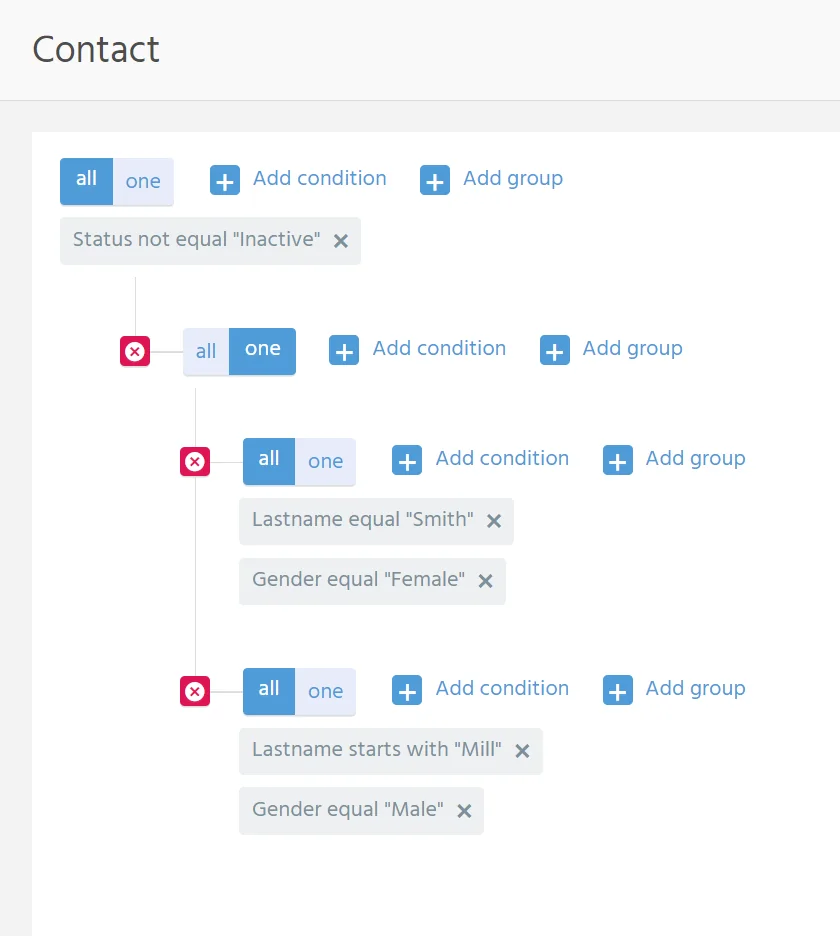
The following example creates an extended filter in the client and then shows how the same filter can be represented in JDito.
First, click Open extended filter in the filter component of the FilterView of
context Contact.

Filter configuration in the client
The extended filter contains four filter groups. The effect of this filter is to show all Contacts that are not inactive and that match either of the following conditions:
- The contact is female and has the last name
Smith. - The contact is male and has a last name starting with
Mill.
Filter configuration in JDito
var filterGroup1 = neonFilter.createFilterGroup();
filterGroup1.mergeOperator(neonFilter.MERGE_OPERATOR_AND);

var filterConditionNotInactive = neonFilter.createFilterCondition()
.field("STATUS")
.searchOperator(neonFilter.SEARCH_OPERATOR_NOT_EQUAL)
.contentType(neonFilter.CONTENT_TYPE_TEXT)
.value("Inactive")
.key("CONTACTSTATINACTIVE");

filterGroup1.addFilterCondition(filterConditionNotInactive);

var filterGroup2 = neonFilter.createFilterGroup();
filterGroup2.mergeOperator(neonFilter.MERGE_OPERATOR_OR);
filterGroup1.addFilterGroup(filterGroup2);

var filterGroup3 = neonFilter.createFilterGroup();
filterGroup3.mergeOperator(neonFilter.MERGE_OPERATOR_AND);
filterGroup2.addFilterGroup(filterGroup3);

var filterConditionLastnameSmith = neonFilter.createFilterCondition()
.field("LASTNAME")
.searchOperator(neonFilter.SEARCH_OPERATOR_EQUAL)
.contentType(neonFilter.CONTENT_TYPE_TEXT)
.value("Smith")
.key("Smith");

filterGroup3.addFilterCondition(filterConditionLastnameSmith);

var filterConditionGenderFemale = neonFilter.createFilterCondition()
.field("GENDER")
.searchOperator(neonFilter.SEARCH_OPERATOR_EQUAL)
.contentType(neonFilter.CONTENT_TYPE_TEXT)
.value("Female")
.key("f");

filterGroup3.addFilterCondition(filterConditionGenderFemale);

var filterGroup4 = neonFilter.createFilterGroup();
filterGroup4.mergeOperator(neonFilter.MERGE_OPERATOR_AND);
filterGroup2.addFilterGroup(filterGroup4);

var filterConditionLastnameMill = neonFilter.createFilterCondition()
.field("LASTNAME")
.searchOperator(neonFilter.SEARCH_OPERATOR_STARTSWITH)
.contentType(neonFilter.CONTENT_TYPE_TEXT)
.value("Mill")
.key("Mill");

filterGroup4.addFilterCondition(filterConditionLastnameMill);

var filterConditionGenderMale = neonFilter.createFilterCondition()
.field("GENDER")
.searchOperator(neonFilter.SEARCH_OPERATOR_EQUAL)
.contentType(neonFilter.CONTENT_TYPE_TEXT)
.value("Male")
.key("m");

filterGroup4.addFilterCondition(filterConditionGenderMale);
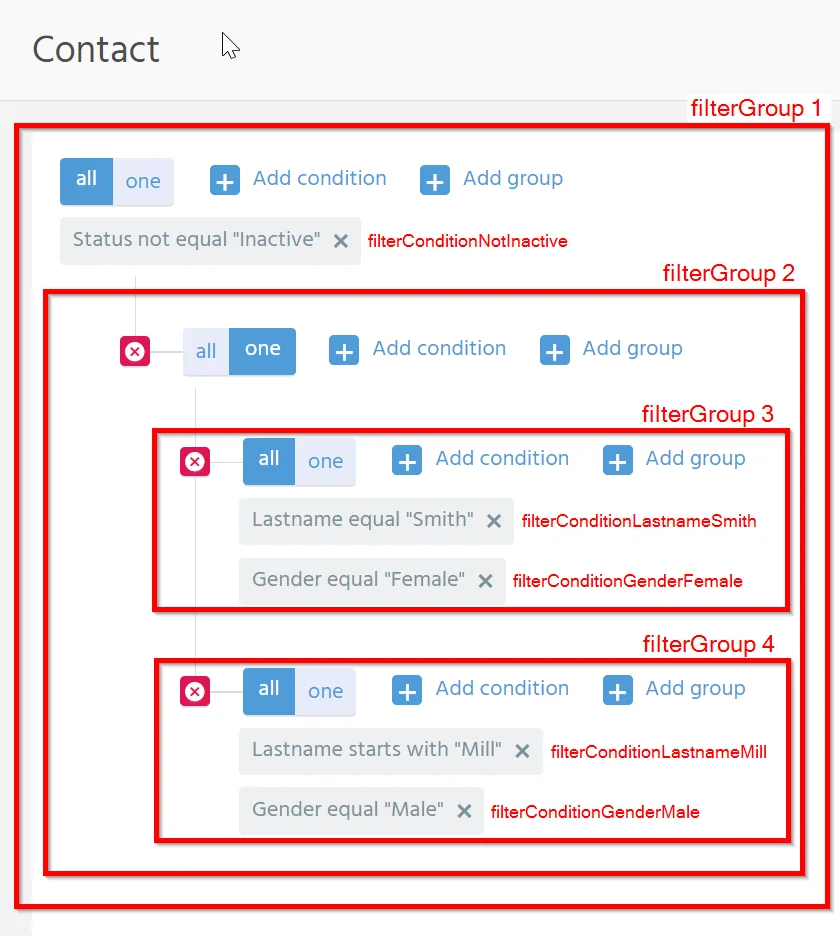
In practice, reference KeywordEntries through the usual JDito methods instead of hard-coded values.
initFilterProcess
If a specific filter should be preset when a Context is opened, the usual
implementation point is the Entity initFilterProcess. The filter itself is
typically built via FilterBuilder.
Example task
When opening the FilterView of Context Person, titled Contact in the client,
only persons whose last name includes the letter M should be shown.
import { neon, neonFilter, result, vars } from "@aditosoftware/jdito-types";

if (vars.get("$sys.presentationmode") === neon.CONTEXT_PRESENTATIONMODE_FILTER)
{
    var recordState = vars.get("$sys.recordstate");
    if (recordState != neon.OPERATINGSTATE_SEARCH)
    {
        var filter = neonFilter.createFilterGroup()
        .mergeOperator(neonFilter.MERGE_OPERATOR_AND)
        .addFilterCondition(neonFilter.createFilterCondition()
            .field("LASTNAME")
            .key("M")
            .value("M")
            .searchOperator(neonFilter.SEARCH_OPERATOR_CONTAINS)
            .contentType(vars.get("$property.LASTNAME.contentType"))
        );
    result.string(filter.toString());
    }
}