FilterExtension and FilterExtensionSet
FilterExtension
FilterExtension extends the standard filter options provided through the
isFilterable properties of RecordFieldMappings. Use it whenever an additional
filter criterion is required that cannot be expressed through the standard
field-based filter alone.
Examples in ADITO xRM include:
Favorites_filter, a FilterExtension included in the RecordContainers of several Entities, for exampleOrganisation_entity.Phase_filter(Phase_filterExtention), a FilterExtension included in the RecordContainer ofSalesproject_entity.
Creating a new FilterExtension
Open the Entity in the Navigator, right-click its RecordContainer, and choose
Add Filter Extension from the context menu. Then enter a suitable name, for
example hasMyEntityFieldSet.
Configure the new FilterExtension properties as described in the following sections.
General properties
title defines the list item text shown in the filter's Property combo box,
for example Has my EntityField set.
contentType defines the data type of the values that users can enter or
select in the filter's Value field. The content type determines, among other
things, the list of relational operators available in the filter component's
Operator field.
filterValuesProcess
Fill property filterValuesProcess only if users should select values through
a combo box. The result must be an array of value pairs:
var myFilterValues = [];
myFilterValues.push(["myID1", "my combobox ListItem1"]);
myFilterValues.push(["myID2", "my combobox ListItem2"]);
myFilterValues.push(["myID3", "my combobox ListItem3"]);

result.object(myFilterValues);
The second value of each pair is displayed in the combo box. The first value is
evaluated in filterConditionProcess; this is often a UID.
In many cases, this result array is generated through an SQL selection:
var myFilterValues = newSelect("MYIDCOLUMN, MYCOLUMNFORCOMBOBOXLISTITEMS")
                     .from("MYTABLE")
                     .table();

result.object(myFilterValues);
If users should enter free text instead of selecting from a combo box,
filterValuesProcess must remain empty.
useConsumer and consumer
Property useConsumer enables lookup functionality through a Consumer. It is
an alternative to filterValuesProcess. When useConsumer is enabled,
property filterValuesProcess disappears and property consumer appears
instead.
The selected Consumer delivers the selectable filter values. The corresponding
Provider Entity's contentTitleProcess or LookupView displays the selectable
values in the combo box. The UID column acts as the value evaluated in
filterConditionProcess.
filterConditionProcess
The property filterConditionProcess reacts to the value that the user entered
or selected in the filter component's Value field. The process result is an
SQL condition that is added to the RecordContainer conditionProcess. The SQL
keywords WHERE and AND must not be included.
The following variables are available:
| Name | Description |
|---|---|
$local.rawvalue | The text typed by the user or the first value of the selected value pair. |
$local.comparison | The selected operator as a string, for example EQUAL, CONTAINS, or STARTSWITH. |
$local.operator | The selected operator as an integer value. Some operator selections result in equal integer values. |
$local.operator2 | The relational operator as a special character, mainly for SQL statements, for example >. |
Example: combo box value
var rawvalue = vars.get("$local.rawvalue");
var comparison = vars.get("$local.comparison");

var myPrimaryId = rawvalue;
var sqlCondition = "";

switch(comparison) {
    case "EQUAL":
        sqlCondition = newWhere("MYTABLE.ANOTHERTABLE_ID", myPrimaryId, SqlBuilder.EQUAL());
        break;
    case "NOT_EQUAL":
        sqlCondition = newWhere("MYTABLE.ANOTHERTABLE_ID", myPrimaryId, SqlBuilder.NOT_EQUAL());
        break;
    case "ISNULL":
        sqlCondition = "MYTABLE.ANOTHERTABLE_ID IS NULL";
        break;
    case "ISNOTNULL":
        sqlCondition = "MYTABLE.ANOTHERTABLE_ID IS NOT NULL";
        break;
    default:
        sqlCondition = "1 = 2";
}

result.string(sqlCondition);
Example: free text value
var myUserInput = vars.get("$local.rawvalue");

var myFilterCondition = newWhere(
  "MYTABLE.MYCOLUMN",
  myUserInput,
  SqlBuilder.EQUAL());

result.string(myFilterCondition);
groupQueryProcess
Property groupQueryProcess groups data provided through a FilterExtension. It
does not require a specific EntityField because the grouping is created in the
process itself. The process result is an SQL string that returns the grouping.
The groupQueryProcess is triggered when the client user selects a
FilterExtension-related Group-by value in the filter component's Grouping
section. Grouping only works if a filterConditionProcess is defined.
Example in xRM
Phase_filter (Phase_filterExtention) is a FilterExtension of the db
RecordContainer of Salesproject_entity.
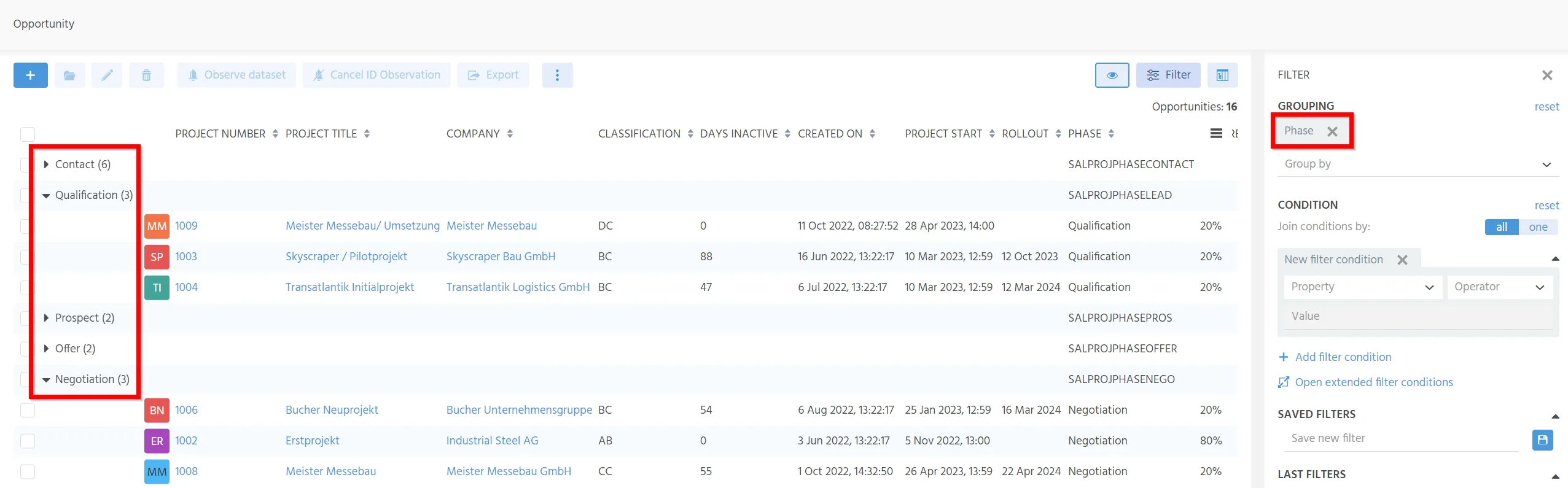
This FilterExtension is not used for filtering because the EntityField PHASE
can already be used for that. Its purpose is to enable grouping of Opportunity
datasets by phase while preserving the correct alphabetical order.
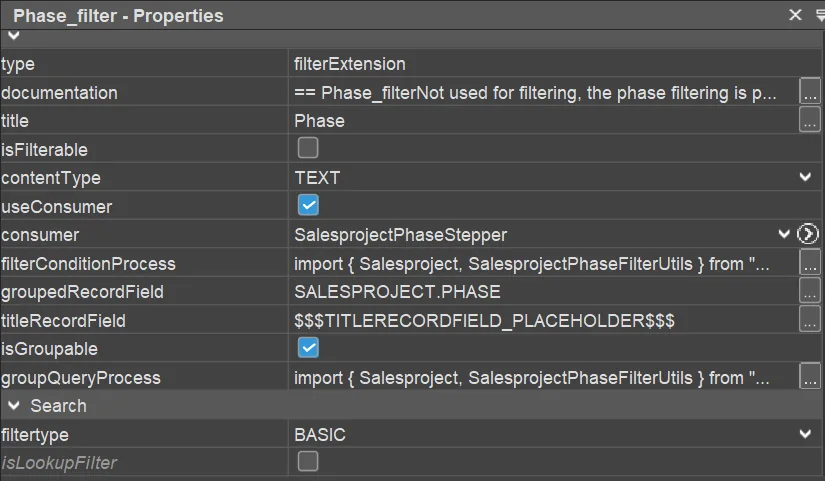
To implement a groupQueryProcess, add a new FilterExtension, enable property
isGroupable, set groupedRecordField, set titleRecordField, and return a
suitable SQL string from groupQueryProcess that includes a GROUP BY clause.
supportsFilterExtensionGrouping
FilterExtensions and FilterExtensionSets can be used on groups with
RecordContainers without paging. If property isPageable is disabled on a
RecordContainer, the additional property supportsFilterExtensionGrouping is
shown. If this property is set to true, the FilterExtensions are also shown
when grouping is used.
Use supportsFilterExtensionGrouping with care. It causes all data to be
reloaded for every grouped row and can affect performance for large datasets.
Filter extensions and the index
Filter extensions are not automatically respected by the index. If you want to
use a FilterExtension such as Supervisor assignment equals YES in access
rights, rebuild this filter in the index. Otherwise, no result is shown for the
respective IndexGroup.
FilterExtensionSet
FilterExtensionSet builds on the same principles as FilterExtension, but is
designed for more complex scenarios where several related custom filter options
must be organized together.
Create a FilterExtensionSet by opening an Entity in the Navigator,
right-clicking its RecordContainer, and choosing Add Filter Extension Set.
Example: managing grades of trainees
This example configures a FilterExtensionSet for managing trainees and their grades in English, German, and math. It demonstrates three options for loading values:
- Directly from the database.
- Through dropdown values from
filterValuesProcess. - Through dropdown values from a Consumer.
The required preparation files are documented in the Appendix "Trainee example".
In the project tree, open Trainee_entity and unfold its RecordContainer db.
Under FilterExtensions, the FilterExtensionSet is named example_filterSet.

Make sure property filtertype is set to BASIC. If it is set to EXTENDED,
the FilterExtensionSet features are only available through Open extended filter conditions.
Consumer for the gender-related field
import { result } from "@aditosoftware/jdito-types";
import { $SalutationKeywords } from "SalutationKeywords_registry";

result.string($SalutationKeywords.personGender());
filterFieldsProcess
import { result } from "@aditosoftware/jdito-types";
import { KeywordUtils } from "KeywordUtils_lib";
import { $SalutationKeywords } from "SalutationKeywords_registry";

var filterFields = [
    {
        name: "FILTER_GRADEENGLISH",
        title: "Grade English entered?",
        contentType: "BOOLEAN",
        isGroupable: true,
        groupedRecordField:"CASE WHEN TRAINEE.GRADEENGLISH IS NOT NULL THEN 1 ELSE 0 END",
        titleRecordField:"CASE WHEN ISNULL(TRAINEE.GRADEENGLISH) = 0 THEN 'Yes' ELSE 'No' END",
    },
    {
        name: "FILTER_GRADE",
        title: "Grade",
        contentType: "TEXT",
        hasDropDownValues: true,
        isGroupable: false,
    },
    {
        name: "FILTER_GENDER",
        title: "Gender",
        contentType: "TEXT",
        hasDropDownValues: true,
        isGroupable: true,
        consumer: "KeywordGenders",
        groupedRecordField: "TRAINEE.GENDER",
        titleRecordField: KeywordUtils.getResolvedTitleSqlPart($SalutationKeywords.personGender(), "TRAINEE.GENDER")
    }
];

result.string(JSON.stringify(filterFields));
filterValuesProcess
import { result, vars } from "@aditosoftware/jdito-types";

let filter = JSON.parse(vars.getString("$local.filter"));

let values = [];
switch(filter.name){
    case "FILTER_GRADE":
        values = [
            ["5", "excellent"],
            ["4", "good"],
            ["3", "satisfactory"],
            ["2", "less than satisfactory"],
            ["1", "unsatisfactory"]
        ];
        break;
}

result.object(values);
filterConditionProcess
import { result, vars } from "@aditosoftware/jdito-types";
import { newWhere, SqlBuilder } from "SqlBuilder_lib";

let rawValue = vars.get("$local.rawvalue");
let comparison = vars.get("$local.comparison");
let name = vars.get("$local.name");
let filterName = name.split(".").pop();
let column = "TRAINEE." + name.split("_").pop();

let cond = newWhere();

switch (filterName)
{
    case "FILTER_GRADEENGLISH":
    case "FILTER_GRADEGERMAN":
    case "FILTER_GRADEMATH":
        {
            let nullOperator = "IS NULL";
            switch (comparison)
            {
                case "EQUAL":
                    nullOperator = rawValue == 1 ? "IS NOT NULL" : "IS NULL";
                    break;
                case "NOT_EQUAL":
                    nullOperator = rawValue == 1 ? "IS NULL" : "IS NOT NULL";
                    break;
                case "ISNOTNULL":
                    nullOperator = "IS NOT NULL";
                    break;
            }
            cond.and(column + " " + nullOperator);
        }
        break;
    case "FILTER_GRADE":
        cond.and(
            newWhere("TRAINEE.GRADEENGLISH", rawValue, SqlBuilder.EQUAL())
                .or("TRAINEE.GRADEGERMAN", rawValue, SqlBuilder.EQUAL())
                .or("TRAINEE.GRADEMATH", rawValue, SqlBuilder.EQUAL())
        );
        break;
    case "FILTER_GENDER":
        cond.and(column, rawValue, SqlBuilder.EQUAL());
        break;
}

result.string(cond.toString());
groupQueryProcess
import { result, vars } from "@aditosoftware/jdito-types";
import { SqlBuilder } from "SqlBuilder_lib";

var sql = new SqlBuilder();

if (vars.get("$local.count"))
{
    sql.select("1");
}
else
{
    sql.select([vars.get("$local.columnlist")]);
}

sql.from("TRAINEE");

let condition = vars.get("$local.condition");
if(condition != "  ")
{
    sql.where(condition);
}

let grouped = vars.get("$local.grouped");
sql.groupBy(grouped);
sql.orderBy(grouped);

result.string(sql.toString());
Available local variables
The following $local variables can be accessed in the code of a
FilterExtensionSet's properties:
| Name | Description |
|---|---|
$local.count | TRUE if the count of the records is needed. |
$local.columnlist | String with the columns and expressions expected to be returned by the query. |
$local.condition | The filter condition that is being used. |
$local.groupedlist | String with the columns and expressions used for grouping. |
$local.order | String that contains the order expression for grouped items. |
$local.name | String value of the name property if a filter field was returned by filterFieldsProcess. |
useConsumer
The useConsumer functionality is also available for FilterExtensionSets. Add
attribute consumer to the JSON config object returned by
filterFieldsProcess:
var myConfig = [];

myConfig.push({
    name: (...),
    title: (...),
    contentType: (...),
    hasDropDownValues: (...),
    isGroupable: (...),
    groupedRecordField: (...),
    titleRecordField: (...),
    consumer: "MyConsumerName"
});

result.string(JSON.stringify(myConfig));