Task
Instead of creating the database tables via the database editor (see chapter Database Connection), you can also create them via Liquibase.
You can find helpful information in chapter Database Tables in the generic part of the documentation.
Solution
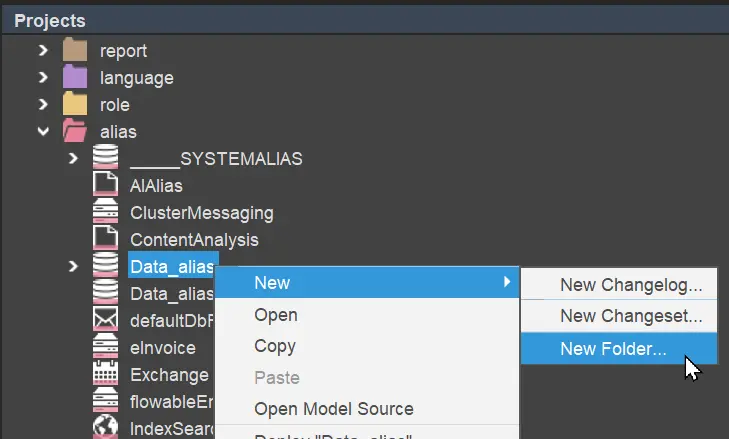
In your project's folder "alias", navigate to folder "Data_alias" and create a (sub-)folder named "Carpool_Data_alias", via folder Data_alias' context menu ("New" > "New Folder..."):
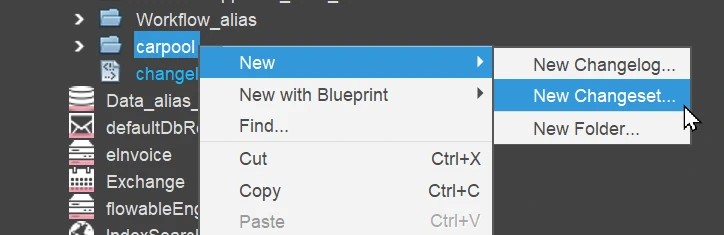
Place the following 3 XML fragments each in one "changeset" file ("carpool" > "New" > "New Changeset...") inside the new "Carpool_Data_alias" folder.
<?xml version="1.1" encoding="UTF-8" standalone="no"?>
<databaseChangeLog xmlns="http://www.liquibase.org/xml/ns/dbchangelog" xmlns:ext="http://www.liquibase.org/xml/ns/dbchangelog-ext" xmlns:xsi="http://www.w3.org/2001/XMLSchema-instance" xsi:schemaLocation="http://www.liquibase.org/xml/ns/dbchangelog-ext http://www.liquibase.org/xml/ns/dbchangelog/dbchangelog-ext.xsd http://www.liquibase.org/xml/ns/dbchangelog http://www.liquibase.org/xml/ns/dbchangelog/dbchangelog-3.6.xsd">
    <changeSet author="j.smith" id="23533445-0d3d-499c-aa98-cf37ca4798c1">
        <createTable tableName="CAR">
            <column name="CARID" type="CHAR(36)">
                <constraints primaryKey="true" primaryKeyName="PK_CAR_CARID"/>
            </column>
            <column name="COLOR" type="VARCHAR(36)"/>
            <column name="LICENSEPLATENUMBER" type="NVARCHAR(20)"/>
            <column name="MANUFACTUREDATE" type="DATE"/>
            <column name="MANUFACTURER" type="VARCHAR(36)"/>
            <column name="PICTURE" type="LONGBLOB"/>
            <column name="PRICE" type="DECIMAL(10,2)"/>
            <column name="CURRENCY" type="VARCHAR(36)"/>
            <column name="TYPE" type="NVARCHAR(30)"/>
        </createTable>
    </changeSet>
</databaseChangeLog>
create_car.xml
<?xml version="1.1" encoding="UTF-8" standalone="no"?>
<databaseChangeLog xmlns="http://www.liquibase.org/xml/ns/dbchangelog" xmlns:ext="http://www.liquibase.org/xml/ns/dbchangelog-ext" xmlns:xsi="http://www.w3.org/2001/XMLSchema-instance" xsi:schemaLocation="http://www.liquibase.org/xml/ns/dbchangelog-ext http://www.liquibase.org/xml/ns/dbchangelog/dbchangelog-ext.xsd http://www.liquibase.org/xml/ns/dbchangelog http://www.liquibase.org/xml/ns/dbchangelog/dbchangelog-3.6.xsd">
    <changeSet author="j.smith" id="64fd2d43-8c77-42d4-b349-4ebcd3a45037">
        <createTable tableName="CARDRIVER">
            <column name="CARDRIVERID" type="CHAR(36)">
                <constraints primaryKey="true" primaryKeyName="PK_CARDRIVER_CARDRIVERID"/>
            </column>
            <column name="CONTACT_ID" type="CHAR(36)"/>
            <column name="DRIVINGLICENSENUMBER" type="NVARCHAR(30)"/>
            <column name="DRIVINGLICENSEISSUEDATE" type="DATE"/>
        </createTable>
    </changeSet>
</databaseChangeLog>
create_cardriver.xml
<?xml version="1.1" encoding="UTF-8" standalone="no"?>
<databaseChangeLog xmlns="http://www.liquibase.org/xml/ns/dbchangelog" xmlns:ext="http://www.liquibase.org/xml/ns/dbchangelog-ext" xmlns:xsi="http://www.w3.org/2001/XMLSchema-instance" xsi:schemaLocation="http://www.liquibase.org/xml/ns/dbchangelog-ext http://www.liquibase.org/xml/ns/dbchangelog/dbchangelog-ext.xsd http://www.liquibase.org/xml/ns/dbchangelog http://www.liquibase.org/xml/ns/dbchangelog/dbchangelog-3.6.xsd">
    <changeSet author="j.smith" id="45e21347-53cd-48e1-9667-591f3506e9e5">
        <createTable tableName="CARRESERVATION">
            <column name="CARRESERVATIONID" type="CHAR(36)">
                <constraints primaryKey="true" primaryKeyName="PK_CARRESERVATION_CARRESERVATIONID"/>
            </column>
            <column name="CAR_ID" type="CHAR(36)"/>
            <column name="CARDRIVER_ID" type="CHAR(36)"/>
            <column name="STARTDATE" type="DATETIME"/>
            <column name="ENDDATE" type="DATETIME"/>
            <column name="MILEAGERETURN" type="INT"/>
            <column name="PARKINGTICKETFINE" type="DECIMAL(7,2)"/>
            <column name="SPEEDINGFINE" type="DECIMAL(7,2)"/>
            <column name="CURRENCY" type="VARCHAR(36)"/>
            <column name="DAMAGE" type="NVARCHAR(300)"/>
        </createTable>

        <!--Index for speeding up searches / join for CAR_ID, e.g. when searching data by a specific car -->
        <createIndex indexName="IDX_CAR_ID" tableName="CARRESERVATION">
            <column name="CAR_ID"/>
        </createIndex>
        <!--Index for speeding up searches / join for CARDRIVER_ID, e.g. when searching for a spcific driver -->
        <createIndex indexName="IDX_CARDRIVER_ID" tableName="CARRESERVATION">
            <column name="CARDRIVER_ID"/>
        </createIndex>
        <!--Compound index for speeding up joins over CAR_ID and CARDRIVER_ID -->
        <createIndex indexName="IDX_CAR_ID_CARDRIVER_ID" tableName="CARRESERVATION">
            <column name="CAR_ID"/>
            <column name="CARDRIVER_ID"/>
        </createIndex>
    </changeSet>
</databaseChangeLog>
create_carreservation.xml
Please note that the latter Liquibase file also includes 3 indices: One for each foreign key (speeding up searches for the respective UID), as well as a compound index, which speeds up SQL JOINs over CAR_ID and CARDRIVER_ID.
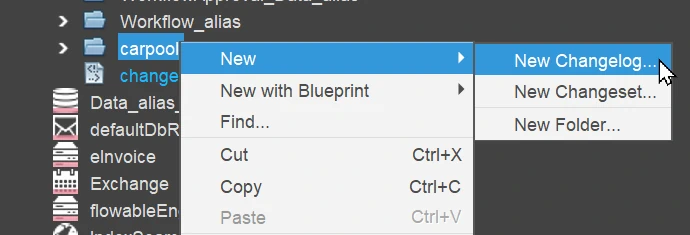
After saving these 3 files, create a new changelog.xml file, also in the "Carpool_Data_alias" folder: "Carpool_Data_alias" > "New" > "New Changelog...".
In this new changelog file, reference the 3 new changeset files:
<?xml version="1.1" encoding="UTF-8" standalone="no"?>
<databaseChangeLog xmlns="http://www.liquibase.org/xml/ns/dbchangelog"
                   xmlns:xsi="http://www.w3.org/2001/XMLSchema-instance"
                   xsi:schemaLocation="http://www.liquibase.org/xml/ns/dbchangelog http://www.liquibase.org/xml/ns/dbchangelog/dbchangelog-4.4.xsd">
    <include relativeToChangelogFile="true" file="create_car.xml"/>
    <include relativeToChangelogFile="true" file="create_cardriver.xml"/>
    <include relativeToChangelogFile="true" file="create_carreservation.xml"/>
</databaseChangeLog>
changelog.xml (in Folder "Carpool_Data_alias")
Now, reference this new changelog.xml file by adding a respective line in the top-level changelog.xml file:
<?xml version="1.1" encoding="UTF-8" standalone="no"?>
<databaseChangeLog xmlns="http://www.liquibase.org/xml/ns/dbchangelog"
        xmlns:ext="http://www.liquibase.org/xml/ns/dbchangelog-ext"
        xmlns:xsi="http://www.w3.org/2001/XMLSchema-instance"
        xsi:schemaLocation="http://www.liquibase.org/xml/ns/dbchangelog-ext http://www.liquibase.org/xml/ns/dbchangelog/dbchangelog-ext.xsd http://www.liquibase.org/xml/ns/dbchangelog http://www.liquibase.org/xml/ns/dbchangelog/dbchangelog-4.4.xsd">
	<include relativeToChangelogFile="true" file="XXX_alias/changelog.xml"/>
	<include relativeToChangelogFile="true" file="YYY_alias/changelog.xml"/>
	<include relativeToChangelogFile="true" file="ZZZ_alias/changelog.xml"/>
(...)
	<include relativeToChangelogFile="true" file="Carpool_Data_alias/changelog.xml"/>
</databaseChangeLog>
changelog.xml (in Folder "Data_alias")
Liquibase update
As soon as you have created and placed the above 3 XML files and linked them in your changelog.xml as advised, you can execute a Liquibase update: In the project tree, choose alias > Data_alias > RMB: Liquibase > Update...
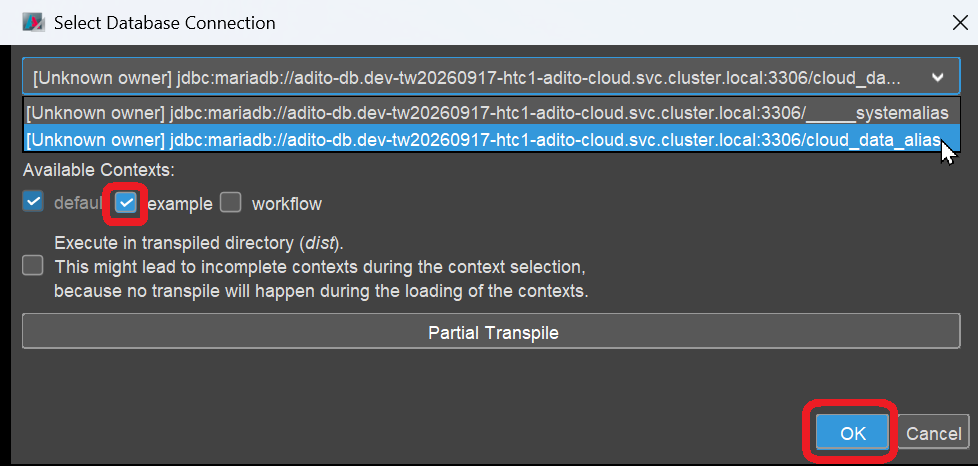
This starts an analysis of the complete Liquibase structure inside the folder Data_alias, which will take several minutes. Finally, you see a dialog named "Select Database Connection". Here, select a connection to "...data_alias":
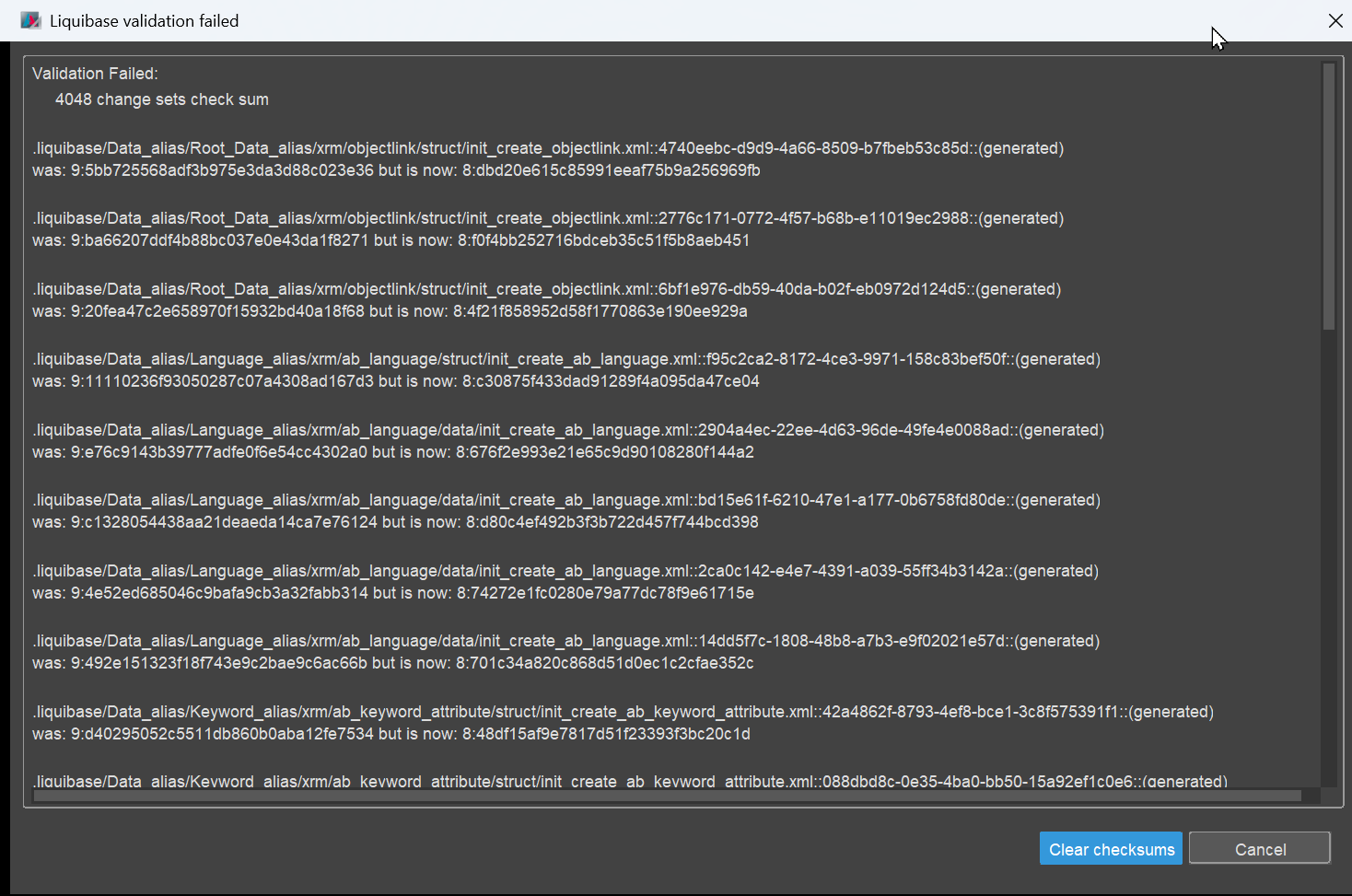
If the dialog "Liquibase validation failed" appears, you can simply react by clicking on the blue button "Clear checksums":
If you, at a later time, execute "Drop All & Update", make sure that, in the update dialog, checkbox "example" (= demo data) is checked, because, e.g., demo data of Context "Contact" (PERSON) are required for being referenced in Context "CarDriver".
You can now check, if all tables have been created correctly, using ADITO's database editor.
The car pool related database tables and columns should appear as follows:
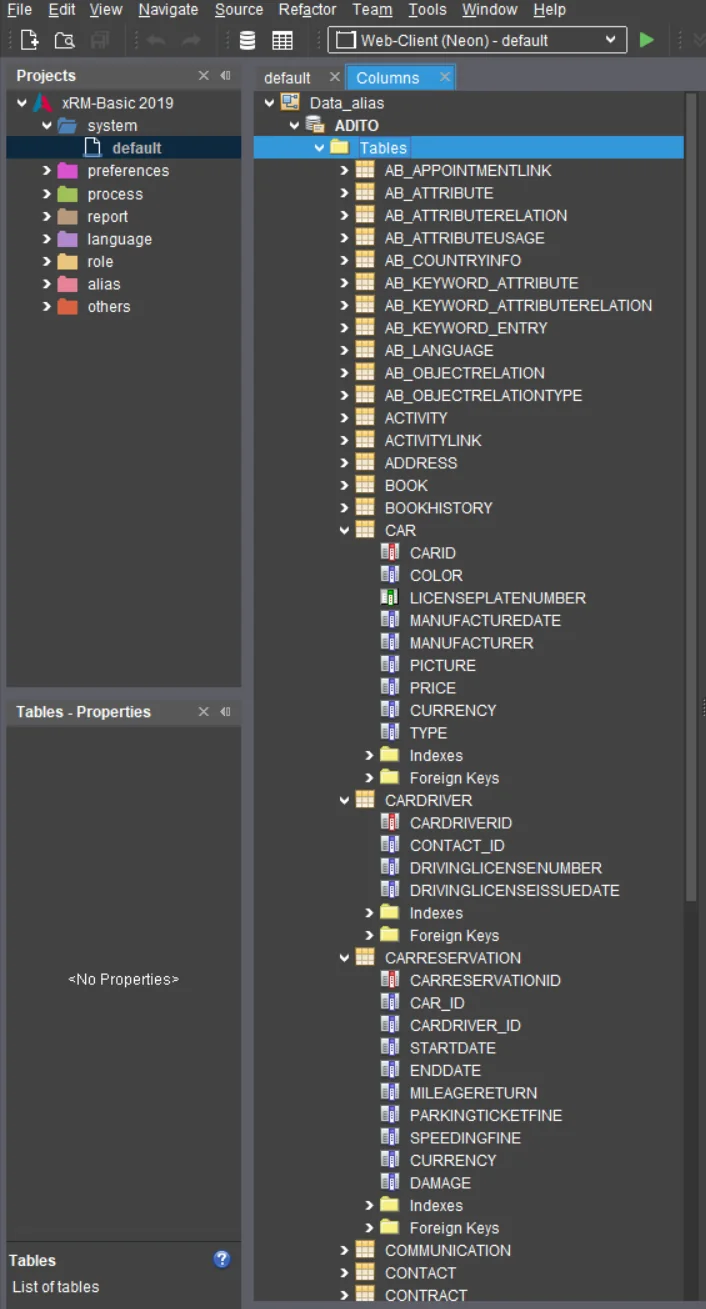
The carpool-related database tables and their columns
Make sure that you named database tables and columns exactly as shown above. Otherwise, some code snippets of this documentation might not work.