Task
Establish all required dependencies, in order to allow
- the selection of clear text values in the foreign key fields (xxx_ID), via dropdown or lookup;
- the usage of keywords (fields MANUFACTURER and COLOR);
- the usage of currencies.
Find a generic description of dependencies in chapter The Basics and in its sub-chapter Providers and Consumers
Solution
As you have learned before, dependencies between Entities are established via the models "Provider" and "Consumer" - optionally including a "Parameter".
At first, we will implement this principle in order to allow the selection of contact persons via CarDriver_entity's field CONTACT_ID:
Create a new Consumer for CarDriver_entity and name it "Persons". Set its Property entityName to "Person_entity", and fieldName to "Contacts" (this is a predefined Provider of the ADITO xRM project). Then, set property consumer of CarDriver_entity’s field CONTACT_ID to "Persons", and deploy. Result: In field CONTACT_ID in CarDriverEdit_view, you can now select a person via the PersonLookup_view.
The n:m relation between cars and car drivers is established via car reservations. Therefore, car reservation has foreign key fields on both ends: CAR_ID and CARDRIVER_ID. These 2 EntityFields contain the UIDs of CARID and CARDRIVERID. However, if you create a reservation, it makes no sense to work with UIDs. Rather, we want to select
- the car with the help of the EntityFields MANUFACTURER and TYPE;
- the car driver with the help of LASTNAME, FIRSTNAME, and SALUTATION of the PERSON dataset, which is connected via CONTACT_ID.
Let's start with car: Create a Provider for Car_entity (-> Navigator: RMB > "New Provider") and a Consumer for CarReservation_entity (-> Navigator: RMB > "New Consumer"). Name both "Cars". Connect Provider and Consumer via the Consumer's properties entityName (value: Car_entity) and fieldName (value: Cars). Specify the Consumer in the EntityField CAR_ID's property consumer.
If you deploy, for testing purposes, you will see that, in the EditView of Context CarReservation, a combobox with empty lines is displayed for the EntityField CAR_ID. The reason for this is that the Consumer identifies the car datasets on the basis of their "content title". However, as we have not filled the Car_entity's contentTitleProcess yet, there are no content titles yet, which results in empty lines.
Therefore, we now fill the contentTitleProcess of Car_entity with suitable code that allows to distinguish the cars:
import { result, vars } from "@aditosoftware/jdito-types";

let contentTitle = vars.get("$field.MANUFACTURER") + " " + vars.get("$field.TYPE");

result.string(contentTitle);
contentTitleProcess of Car_entity
A further improvement would be to specify a LookupView for Context Car. For reasons of simplification, we use CarFilter_view for this purpose: In the project tree, navigate to context > Car. In Car's property sheet, select CarFilter_view for property lookupView. Then, this LookupView will be used to select a car instead of the contentTitleProcess:
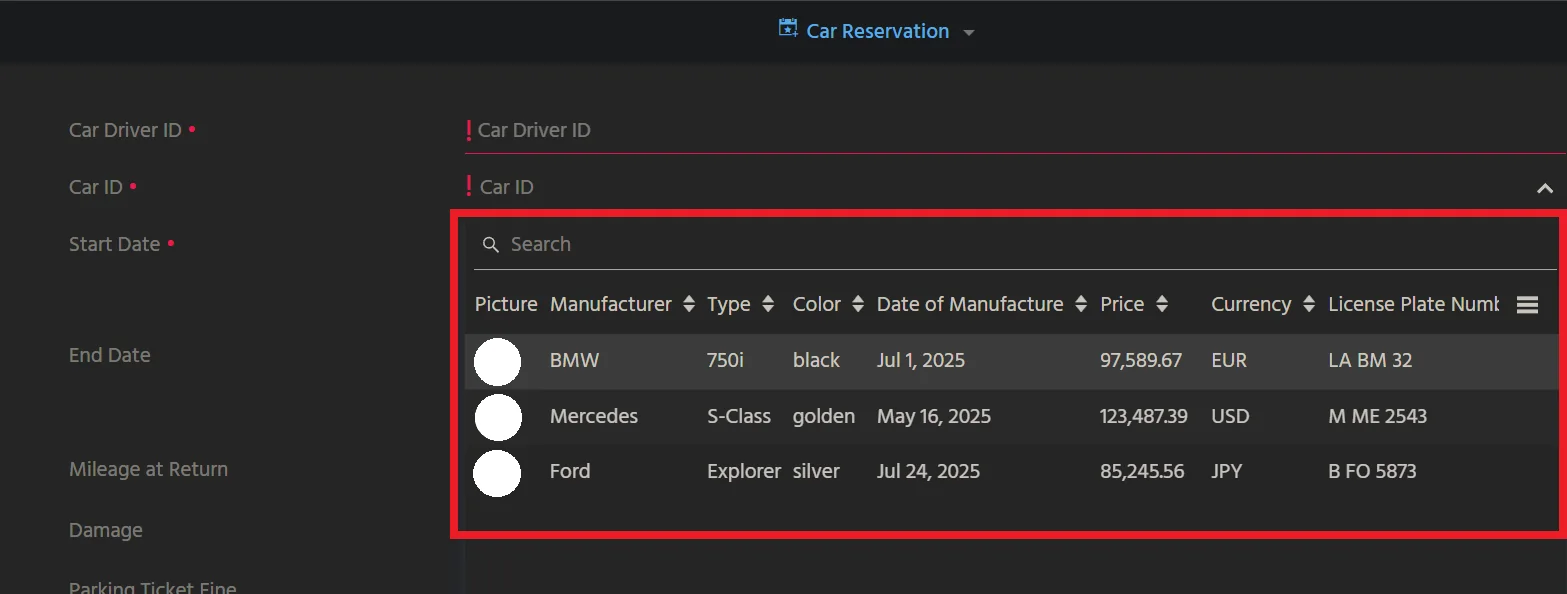
To enable lookup filtering, set property isLookupFilter to true for the RecordFieldMappings of all EntityFields that should be used as filter criteria.
Nevertheless, the contentTitleProcess should remain set, as it will be used
- to display the car after selection;
- as content title (= as part of the title of a dataset in the MainView):

Now, create Provider, Consumer, and Consumer assignment also for the other foreign key field, CARDRIVER_ID. In this case, the contentTitleProcess of CarDriver_entity is a little more complex, as FIRSTNAME, LASTNAME, and SALUTATION are not EntityFields of CarDriver_entity, but of the related Person_entity (module contact), see this diagram.
import { logging, neon, result, vars } from "@aditosoftware/jdito-types";
import { newSelect } from "SqlBuilder_lib";

var contactId = vars.get("$field.CONTACT_ID");
if (contactId)
{
    var displayData = newSelect("SALUTATION, FIRSTNAME, LASTNAME")
        .from("PERSON")
        .join("CONTACT", "CONTACT.PERSON_ID = PERSON.PERSONID")
        .where("CONTACT.CONTACTID", contactId)
        .arrayRow();
    var salutation = displayData[0];
    var firstname = displayData[1];
    var lastname = displayData[2];
    result.string(salutation + " " + firstname + " " + lastname);
}
contentTitleProcess of CarDriver_entity
In the CarDriverFilter_view, the related contact is displayed only as UUID.

Of course, in practice, the contact should here appear in clear text, not cryptic. Therefore, in the RecordContainer, we define a displayValue for CONTACT_ID (property expression of RecordFieldMapping CONTACT_ID.displayValue). Fortunately, the ADITO xRM project already includes a suitable function for building the required SQL subselect:
import { result } from "@aditosoftware/jdito-types";
import { PersUtils } from "Person_lib";

result.string(PersUtils.getResolvingDisplaySubSql("CONTACT_ID"));
CarDriver_entity.db.CONTACT_ID.displayValue.expression

As an alternative approach, we could also have used property displayValueProcess of the EntityField CONTACT_ID. However, when the FilterView is opened, this process is then executed multiple times - one time for every single dataset. Therefore, for performance reasons, the above solution in the RecordContainer should generally be preferred (if possible).
Now that we have configured a displayValue for CONTACT_ID, we could simplify CarDriver_entity's contentTitleProcess like this:
import { logging, neon, result, vars } from "@aditosoftware/jdito-types";

var contactDisplayValue = vars.get("$field.CONTACT_ID.displayValue");

if (contactDisplayValue)
{
   result.string(contactDisplayValue);
}
CarDriver_entity.contentTitleProcess (simplified)
Depending on how you have followed the previous steps, CarReservationFilter_view can also show UUID values for CAR_ID and CARDRIVER_ID: Depending on how you have followed the previous steps, CarReservationFilter_view can also show UUID values for CAR_ID and CARDRIVER_ID:
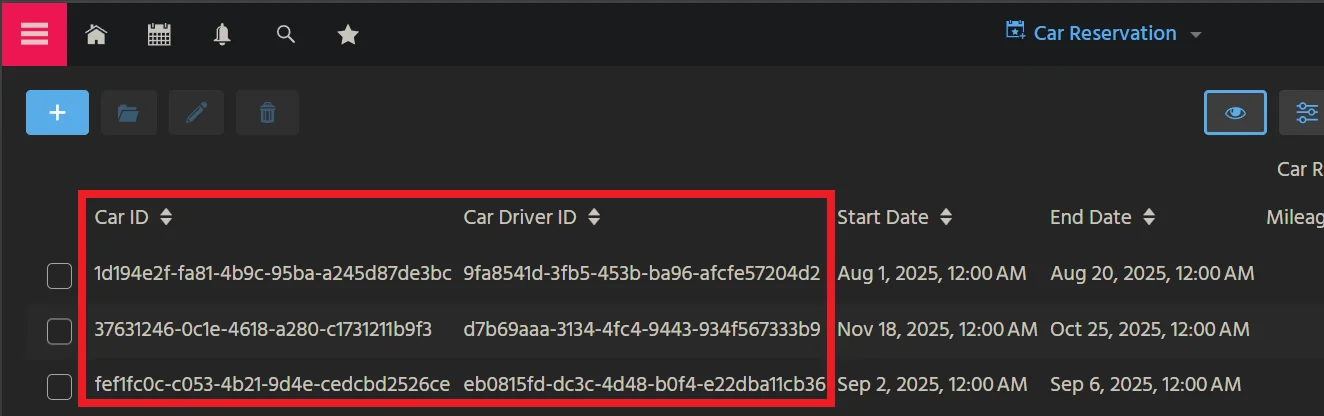 CarReservationFilter_view
Of course, instead of the UUIDs, clear text should be displayed, e.g.:
- Car: Manufacturer and type
- CarDriver: Salutation and full name (the same as in CarDriverFilter_view)
For this purpose, similar to CarDriver_entity, we add displayValues in the RecordContainer of CarReservation_entity. Now, one solution would be to write subselects, in order to reach the required sql columns. However, in cases like our strongly linked car pool Entities, best practice is to
- enter all 3 tables in property
linkInformationof CarReservations_entity's RecordContainer: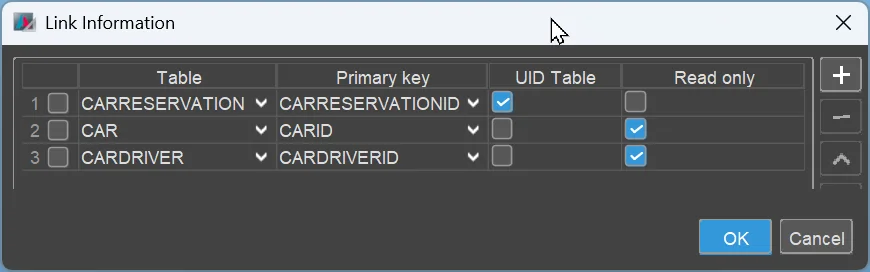
- join the tables in the RecordContainer's property
fromClauseProcess:
import { result } from "@aditosoftware/jdito-types";
import { SqlBuilder } from "SqlBuilder_lib";

var sql = new SqlBuilder()
    .from("CARRESERVATION")
    .join("CAR", "CAR.CARID = CARRESERVATION.CAR_ID")
    .join("CARDRIVER", "CARDRIVER.CARDRIVERID = CARRESERVATION.CARDRIVER_ID");

result.string(sql.toString());
CarReservation_entity.db.fromClauseProcess
These JOINs allow us to directly use columns of the other tables in the respective displayValueProcesses:
import { result } from "@aditosoftware/jdito-types";

result.string("CONCAT(CAR.MANUFACTURER, ' ', CAR.TYPE)");
CarReservation_entity.db.CAR_ID.displayValue.expression
For resolving the CARDRIVER_ID, we can simply copy the code that we use in CarDriver_entity.db.CONTACT_ID.displayValue.expression:
import { result } from "@aditosoftware/jdito-types";
import { PersUtils } from "Person_lib";

result.string(PersUtils.getResolvingDisplaySubSql("CONTACT_ID"));
CarReservation_entity.db.CARDRIVER_ID.displayValue.expression
Keywords
The approach to connect Entities via Provider and Consumer is also used for configuring keywords.
Manufacturer
Let's start with Car_entity's field MANUFACTURER. Instead of typing free text, we want to select from a list of car manufacturers' names.
First, in the client's menu group "Administration", we navigate to Context Keyword Category and add a KeywordCategory named "CarManufacturer". Then we switch to Context "Keyword Entry", filter for the new Category's name and then assign to it several KeywordEntries, holding the names of the manufacturers. First, in the client's menu group "Administration", we navigate to Context Keyword Category and add a KeywordCategory named "CarManufacturer". Then we switch to Context "Keyword Entry", filter for the new Category's name and then assign to it several KeywordEntries, holding the names of the manufacturers.
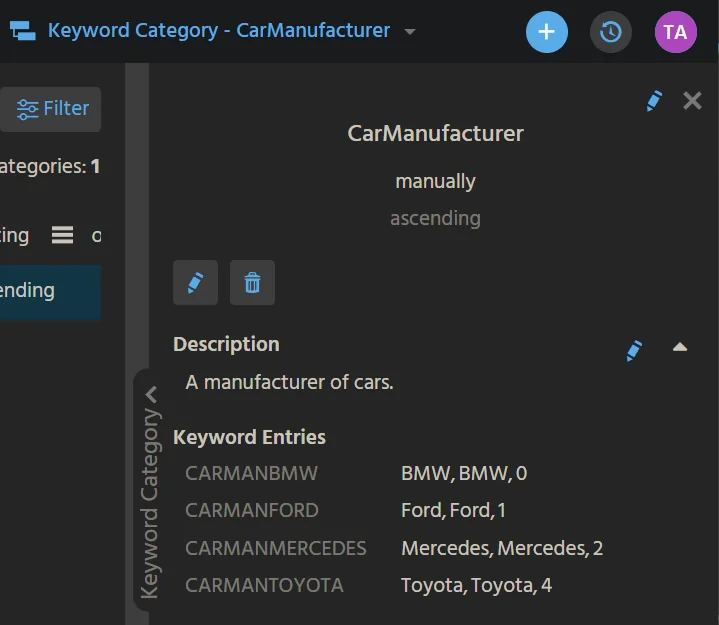
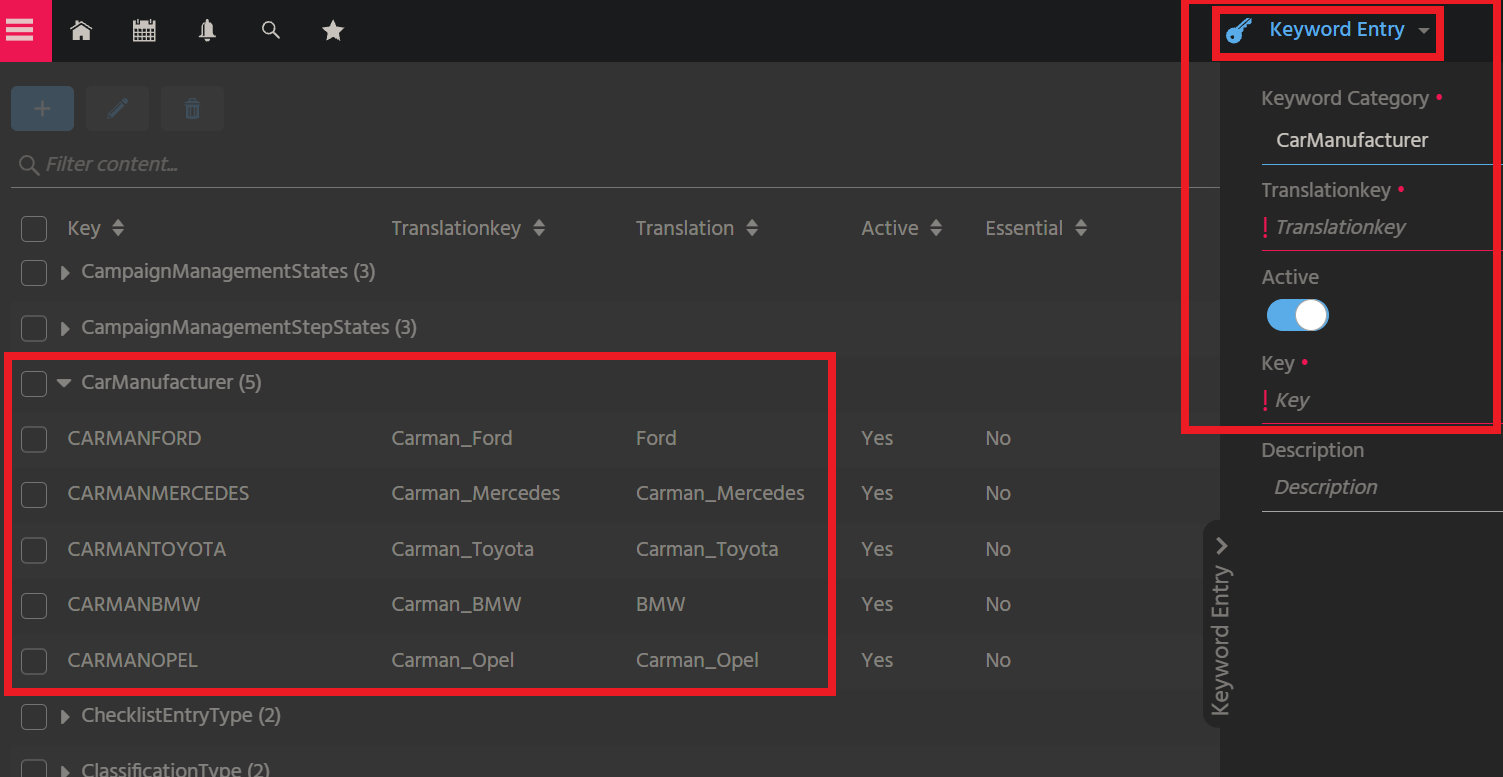
- As you can see, the keys are usually written in capital letters and begin with the keyword category, or an abbreviation of it - like "CARMAN", in this case.
- The field "Translationkey" relates to the first ("key") column of the language files (see folder "language" in the project tree):

Now we can use these new Keyword Category and its Keyword Entries in the project: Now we can use these new Keyword Category and its Keyword Entries in the project:
Create a new Consumer for Car_entity and name it, e.g., "CarManufacturers". Assign the Consumer to EntityField MANUFACTURER (via property consumer).
Next we set the Consumer's properties in order to connect it with the respective Provider of the keyword logic:
| Property | Value |
|---|---|
entityName | KeywordEntry_entity |
fieldName (name of the provider) | SpecificContainerKeywords |
After specifying the Provider, the target Entity's Parameters appear subordinated to the Consumer. (Only those Parameters appear that have set their property flag exposed to "true".) Here, we only need the Parameter named ContainerName_param. Double-click on it, in order to initialize it. Then, we enter the KeywordCategory's name as result of the Parameter's valueProcess. We could do this explicitely, like this:
import { result } from "@aditosoftware/jdito-types";

// bad example
result.string("CarManufacturer");
Car_entity.Consumers.CarManufacturers.ContainerName_param.valueProcess
Although this works for now, the best practice is to use a function that returns the car manufacturer's name, similar to a constant. For this reason, we create (in node "process" of the project tree) a project-specific library named, e.g. "CarPoolKeywords_registry", that contains all keyword categories and all keyword entries used in our carpool-related code: Although this works for now, the best practice is to use a function that returns the car manufacturer's name, similar to a constant. For this reason, we create (in node "process" of the project tree) a project-specific library named, e.g. "CarPoolKeywords_registry", that contains all keyword categories and all keyword entries used in our carpool-related code:
function $CarPoolKeywords()
{}

$CarPoolKeywords.carManufacturer = () => "CarManufacturer";
$CarPoolKeywords.carManufacturer$Bmw = () => "CARMANBMW";
$CarPoolKeywords.carManufacturer$Mercedes = () => "CARMANMERCEDES";
$CarPoolKeywords.carManufacturer$Ford = () => "CARMANFORD";
$CarPoolKeywords.carManufacturer$Toyota = () => "CARMANTOYOTA";
process.libraries.CarPoolKeywords_registry.process
In order to create the above new library, right-click on the project tree's folder "process" and then choose "New". ("New" is not available directly via the sub-folder "libraries".) Type in a suitable name - in this case, type "CarPoolKeywords_registry" and confirm with "OK". Now you see the new library below the folders of the various process categories. In the property sheet of the new library, set property "variants" to value "libraries" (checkbox checked). After clicking somewhere else, the new library is automatically moved to the folder "libraries".
On the basis of these definitions, we can now improve the valueProcessof ContainerName_param (cf. above).
import { result } from "@aditosoftware/jdito-types";
import { $CarPoolKeywords } from "CarPoolKeywords_registry";

// good example
result.string($CarPoolKeywords.carManufacturer());
Car_entity.Consumers.CarManufacturers.ContainerName_param.valueProcess
As we do not want the key of the car manufacturer to be displayed (e.g., CARMANMERCEDES), but its language-specific translation (e.g. "Mercedes"), we define a "display value" for the RecordFieldMapping of the field MANUFACTURER: Open Car_entity in the Navigator window, and there navigate to RecordContainers > db > MANUFACTURER.displayValue > property expression. Here, enter the following code:
import { result } from "@aditosoftware/jdito-types";
import { $CarPoolKeywords } from "CarPoolKeywords_registry";
import { KeywordUtils } from "KeywordUtils_lib";

var sql = KeywordUtils.getResolvedTitleSqlPart($CarPoolKeywords.carManufacturer(), "CAR.MANUFACTURER");
result.string(sql);
Car_entity.db.MANUFACTURER.displayValue.expression
Now, repeat these steps in order to implement the usage of keywords for car color.
Car color
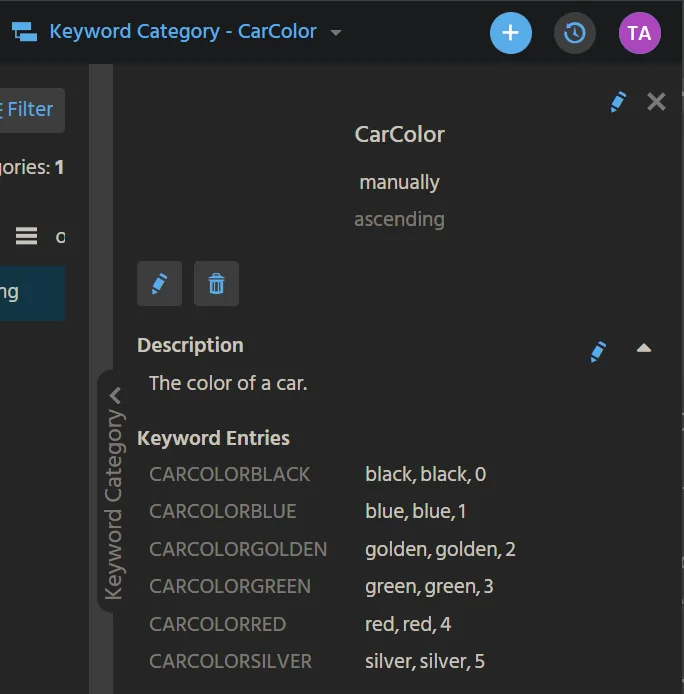

$CarPoolKeywords.carColor = () => "CarColor";
$CarPoolKeywords.carColor$Black = () => "CARCOLORBLACK";
$CarPoolKeywords.carColor$Blue = () => "CARCOLORBLUE";
$CarPoolKeywords.carColor$Golden = () => "CARCOLORGOLDEN";
$CarPoolKeywords.carColor$Green = () => "CARCOLORGREEN";
$CarPoolKeywords.carColor$Red = () => "CARCOLORRED";
$CarPoolKeywords.carColor$Silver = () => "CARCOLORSILVER";
process.libraries.CarPoolKeywords_registry.process
Now we can use the above configuration in the project:
Create a new Consumer for Car_entity and name it, e.g., "CarColors". Assign the Consumer to EntityField COLOR (via property consumer).
Next we set the Consumer's properties in order to connect it with the respective Provider of the keyword logic:
| Property | Value |
|---|---|
entityName | KeywordEntry_entity |
fieldName (name of the provider) | SpecificContainerKeywords |
After specifying the Provider, the target Entity's Parameters appear subordinated to the Consumer. (Only those Parameters appear that have set their property flag exposed to "true".) Here, we only need the Parameter named ContainerName_param. Double-click on it, in order to initialize it. Then, we enter the KeywordCategory's name as result of the Parameter's valueProcess.
import { result } from "@aditosoftware/jdito-types";
import { $CarPoolKeywords } from "CarPoolKeywords_registry";

result.string($CarPoolKeywords.carColor());
Car_entity.Consumers.CarColors.ContainerName_param.valueProcess
As we do not want the key of the car color to be displayed (e.g., CARCOLORBLUE), but its language-specific translation (e.g., "blau"), we define a "display value" for the RecordFieldMapping of the field COLOR: Open Car_entity in the Navigator window, and there navigate to RecordContainers > db > COLOR.displayValue > property expression. Here, enter the following code:
import { result } from "@aditosoftware/jdito-types";
import { $CarPoolKeywords } from "CarPoolKeywords_registry";
import { KeywordUtils } from "KeywordUtils_lib";

var sql = KeywordUtils.getResolvedTitleSqlPart($CarPoolKeywords.carColor(), "CAR.COLOR");
result.string(sql);
Car_entity.db.COLOR.displayValue.expression
Currency
As for currency, we do not use keywords, although there might be a (deprecated/deactivated) keyword category "Currency". Instead, there is a separate Context "Currency", and we will establish a dependency to Currency (module currency):
For Car_entity, create a new Consumer "Currencies" and connect it with Provider "Currencies" of Currency_entity. Then, set "Currencies" in property consumer of Car_entity's field CURRENCY.
This Provider has its property lookupIdfield set to column ALPHA3, which defines that this field is to be used as ID instead of the primary key AB_CURRENCYID. This results in the ALPHA3 (ISO) code ("EUR", "USD", etc.) being saved in column CAR.CURRENCY.
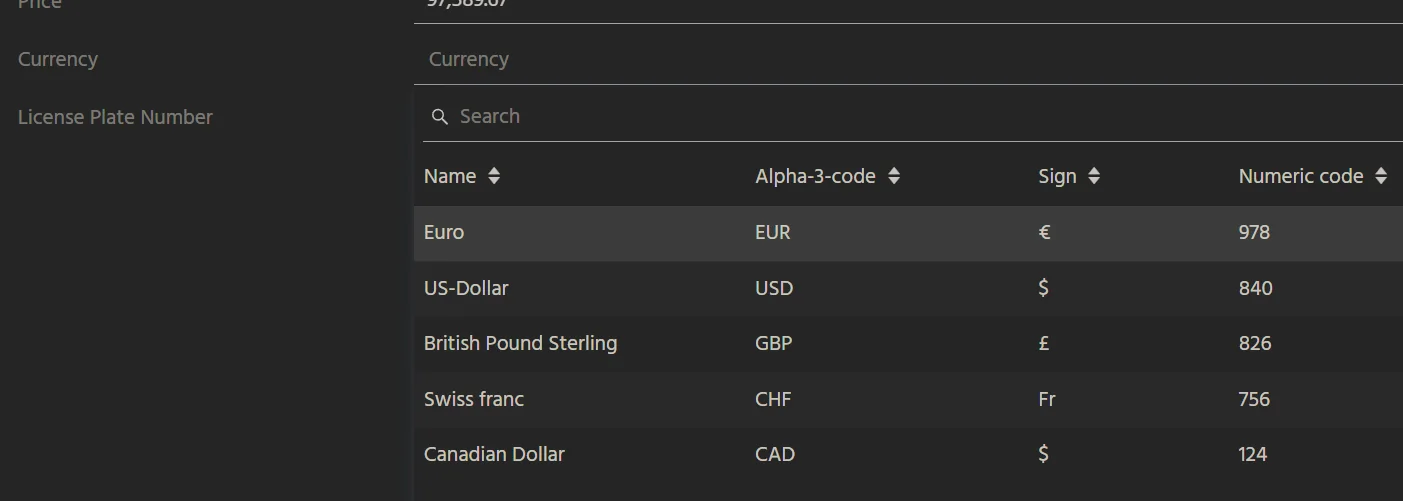
After selection, the currency's ALPHA3 code is visible. To improve this, we enter the following code in the expression property of Car_entity's RecordFieldMapping CURRENCY.displayValue:
import { CurrencyUtils } from "Currency_lib";

result.string(CurrencyUtils.getTranslatedNameForAlpha3Sql("CAR.CURRENCY", undefined, true));
Car_entity.db.CURRENCY.displayValue.expression
Now, a combination of the translated name of the currency and its ALPHA3 code (in parentheses) is displayed instead of only the ALPHA3 code:
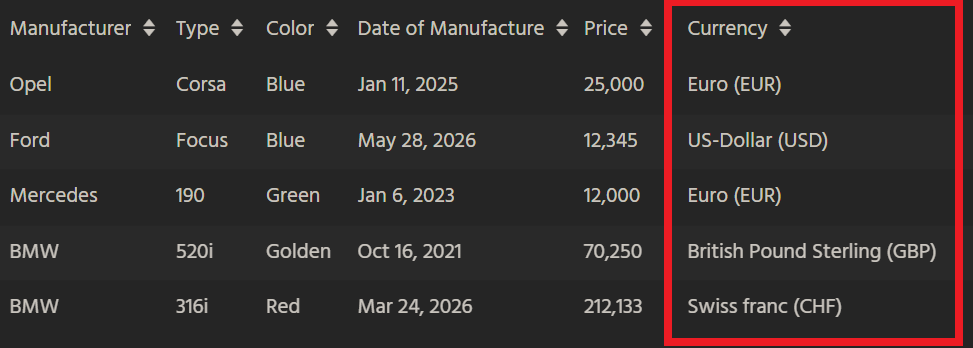
The above instructions are a simplified implementation. In practice, some more configuration is usual (e.g., a preselection via valueProcess or the exclusion of inactive currencies). Furthermore, currency rates can be included. You can use xRM Contexts like Offer as model for learning the details.